Generations/Simulations - 47
Switch Sensing
Switch Sensing has three settings:
• A possibility to invert switch's open/close state indication.
• Trigger level. Select a level that suits your switch. See note to the right.
• Sound setting. Define whether MC6-T emits a sound when the switch's
state change and if yes, when it is emitted.
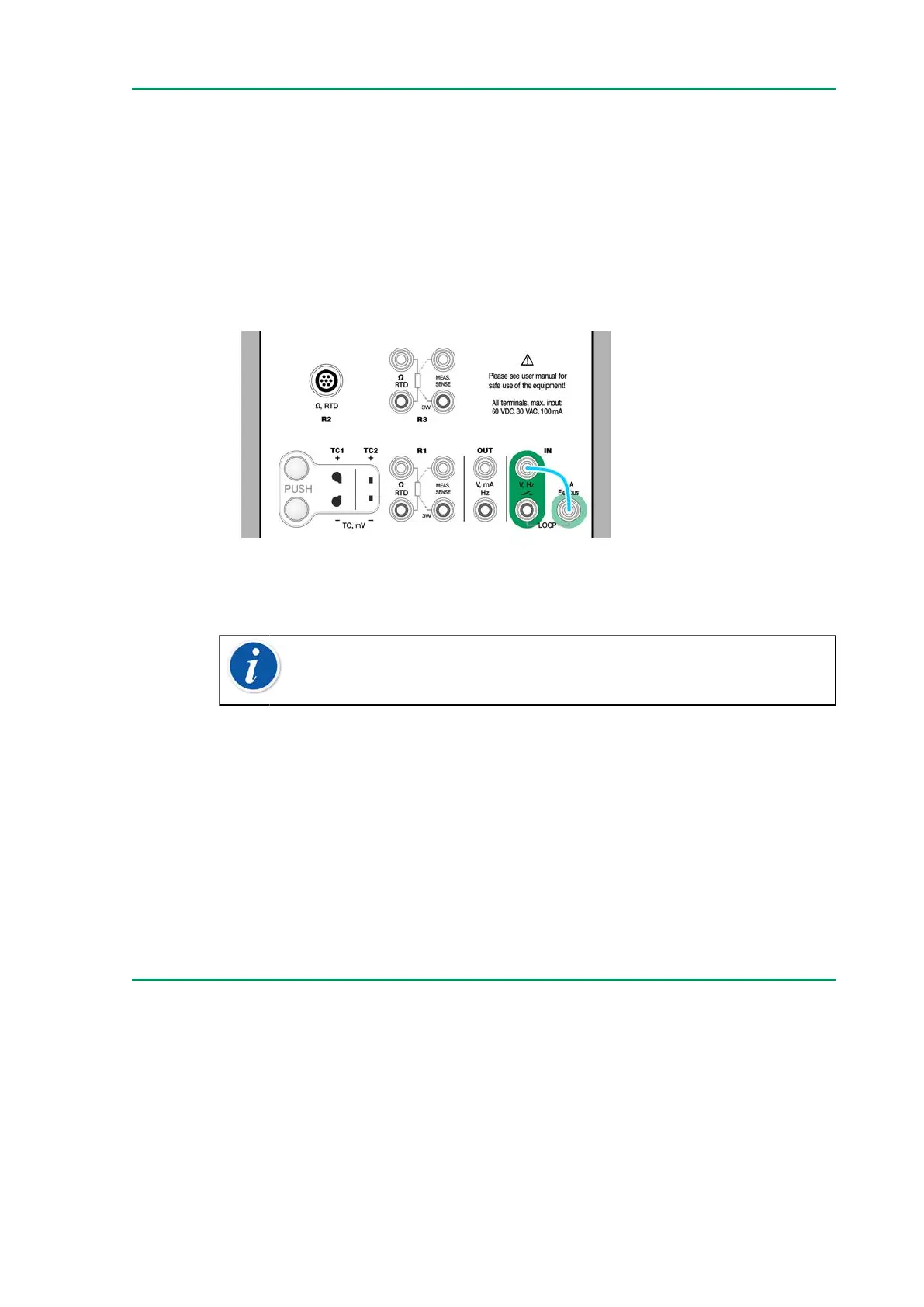
Figure 31: Switch sensing terminals
See also Pulse Counting and Pulse Generation.
Note: There is a trigger level choice for (dry) contacts with no
external potential. 24 V supply may also be used. Connect as
light blue line shows in picture above.
You can also use Switch Sensing for binary signal detection. For normal
switch state detection: an open switch equals 1 / True and a closed switch
0 / False.
Generations/Simulations
Generations and simulations are supported in all operational modes.
Changing the Generated/Simulated Value
There are several ways of changing the generated/simulated value. The
following subchapters present the available utilities.
Using the Soft Numeric Keypad
This tool is useful when a generated/simulated value (or any numeric field
in MC6-T) is either empty (displaying dashes) or when a new and different



 To Next Page