54 - Active Terminals and Connections
Voltage Generation
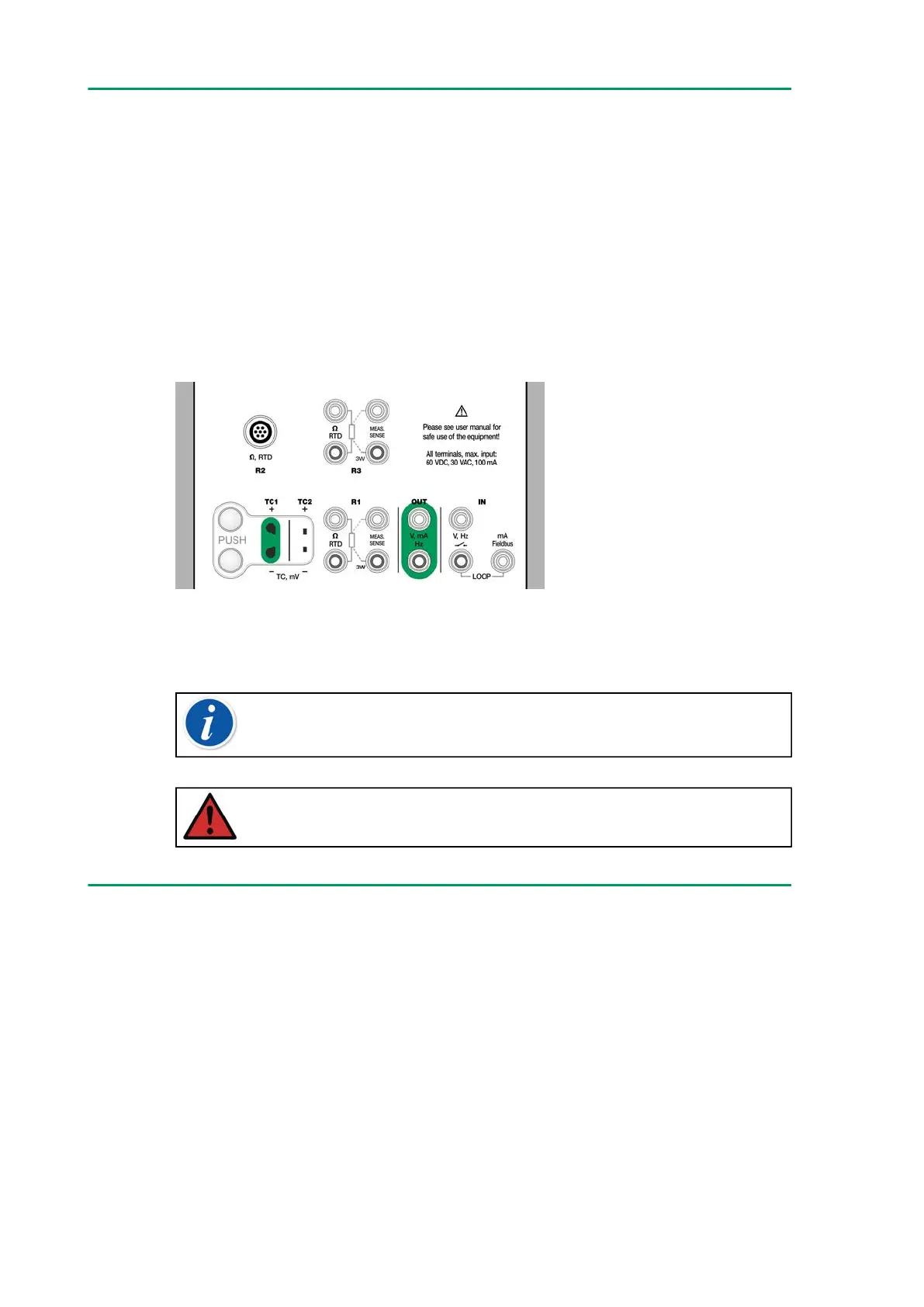
MC6-T has two voltage generation terminals as shown in Figure 40:
Voltage generation terminals.
• TC1, generation range: -1 to +1 VDC.
• OUT, generation range: -3 to +24 VDC.
Note that you may simulate non-supported thermocouple signals using
TC1 port. Since you actually generate (milli)volts, you need a data table to
convert desired temperatures to millivolts.
Figure 40: Voltage generation terminals
See also Voltage Measurement and Thermocouple Simulation.
Note: It is advisable to enter 0 V output before connecting the
circuit.
Warning: Short circuiting the voltage output may result in
damage to MC6-T and/or the connected instrument.
Resistance Simulation
Resistance simulation is available from R1 terminals only.
Use of 2-, 3- or 4-wire connection is up to the receiving instrument.
Connect the possible third and fourth wire according to the requirements of
the connected instrument, but use only the two leftmost RTD1 terminals
in MC6-T. See Figure 41: Resistance simulation terminals. Range 0 …
4000 Ohm.
MC6-T monitors the resistance measurement current. If the current is too
high, MC6-T cannot simulate the right resistance value and displays an
error message.



 To Next Page