50 - Active Terminals and Connections
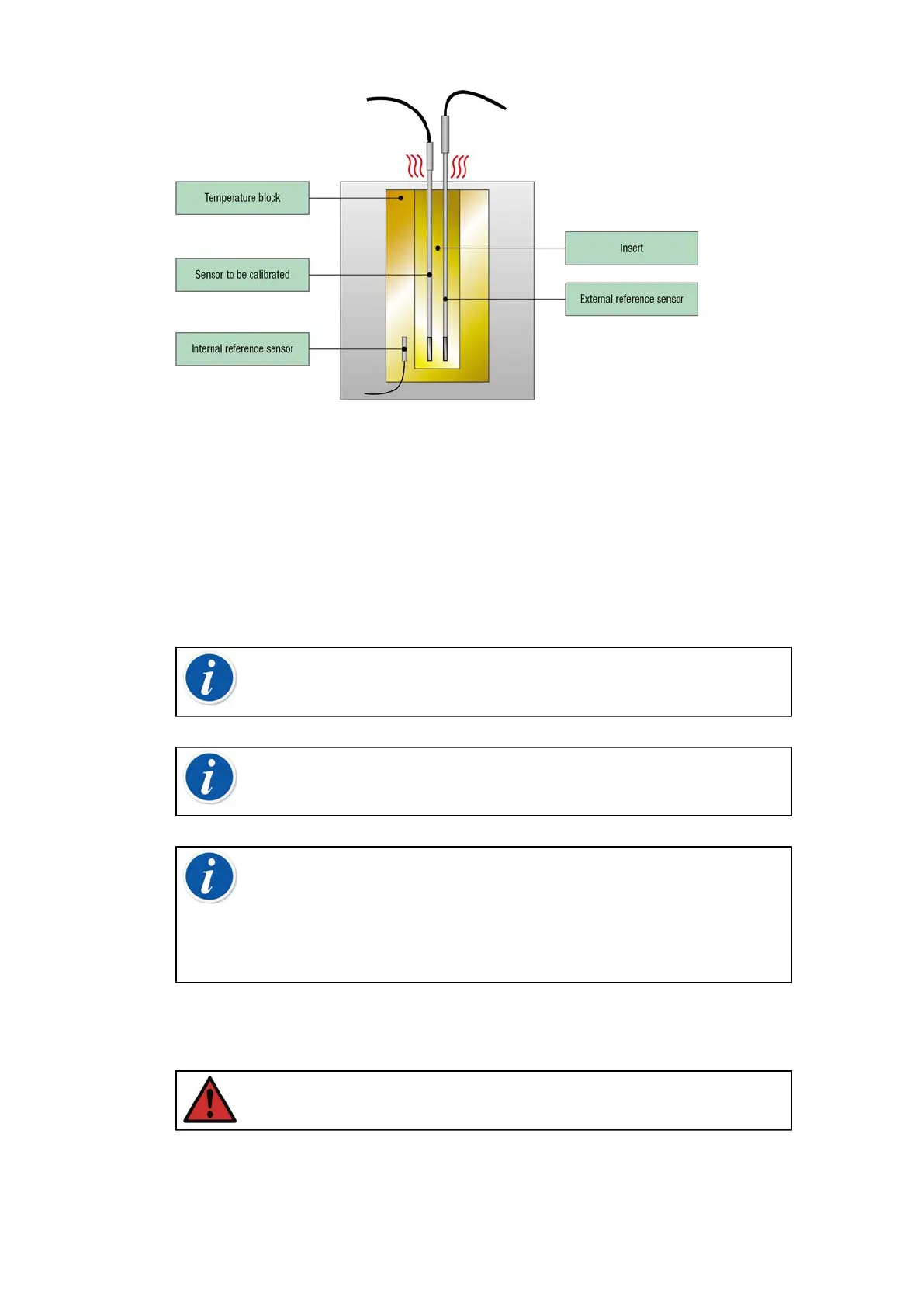
Figure 35: Internal vs External reference sensor
When using internal reference sensor, no connections are needed. Select
the Internal Reference in the Temperature Calibrator or use Temperature
Instrument – Wizard in Documenting Calibrator.
When using external reference sensor, any of the five temperature
measurement ports can be used. See the connections in sections
Temperature Measurement (RTD) or Temperature Measurement
(Thermocouple).
Note: Temperature changes relatively slowly and it takes
time for the temperatures to stabilize enough to record the
measurement results. See more about stability in section Tools.
Note: Choose a reference sensor that has suitable accuracy
for the instrument to be calibrated. Typically, RTDs are more
accurate than thermocouples.
Note: When calibrating an instrument using automatic
acceptance, ensure that the wait time is long enough for
the temperatures to stabilize. The time depends on several
parameters, e.g. how well the sensor fits into the insert and what
is the thermal conductivity between the insert and sensor and
also within the sensor itself. Be patient.
Inserts to be used in the Temperature Block
Warning: For reliable and safe performance of the calibrator,
only use original Beamex MC6-T inserts.



 To Next Page