120
Settings
The external device has not been
connected to the Traffic Probefore*
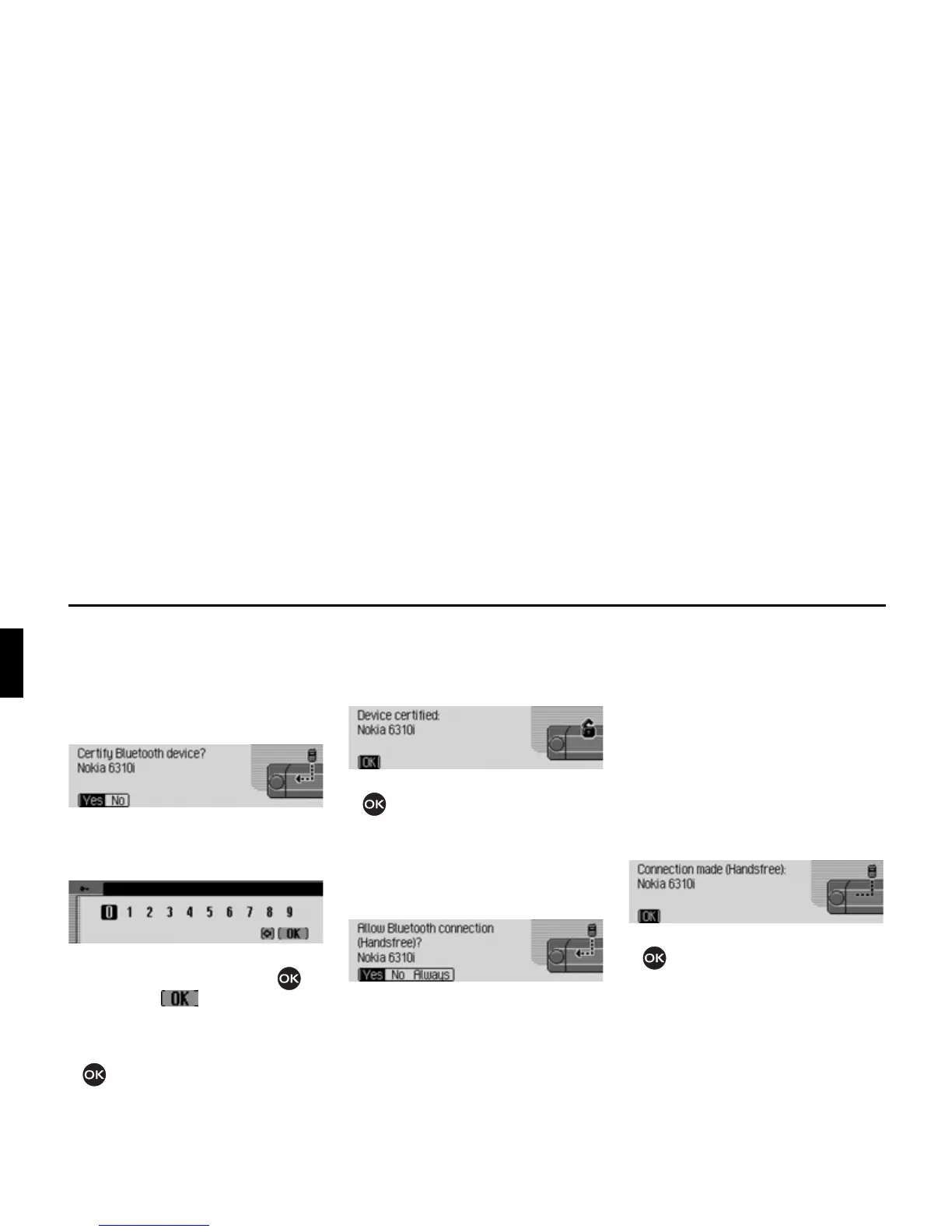
When the external device attempts to
establish a connection, a signal tone can
be heard and the following message
appears.
X Select between<HV and 1R.
If you select
<HV, you will be requested
to enter a password.
X Enter password by rotating/ pressing
the rotary control/push button .
X Select the symbol from the
input menu.
or
X press the rotary control/push button
and hold for at least 2 seconds.
If the connection to the external device
is established successfully, another
signal tone can be heard and the
following message appears.
X Press the rotary control/push button
.
If the connection is terminated by the
external device after authentication, the
device list will be displayed.
If the connection is not terminated, the
following message will appear.
X Select between <HV, 1R and $OZD\V.
•
<HV
Connection to the external device is
allowed.
•
1R
Connection to the external device is
rejected.
•
$OZD\V
Connection to the external device is
allowed. The function described in
“Always allow connection*” auf
Seite 116 will also be activated.
Further connection requests will be
accepted without a query.
If the connection to the external device
is established successfully, another
signal tone can be heard and the
following message appears.
X Press the rotary control/push button
.
A connection has now been established
to the external device.















 To Next Page