54
Clinician's Guide
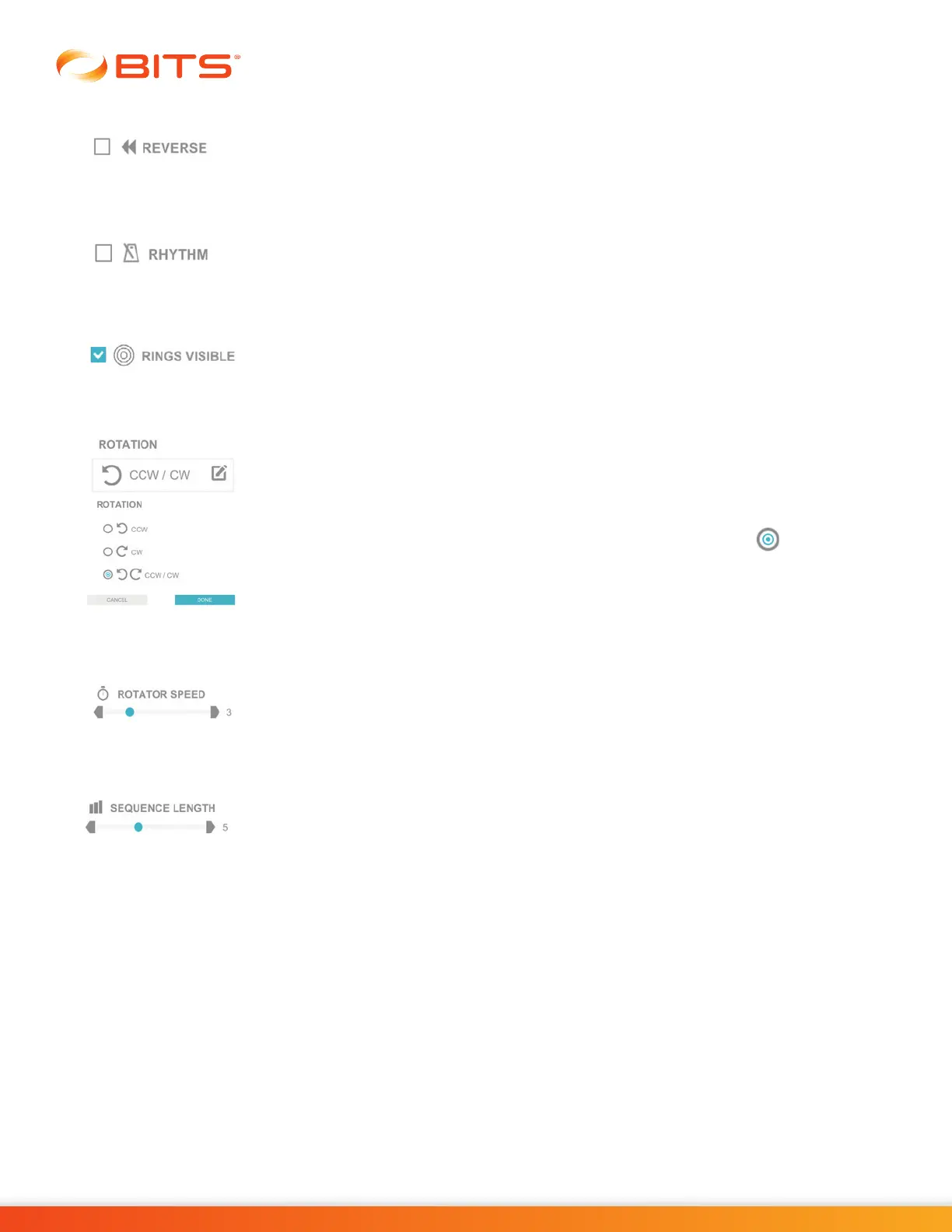
Reverse
When selected, the Reverse Parameter changes the direction of the sequence
order. For example, letters must be selected in the sequence Z, Y, X, etc.
Rhythm
The Rhythm Parameter controls the speed of the Rhythm during the therapy
session. Press the gray arrows or drag the blue indicator to change the value.
Rings Visible
The Rings Visible Parameter controls whether the rings will be displayed on screen
during therapy session.
Rotation
The Rotation Parameter controls the direction the rotator will rotate. The Rotation
Parameter options are: Counterclockwise (CCW), Clockwise (CW), and alternating
from Counterclockwise to Clockwise (CCW/CW).
To change the setting, press the Rotation Parameter Icon. The Rotation pop up
window will open displaying the options. Press the radio button next to the
desired option to enable it. Press the Done Button to close the window.
Rotator Speed
The Rotator Speed Parameter controls how fast the rotator will rotate on the
display screen. Press the gray arrows or drag the blue indicator to change the
value.
Sequence Length
The Sequence Length Parameter controls the maximum number of target stimuli
that are presented on the display screen during any given trial in the Memory
Programs. Press the gray arrows or drag the blue indicator to change the value.



 To Next Page