Vacuum Filtration for Filter Plate Assays | 103
Install Vacuum Filtration Plate Carrier
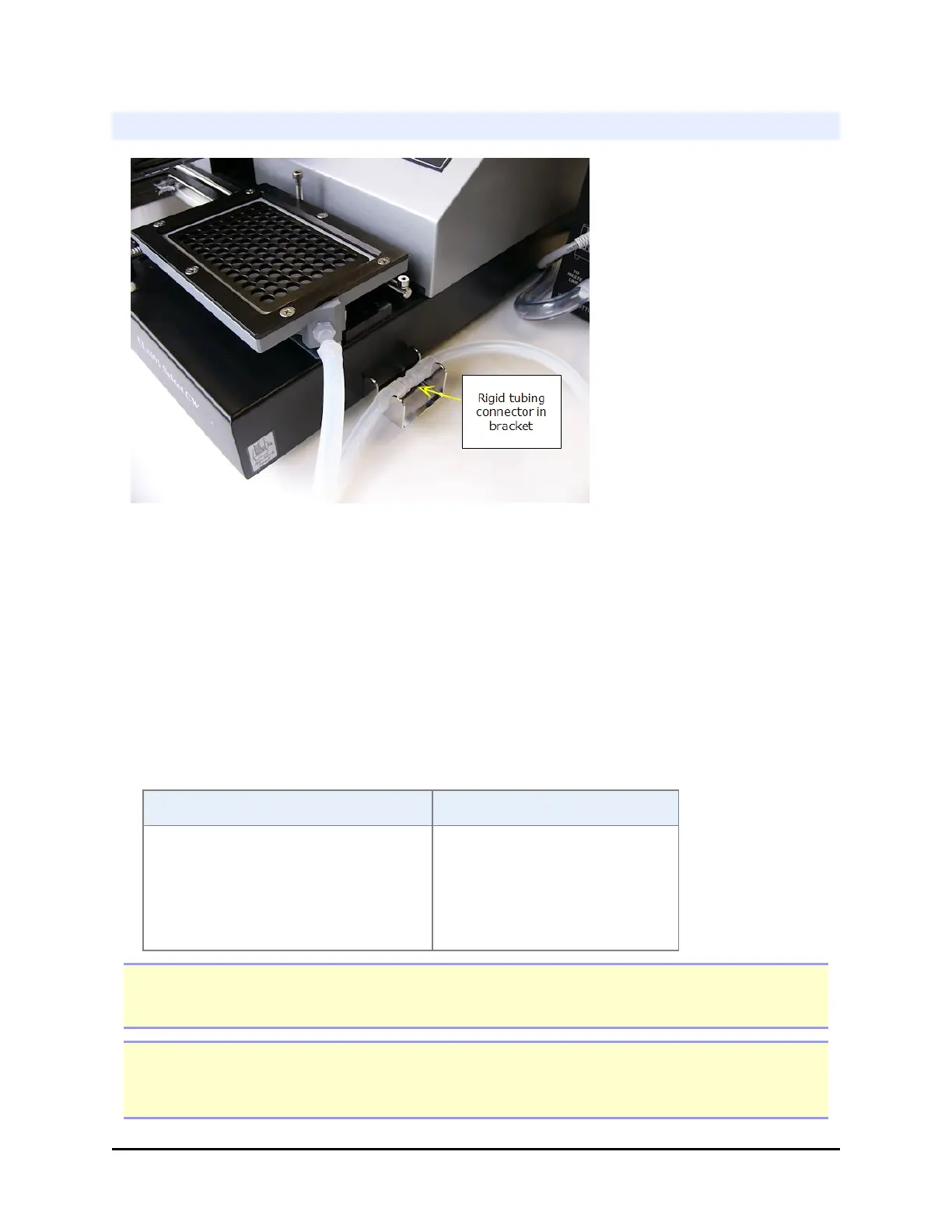
Vacuum Filtration Plate Carrier (and bracket for holding tubing)
1. Locate the longest length of tubing shipped with the module. It is made from
two tubes joined by a rigid connector.
2. Connect the shorter end to the special plate carrier for vacuum filtration.
3. Connect the longer end to the control module port labeled To Vacuum
Filtration Carrier.
4. Tuck the rigid connector into the bracket you installed on the side of the
instrument.
5. Change the instrument setting:
LHC Keypad
1. Select Tools> Instrument
Utilities.
2. For Plate Carrier
Selection, select Vacuum
Filtration.
1. Press Setup Menu >
MORE > CARR
2. Select VAC.
Note: Make sure Vacuum Filtration is "enabled" to select the special plate carrier: Setup
Menu> g>ADVANC>VACFIL
Important: Always set the carrier selection to match the installed hardware, regardless
of the type of plate processing you are doing. You can perform a regular wash (non-filter
plates) using the vacuum filtration carrier.
BioTek Instruments, Inc.



 To Next Page