Output Conguration 27
4.1.5 Protection Clear
Protections are cleared from the output conguration settings as shown in the following steps.
1. Press the button then use the soft key to select Output cong > Protection Clear.
2. Press the soft key to clear the triggered protections.
4.2 Output Settings
4.2.1 Remote Sense
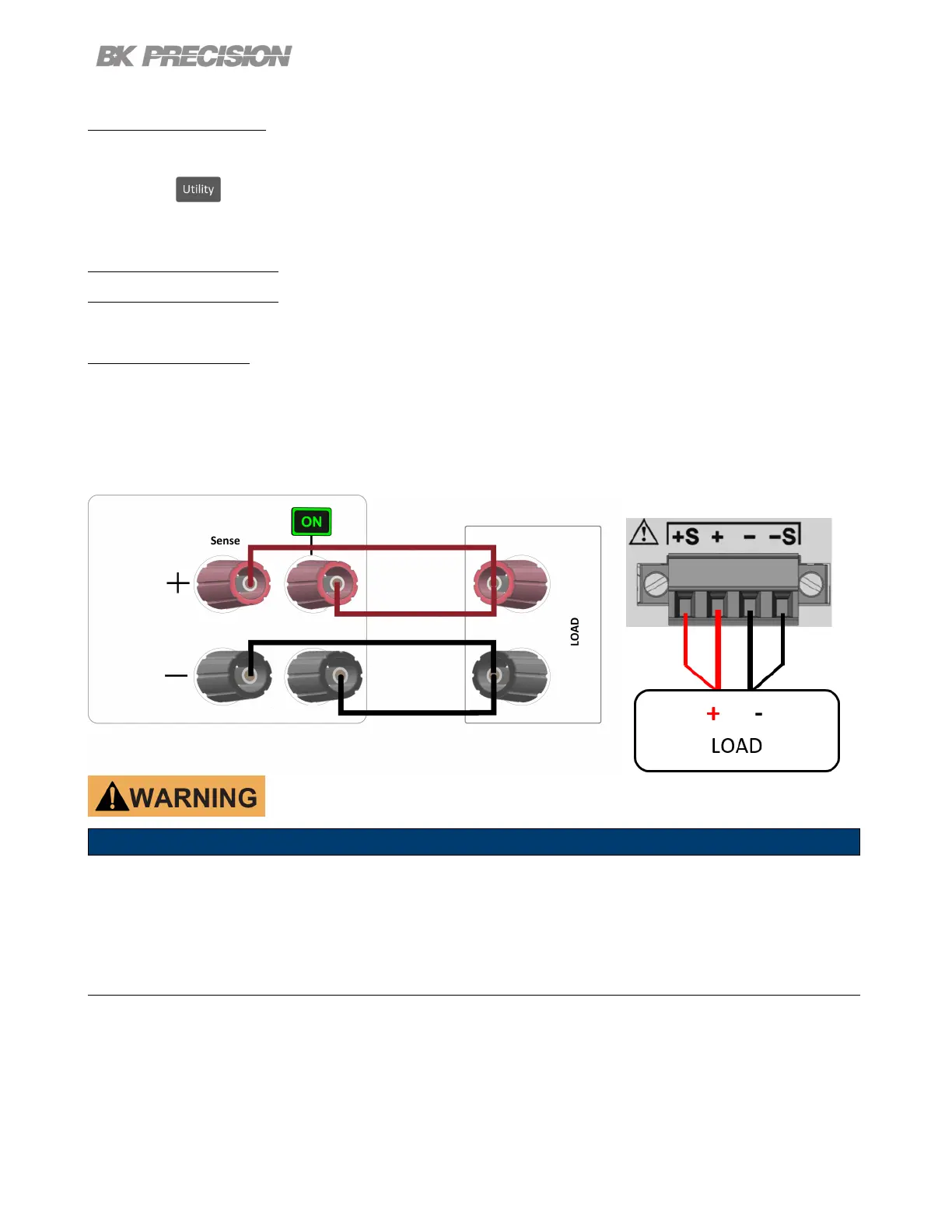
Remote sense can be used to compensate for voltage drops (up to 1 V) due to resistance from test leads connected to
your device under test (DUT), thus providing more accurate output voltage. When remote sense is enabled, the positive
(+S) and positive lead (+) of the DC output are connected to the positive (+) of the load. Similarly, the negative sense
(-S) and negative lead (-) of the DC output are connected to the negative (-) end of the load shown in the gures below.
The sense terminals and output terminals are shorted by the shorting bar provided.
Do not connect any power source into any of the terminals at any time during operation.
When output is enabled, DO NOT use your hands to touch the terminals
or the screws that are designed to tighten wires to the terminals. Doing
so may create a shock hazard under high voltage output conditions.



 To Next Page
 Loading...