Diagnostics and Troubleshooting
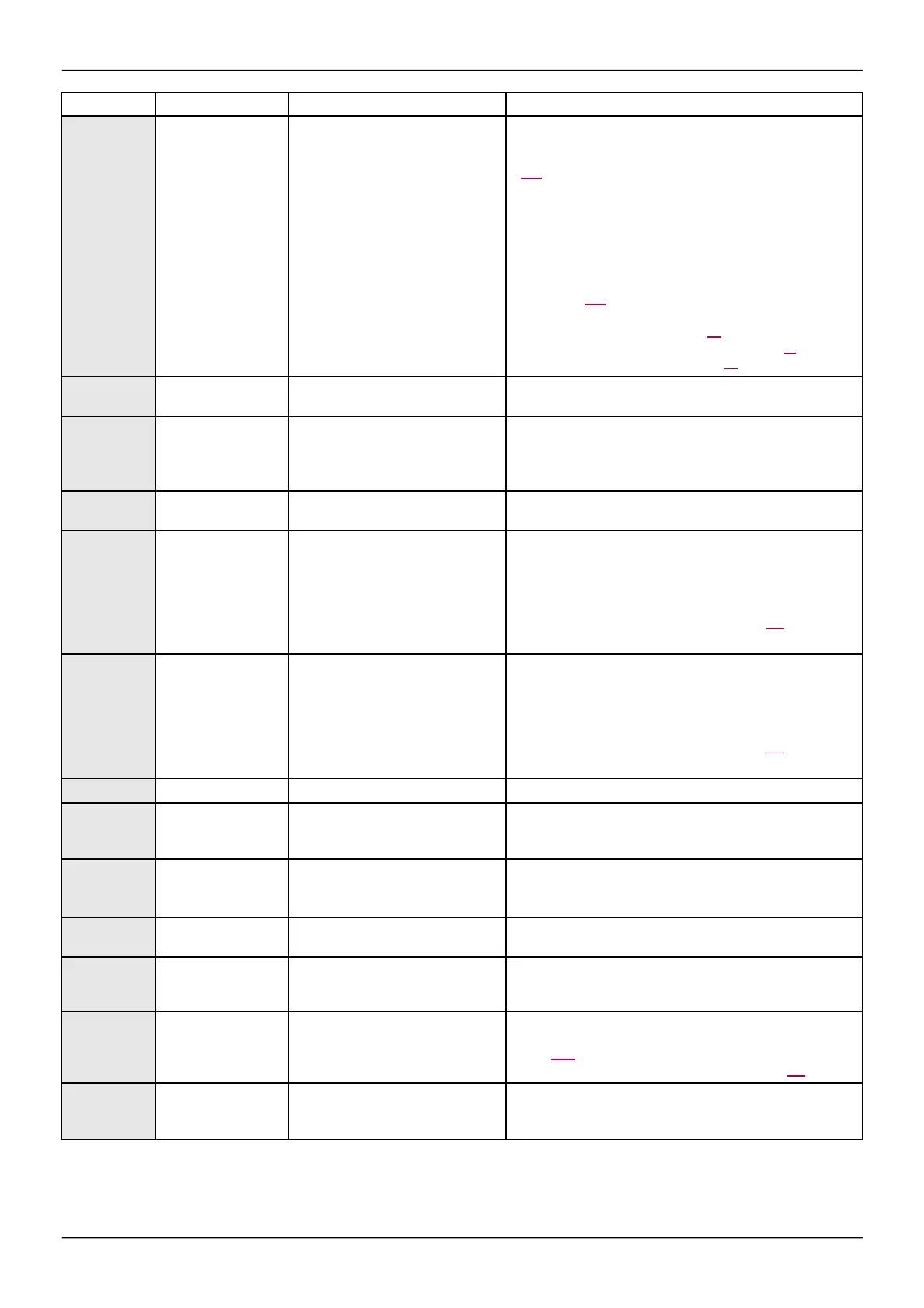
De te cte d Fault
Nam e Probable cause Rem edy
OPF2
[3 m otor phase loss]
•
Motor not connected or motor power
too low .
•
Output contactor open.
•
Instantaneous instability in the motor
current.
•
Check the connections from the drive to the motor.
•
If an output contactor is being used, set
[Output Phase Los s ]
(OPL) to
[Output cut]
(OAC), page
256.
•
Test on a low pow er motor or w ithout a motor: In factory
settings mode, motor phase loss detection is active
[Output Phas e Loss]
(OPL) =
[Ye s ]
(YES). To check the
drive in a test or maintenance environment, w ithout having to
use a motor w ith the same rating as the drive (in particular for
high pow er drives), deactivate motor phase loss detection
[Output Phas e Loss]
(OPL) =
[No]
(nO), see instructions
given page 256.
•
Check and optimize the follow ing parameters:
[IR com pe nsation]
(UFr)
page 90,
[Rated m otor volt.]
(
UnS
)
and
[Rated
mot.
curre nt ]
(
nC
r
)
page
86
and
perform
[Auto tuning]
(tUn)
page 87.
OSF
[M ains overvoltage]
•
Supply voltage too high.
•
Disturbed mains supply.
•
Check the supply voltage.
OtFL
[LI6=PTC overheat]
•
Overheating of PTC probes detected
on input LI6.
•
Check the motor load and motor size.
•
Check the motor ventilation.
•
Wait for the motor to cool before restarting.
•
Check the type and state of the PTC probes.
PtFL
[LI6=PTC probe]
•
PTC probe on input LI6 open or
short-circuited.
•
Check the PTC probe and the w iring betw een it and the
motor/drive.
SCF1
[M otor s hort circuit]
•
Short-circuit or grounding at the drive
output.
•
Check the cables connecting the drive to the motor, and the
motor insulation.
•
Reduce the sw itching frequency.
•
Connect chokes in series w ith the motor.
•
Check the adjustment of speed loop and brake.
•
Increase
the
[Time
to
restart ]
(
ttr
),
page
101.
•
Increase the sw itching frequency.
SCF3
[Ground short
circuit]
•
Significant earth leakage current at
the drive output if several motors are
connected in parallel.
•
Check the cables connecting the drive to the motor, and the
motor insulation.
•
Reduce the sw itching frequency.
•
Connect chokes in series w ith the motor.
•
Check the adjustment of speed loop and brake.
•
Increase
the
[Time
to
restart ]
(
ttr
),
page
101.
•
Reduce the sw itching frequency.
SCF4
[IGBT short circuit]
•
Pow er component detected fault.
•
Contact BLEMO Product Support.
SCF5
[M otor s hort circuit]
•
Short-circuit at drive output.
•
Check the cables connecting the drive to the motor, and the
motor’s insulation.
•
Contact BLEMO Product Support.
SLF1
[M odbus com.]
•
Communication interruption on the
Modbus bus.
•
Check the communication bus.
•
Check the time-out.
•
Refer to the Modbus User's manual.
SLF2
[PC com .]
•
Communication interruption w ith PC
Softw are.
•
Check the PC Software connecting cable.
•
Check the time-out.
SLF3
[HM I com .]
•
Communication interruption w ith the
graphic display terminal or remote
display terminal.
•
Check the terminal connection
•
Check the time-out.
SSF
[Torque/current lim ]
•
Sw itch to torque or current limitation.
•
Check if there are any mechanical problems.
•
Check the parameters of
[TORQUE LIM ITATION]
(tOL-)
page 216 and the parameters of the
[TOR Q U E
OR
I
LIM.
DETE C T .]
(
tId-
),
page
264.
tJF
[IGBT ove rheat]
•
Drive overheated.
•
Check the size of the load/motor/drive.
•
Reduce the sw itching frequency.
•
Wait for the motor to cool before restarting.


 To Next Page
 Loading...
