Configuration Mode (ConF)
Other configurations and settings
In addition to the as s ignment of inputs /outputs, other param eters are as signed
only in the Hoisting macro
configuration
.
Hoisting:
•
[Movement type]
(bSt)
is set to
[Hoisting]
(UEr) page 194
•
[Brake contact]
(bCI)
is s et to
[No]
(nO) page 194
•
[Brake
impu
lse]
(
bI
P
) is s et to
[Yes]
(
YES
) page 194
•
[Brake
release
I FW
]
(
Ib
r
) is s et to 0 A page 194
•
[Brake
Re
le
ase
time]
(
br
t
) is s et to 0 s page 194
•
[Brake
release
fr
eq]
(
bI
r
) is set to
[Auto]
(
A
UtO
) page 195
•
[Brake engage freq]
(bEn) is s et to
[Auto]
(AUtO) page 195
•
[
Brake
engage time]
(
bE
t
) is set to 0 s page 195
•
[Engage at reversal]
(bEd) is s et to
[No]
(nO) page 195
•
[Jump at reversal]
(JdC) is s et to
[Auto]
(AUtO) page 195
•
[Tim
e
to
restart]
(
ttr
) is s et to 0 s page 196
•
[Curre
nt
ra
mp tim
e]
(
brr
) is s et to 0 s page 198
•
[Low speed]
(LSP) is set to Rated m otor slip calculated by the drive, page 87
•
[Output Phase Loss]
(OPL) is set to
[Yes]
(YES) page 256
No further m odifications can be m ade to this param eter.
•
[Catch on the fly]
(FLr)
is set to
[No]
(nO) page 253
No further m odifications can be m ade to this param eter.
Return to factory settings:
Returning to factory s ettings with
[Config. Source]
(
FC
SI
) is s et to
[Macr
o-Conf]
(
InI
) page 81 will
return the drive to the s elected m acro configuration. The
[Macro configuration]
(CFG) param eter does not
change, although
[Customized macro]
(CCFG) dis appears .
Note:
The factory s ettings that appear in the param eter tables correspond to
[Macro configuration]
(CFG) =
[Start/Stop]
(StS). This is the m acro configuration set at the factory.
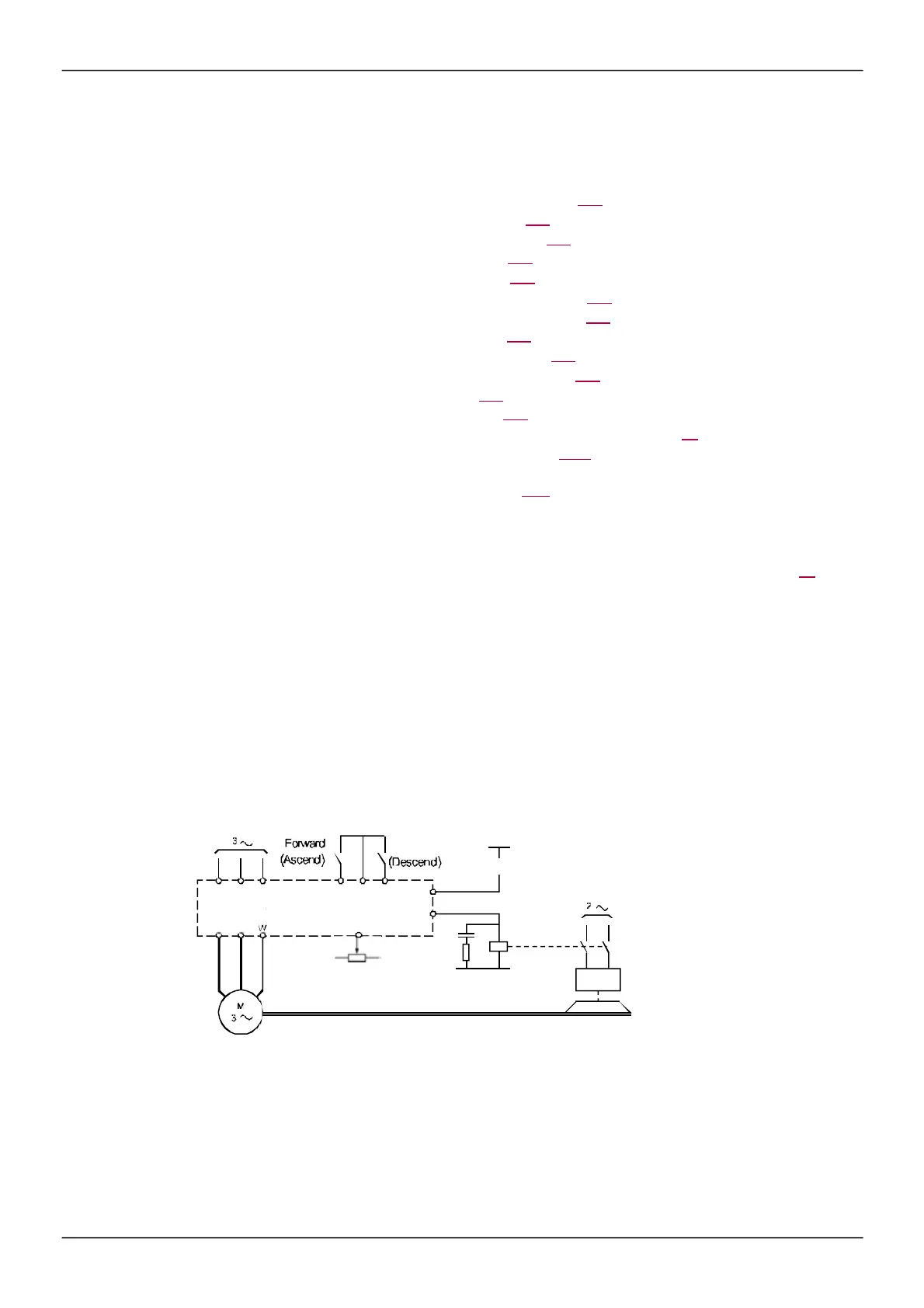
Example diagrams for use with the macro configurations
[H
oi
st
ing
]
(
HS
t
) diagram
Electromagnetic brake
(1) Whithout integrated safety function, a contact on the Preventa module must be inserted in the brake control circuit to
engage it w hen the "Safe Torque Off" safety function is activated (see connection diagrams in the Installation manual).



 To Next Page