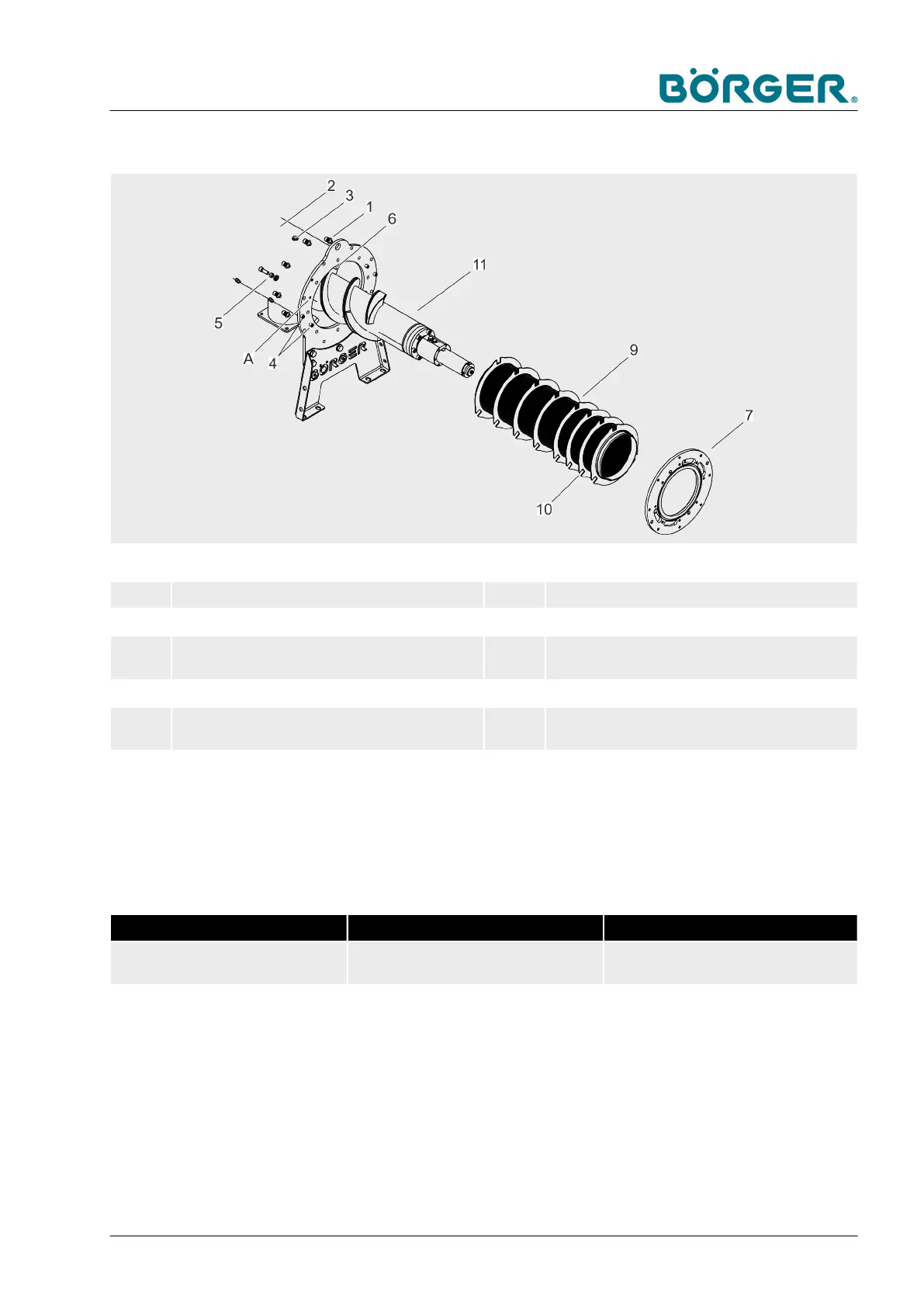
6.3.6 Replacing the wedge wire screen
1 Hexagon socket head cap screws with washers 7 Adapter plate
2 Pipe casing 9 Wedge wire screen
3 Hexagon head screws with DSL double lock
washer
10 Rotation locks on the wedge wire screen
4 Dowel pins 11 Brush auger
5 Hexagon head screws with hexagon nuts and
DSL double lock washer
12 Hexagon head screws with DSL double lock
washer
6 Rotation lock rails A Jacking threads
Tool:
n
Torque wrench
Tightening torques approx. [Nm] approx. [ft-lbs]
M12 hexagon head screws, stain-
less steel
30 22
— Read and follow the safety instructions detailed in
Ä
Chapter
2.12 “Safety instructions for maintenance and rectifying mal-
functions” on page 37.
— Empty the Börger machine as described in
Ä
Chapter 6.3.1
“Notes on repair work” on page 129.
Rotation lock rails
Maintenance and repairs
BA-RC40_EN, 17.01.2024 www.boerger.de / www.boerger.com 153



 To Next Page