Confidential
2-22
Error Code 17
Recording paper size error (duplex-printing/duplex-copying)
- Paper width is wider than 301.5 mm (detection by
paper width sensor.)
- Paper width is narrower than 95.5 mm (detection by
paper width sensor.)
- Paper length is longer than 245.9 mm
(detection by
registration sensor, switchback sensor.)
- Paper length is shorter than 143.5 mm
(detection by
registration sensor, switchback sensor.)
User Check
- Check whether the recording paper being used is within the specification.
- Check that dark recording paper is not used.
- Firmly set the paper tray to the rear end.
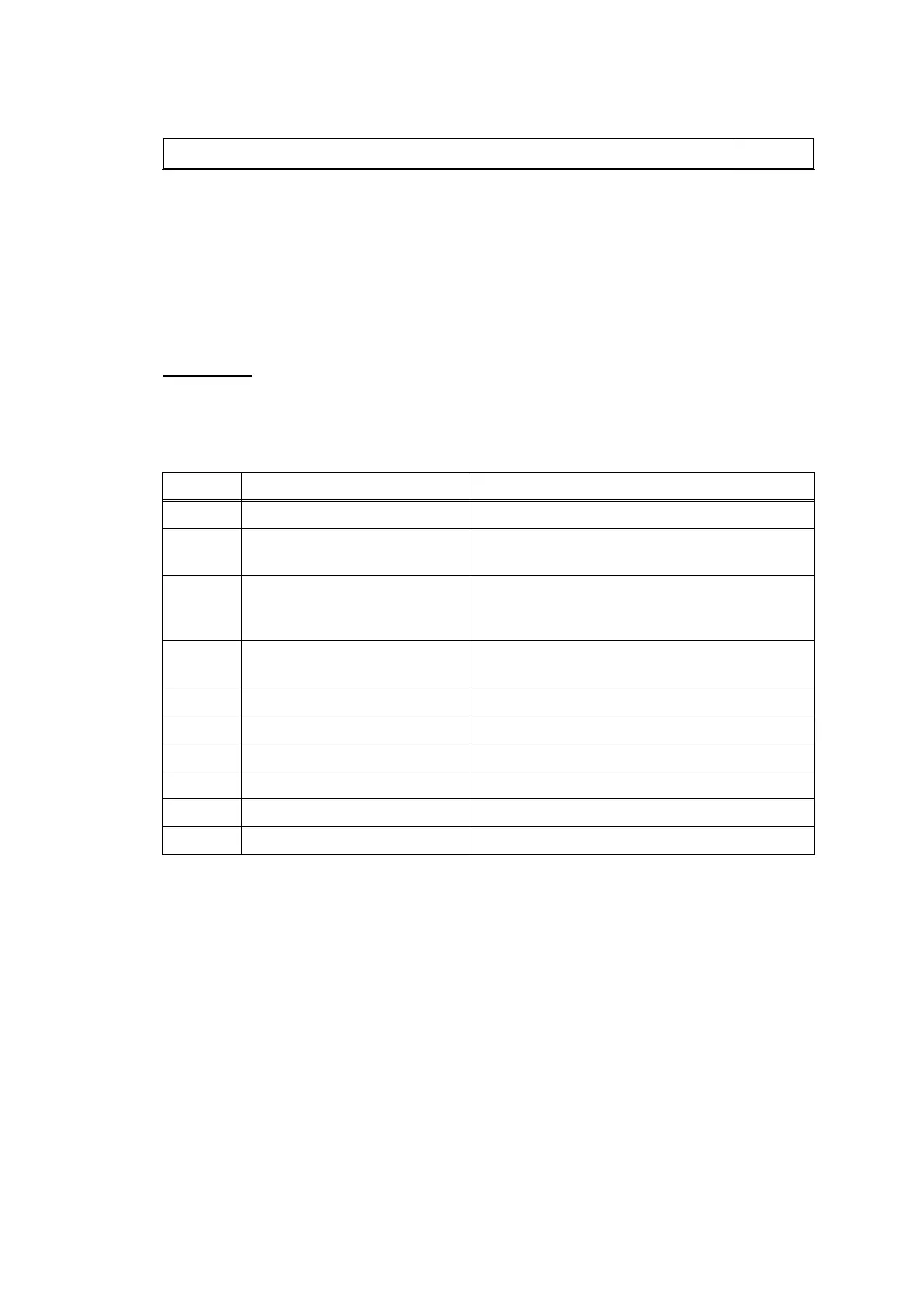
Wrong Paper Size / Wrong Paper LCD
Step Cause Solution
1 CR encoder strip stained Clean the CR encoder strip.
2 Registration actuator caught
on the surrounding parts
Set the registration actuator into place.
3 PF encoder disk stained Clean the PF encoder disk and flushing guide
(refer to Chapter 3, Section 1 "PRECAUTIONS
BEFORE PROCEEDING.")
4 Switchback actuator caught on
the surrounding parts
Set the switchback frame ASSY into place.
5 CR encoder strip defective Replace the CR encoder strip.
6 PF encoder disk defective Replace the PF encoder disk.
7 Registration sensor defective Replace the registration sensor PCB ASSY.
8 Paper width sensor defective Replace the carriage PCB ASSY.
9 Paper feed motor defective Replace the paper feed motor.
10 Main PCB defective Replace the main PCB ASSY.



 To Next Page
 Loading...











