4. In the A Media Type list, select the type of paper that is loaded. In this case, click Plain Paper.
5. Click the Page Setup tab to display the Page Setup sheet.
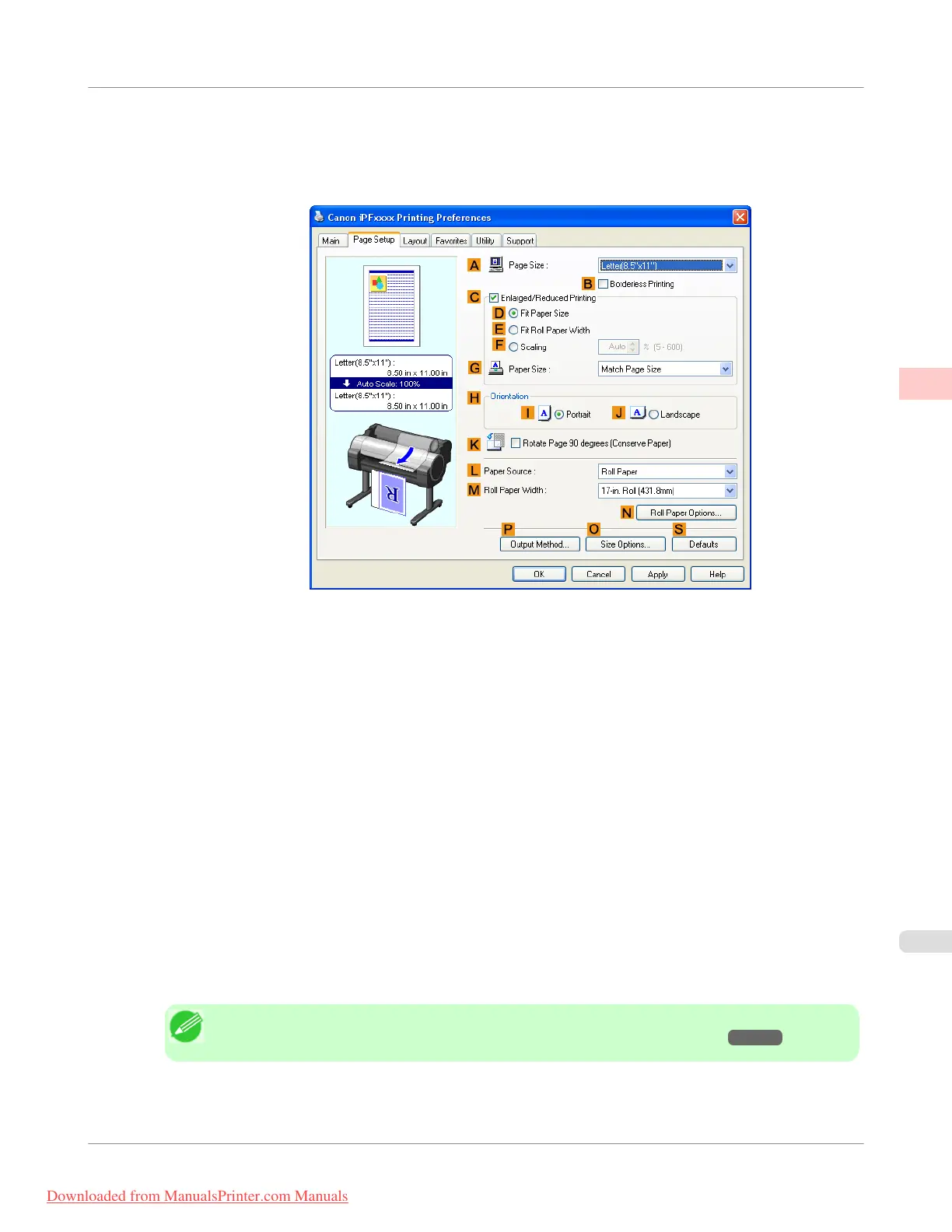
6. Click O Size Options to display the Paper Size Options dialog box.
7. In the Paper Size Options dialog box, select the Oversize check box in Display Series.
8. Click OK to close the Paper Size Options dialog box.
9. Click Oversize - ISO A4 in the A Page Size list.
10. Select and click a roll paper in the L Paper Source list.
11. Select the width of the loaded roll in the M Roll Paper Width list—in this case, ISO A2/A3 Roll (420.0mm).
12. Confirm the print settings and print as desired.
Note
• For tips on confirming print settings, see "Confirming Print Settings(Windows) →P.212 "
Enhanced Printing Options
>
Printing at full size
>
iPF755
Printing at Full Size (Windows)
2
91
Downloaded from ManualsPrinter.com Manuals


 To Next Page
 Loading...











