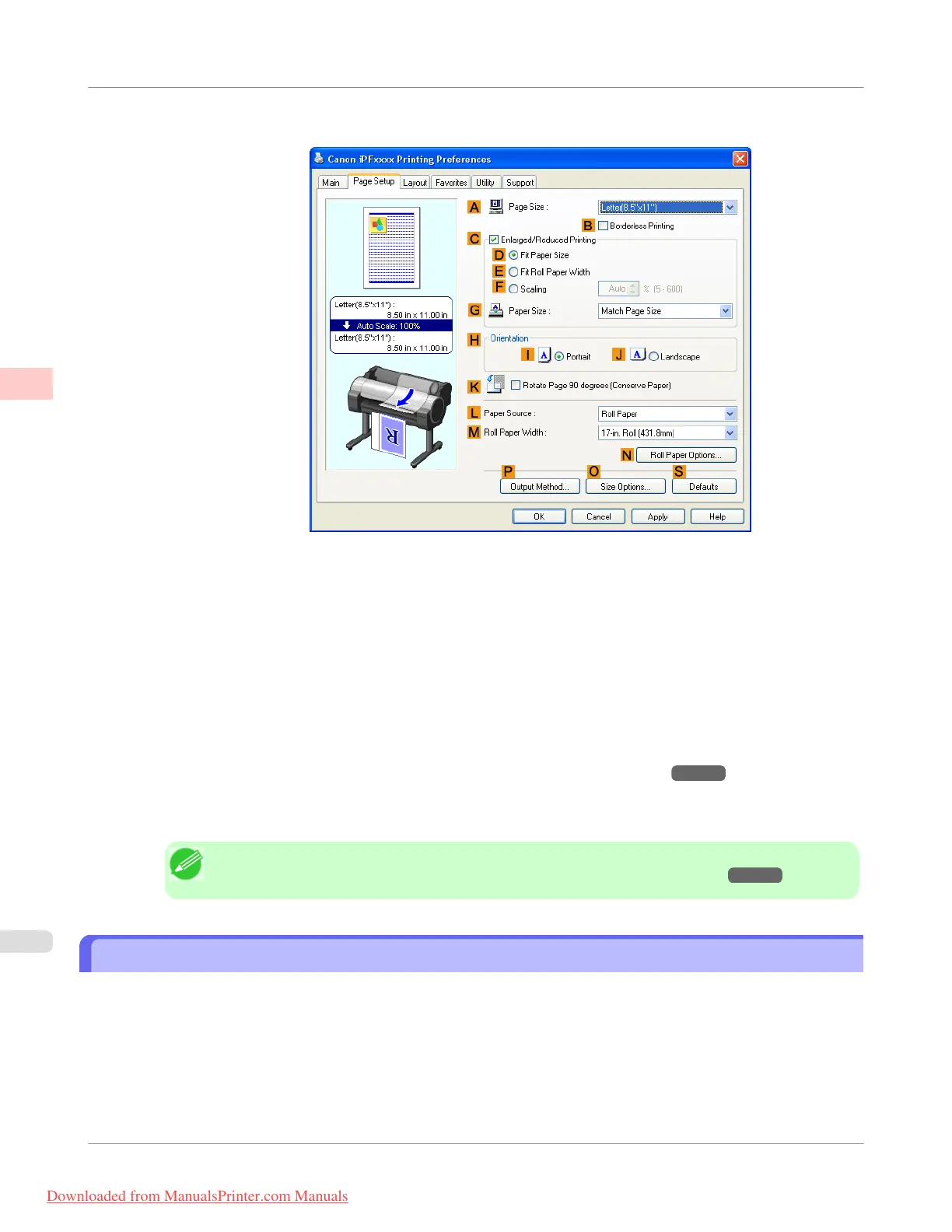
6. Click the Page Setup tab to display the Page Setup sheet.
7. In A Page Size, click the size of the original as specified in the application. In this case, click ISO A3.
8. Select and click a roll paper in the L Paper Source list.
9. Select the width of the loaded roll in the M Roll Paper Width list—in this case, ISO A2/A3 Roll (420.0mm).
10. Specify additional printing conditions.
For details on available printing conditions, see "Printer Driver Settings(Windows)
→P.207 "
11. Confirm the print settings and print as desired.
Note
• For tips on confirming print settings, see "Confirming Print Settings(Windows) →P.212 "
Printing Line Drawings and Text (Mac OS X)
This topic describes how to print line drawings based on the following example.
• Document: CAD drawing
• Page size: A3 (297.0 × 420.0 mm [11.7 × 16.5 in])
• Paper: Roll
• Paper type: Plain Paper
• Roll paper width: A2/A3 roll (420.0 mm [16.5 in])
Enhanced Printing Options
>
Printing CAD Drawings
>
Printing Line Drawings and Text (Mac OS X)
iPF755
2
42
Downloaded from ManualsPrinter.com Manuals


 To Next Page
 Loading...











