Note
• Watermarks are supported in Windows.
• In addition to the provided watermarks, you can create up to 50 original watermarks.
For detailed instructions on printing with watermarks, refer to the following topics:
• Printing with Watermarks— COPY, FILE COPY, and so on (Windows) →P.191
Printing with Watermarks— COPY, FILE COPY, and so on (Windows)
This topic describes how to print with watermarks, based on the following example of printing with a FILE COPY water-
mark.
• Document: Any type
• Page size: A2 (420.0×594.0 mm [16.5 × 23.4 in])
• Paper: Roll paper
• Paper type: Plain Paper
• Roll paper width: A2/A3 roll (420.0 mm [16.5 in[)
1.
Choose Print in the application menu.
2. Select the printer in the dialog box, and then display the printer driver dialog box.(See "Accessing the Printer
Driver Dialog Box from Applications(Windows) →P.217 ")
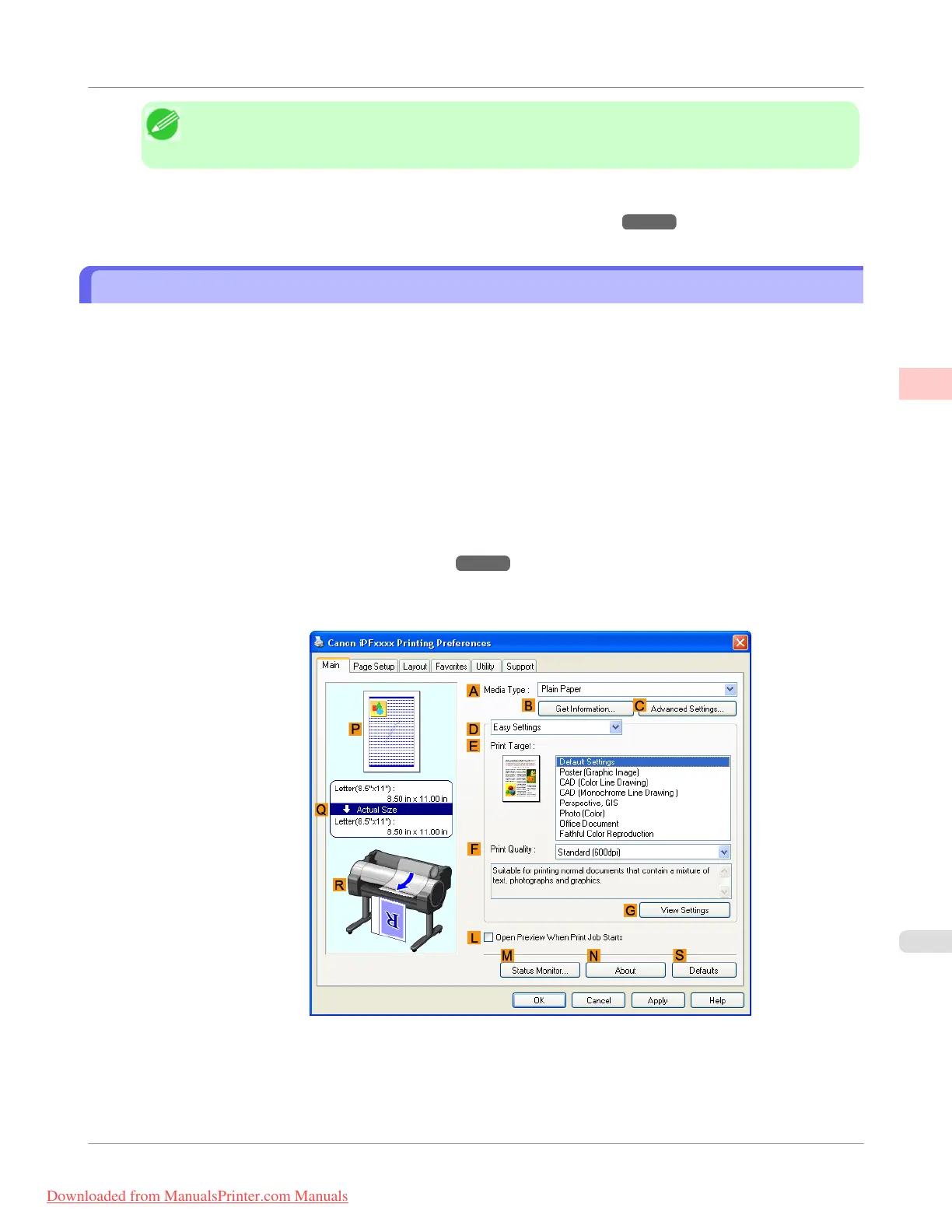
3. Make sure the Main sheet is displayed.
4. In the A Media Type list, select the type of paper that is loaded. In this case, click Plain Paper.
Enhanced Printing Options
>
Other useful settings
>
iPF755
Printing with Watermarks— COPY, FILE COPY, and so on (Windows)
2
191
Downloaded from ManualsPrinter.com Manuals



 To Next Page
 Loading...










