Borderless Printing by Resizing Originals to Fit the Roll Width (Windows)
This topic describes how to enlarge originals before borderless printing to match the roll width, based on the following ex-
ample.
• Document: Any type
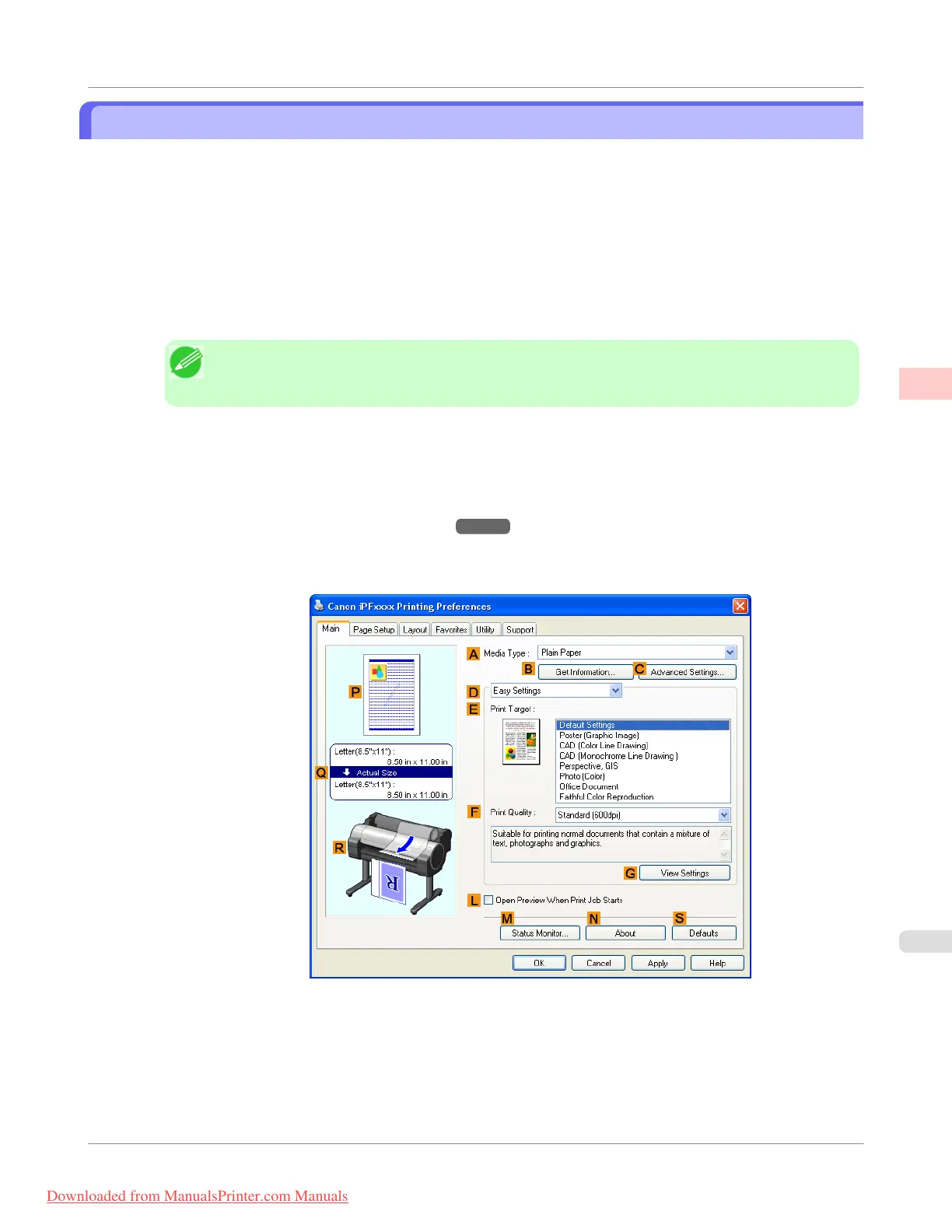
• Page size: A4 (210.0×297.0 mm)/Letter (8.3 × 11.7 in)
• Paper: Roll
• Paper type: Heavyweight Coated Paper
• Roll paper width: 10 inches (254.0 mm)
1. In the application, create an original that takes up the entire space of the paper size.
Note
• If you can specify the margin, as in Microsoft Word, set the margin at 0 mm. For instructions on
specifying the margin, refer to the software documentation.
2. Choose Print in the application menu.
3. Select the printer in the dialog box, and then display the printer driver dialog box.(See "Accessing the Printer
Driver Dialog Box from Applications(Windows) →P.217 ")
4. Make sure the Main sheet is displayed.
5. In the A Media Type list, select the type of paper that is loaded. In this case, click Heavyweight Coated Paper.
6. Select the print target in the E Print Target list.
Enhanced Printing Options
>
Borderless Printing
>
iPF755
Borderless Printing by Resizing Originals to Fit the Roll Width (Windows)
2
113
Downloaded from ManualsPrinter.com Manuals



 To Next Page
 Loading...










