Cutting Method Printer Setting Driver Setting
Paper
Cut-
ting
→P.656
Otherwise choose this option if you want to cut
the roll edge after loading a roll.
Auto CutCut but-
ton press-
ed
Yes No Print Cut
Guideline
Note
• Automatic and Eject are valid only when you have selected Auto Cut > Yes in the printer driver.
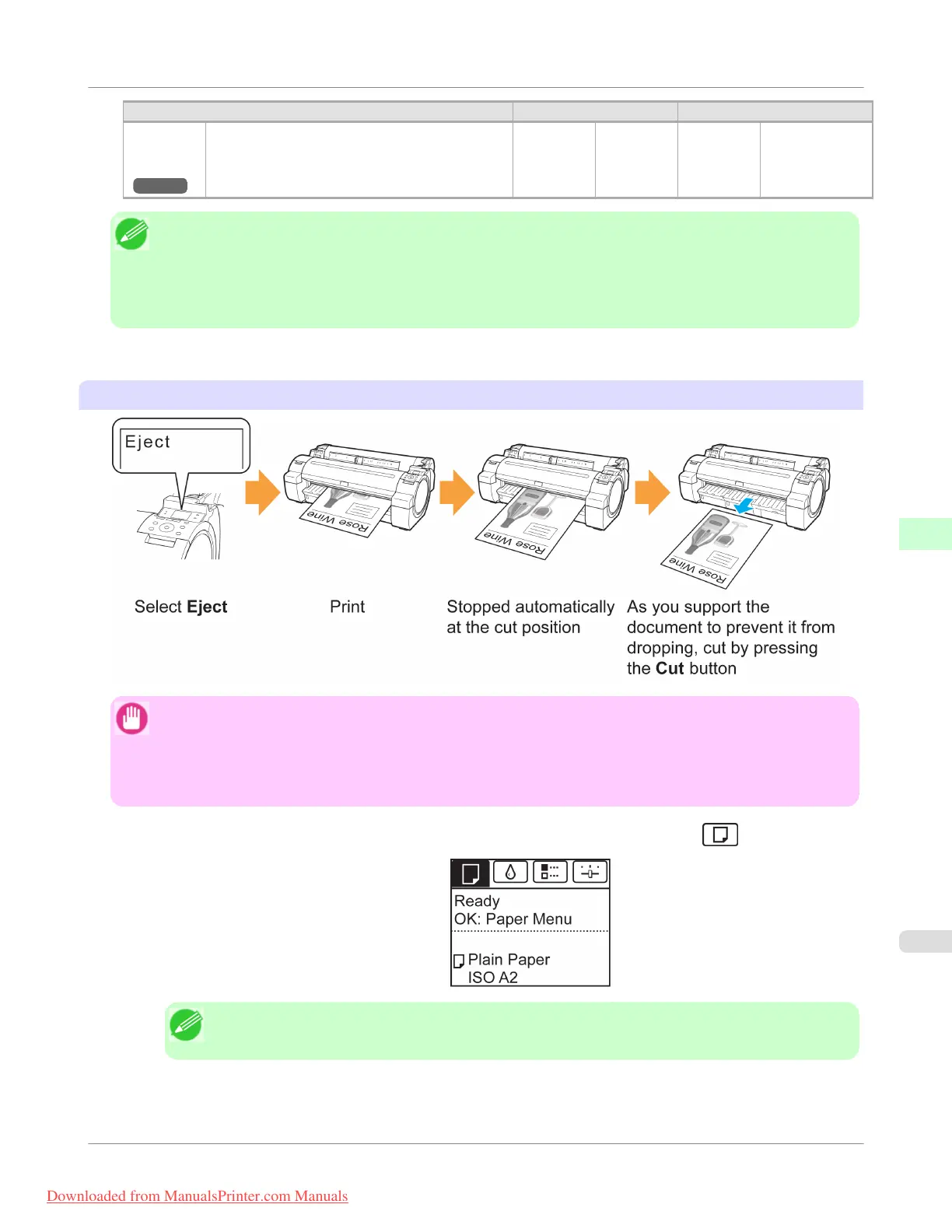
• With Eject, printing does not resume after a series of jobs have been printed continuously until the roll is cut.
• Eject is the preset selection in Cutting Mode for some types of paper. For this paper, we recommend keep-
ing the preset cutting mode.
Cut rolls manually in the following cases:
Eject (waiting for ink to dry after printing)
Important
• When cutting wide printed documents after ejection, have two people support the documents. If the paper
drops, printed documents may be damaged.
• Do not lift the paper when holding printed documents before cutting. If the paper rises, it may affect the
printing quality or cause rough cut edges.
1.
On the Tab Selection screen of the Control Panel, press ◀ or ▶ to select the Paper tab ( ).
Note
• If the Tab Selection screen is not displayed, press the Menu button.
2. Press the OK button. The Paper Menu is displayed.
Handling Paper
>
Handling rolls
>
iPF755
Specifying the Cutting Method for Rolls
6
653
Downloaded from ManualsPrinter.com Manuals


 To Next Page
 Loading...











