Matching Sheet
On the Matching sheet, you can specify color matching to compensate for differences in the appearance of colors on vari-
ous devices.
Important
• If No color correction is selected under Color Mode, the Matching sheet is not displayed.
Note
• To display the Matching sheet, on the Main sheet, click Color Settings in Color Mode in Advanced Set-
tings, and then click the Matching sheet. (Refer to "Main Sheet →P.220 ")
Driver Matching Mode
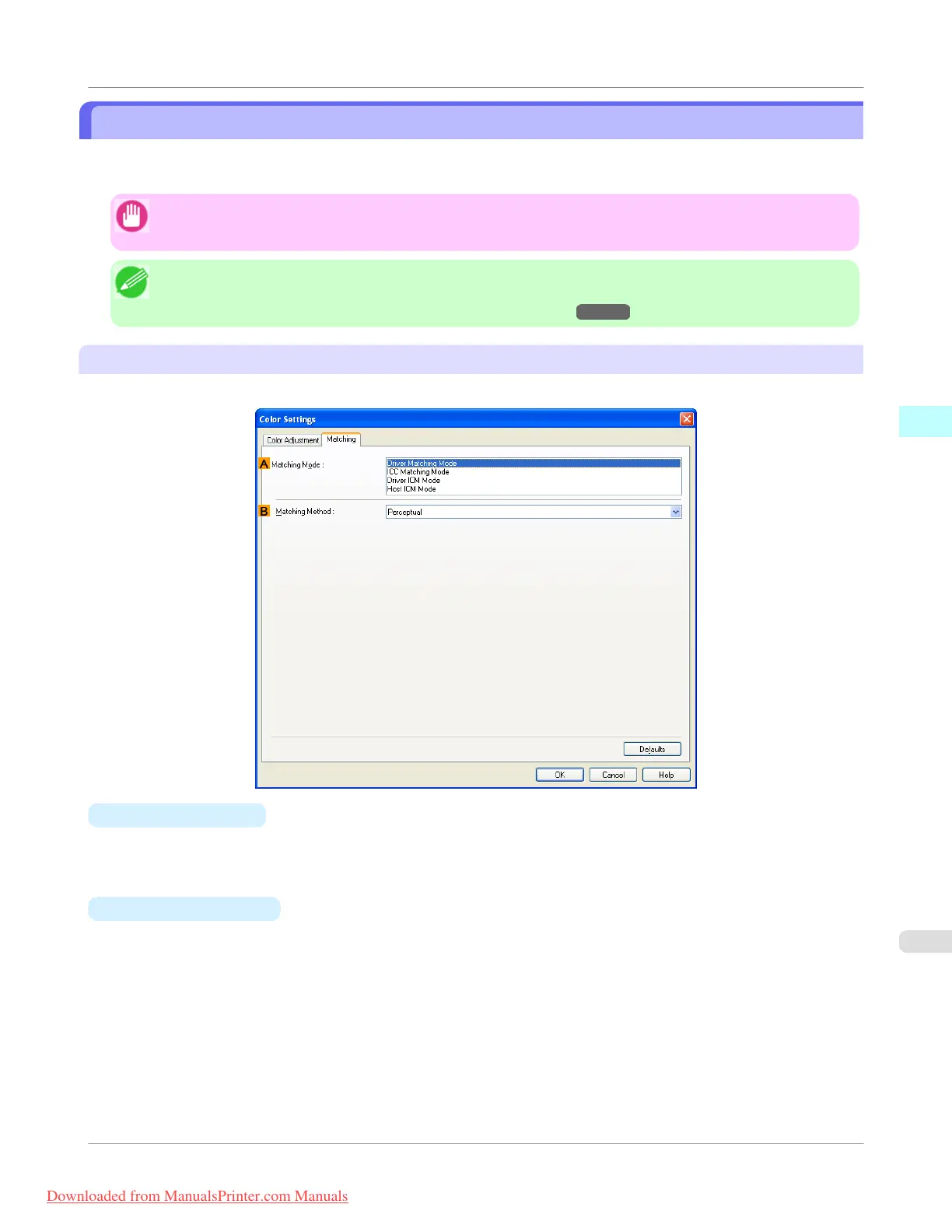
The following options are available when you select Driver Matching Mode in the A Matching Mode list.
•
A Matching Mode
Select the color matching mode to use, as desired.
Normally, select Driver Matching Mode. For color matching based on ICC profiles, select ICC Matching Mode,
Driver ICM Mode, or Host ICM Mode, depending on your color matching system.
•
B Matching Method
Select the color matching method that suits the document to be printed. Various Matching Method options are availa-
ble depending on your selection in Matching Mode.
Windows Software
>
Printer Driver
>
iPF755
Matching Sheet
3
229
Downloaded from ManualsPrinter.com Manuals


 To Next Page
 Loading...











