Color settings Compatible models
Color (CAD) 2 Print with a light-shade color.
Color (CAD) 3 Print with approximate colors emulating Canon iPF500/iPF600/iPF700/iPF510/
iPF610/iPF710/iPF605/iPF720/iPF810/iPF820.
Color (CAD) 4 Print with approximate colors emulating HP Designjet 500/800.
Color (CAD) 5 Print with approximate colors emulating HP Designjet 1000.
Printing
This section describes how to execute a print job with the HDI driver.
Note
• The description below uses printing with the AutoCAD 2007 as an example.
1. Start AutoCAD and open the image file.
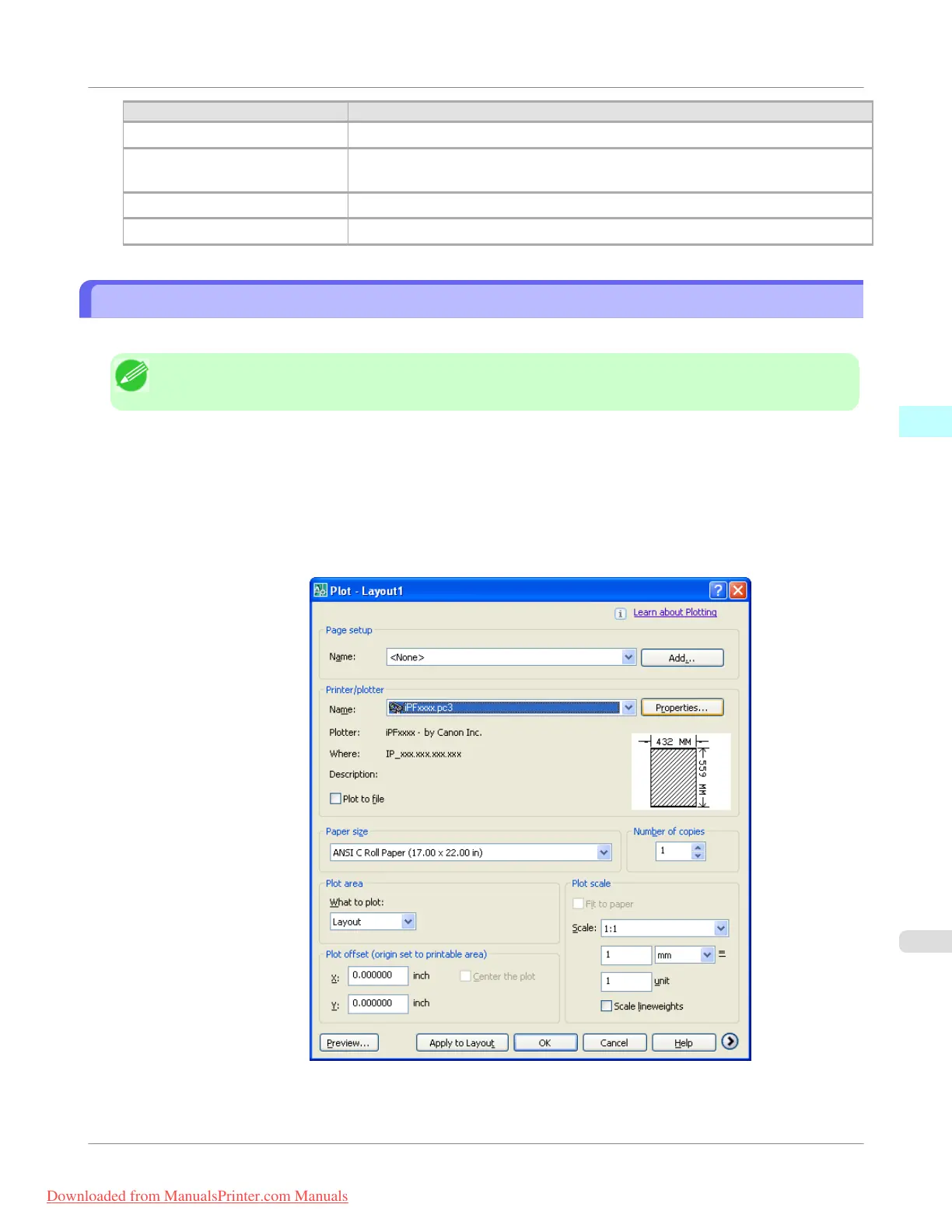
2. Select Plot from the File menu. The Plot dialog box opens.
Check the Name setting under Printer/plotter and confirm that iPFxxxx.pc3 (the name of the printer you use) is
displayed.
Click the Properties button.
Windows Software
>
HDI Driver
>
iPF755
Printing
3
389
Downloaded from ManualsPrinter.com Manuals


 To Next Page
 Loading...











