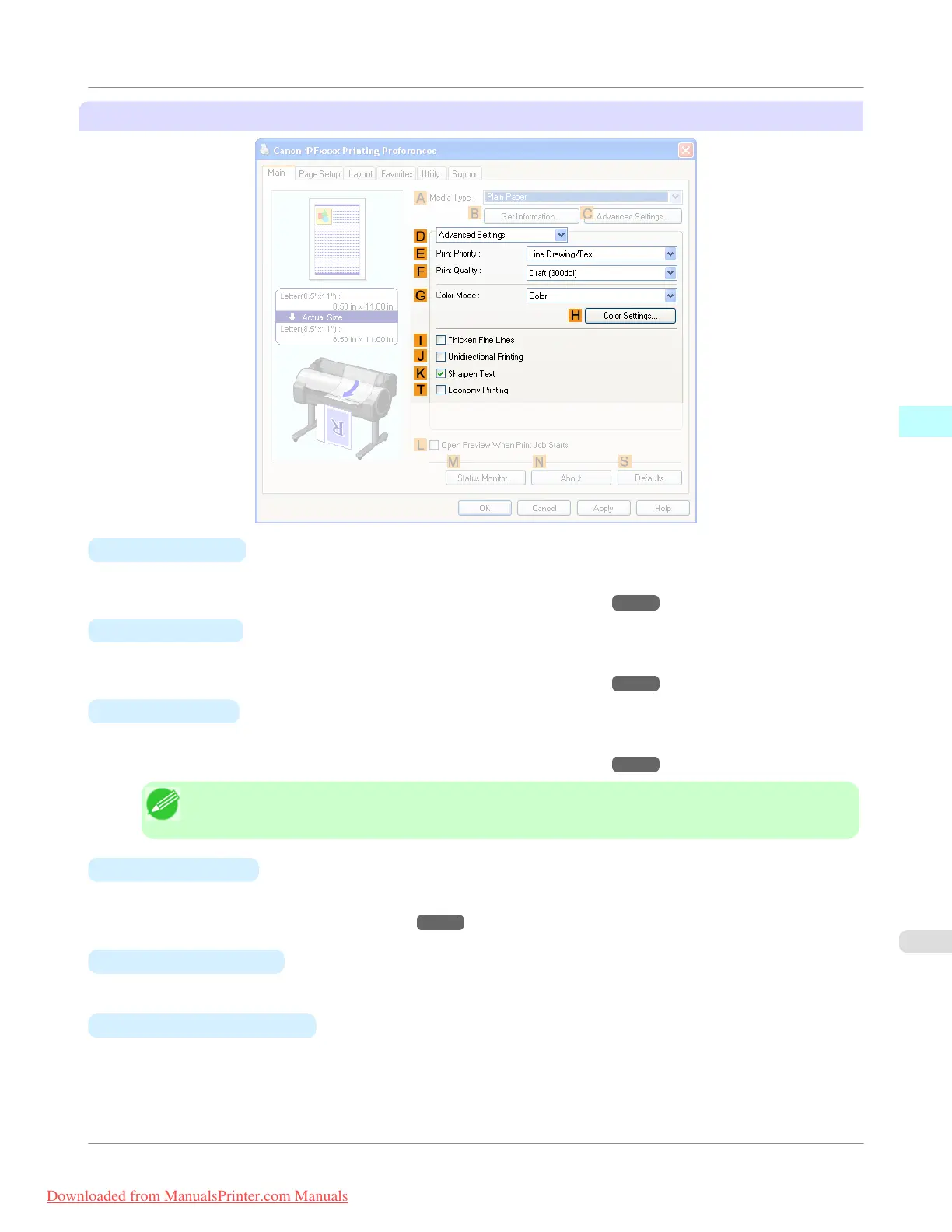
Configuration using Advanced Settings
•
E Print Priority
Choose the graphic elements that you want to emphasize for printing.
• Giving Priority to Particular Graphic Elements and Colors for Printing →P.60
•
F Print Quality
Choose the level of print quality.
• Giving Priority to Particular Graphic Elements and Colors for Printing →P.60
•
G Color Mode
Choose the color mode.
• Giving Priority to Particular Graphic Elements and Colors for Printing
→P.60
Note
• Depending on the A Media Type setting, some G Color Mode options may not be available.
•
H Color Settings
Click to display the Color Settings dialog box for more advanced color settings.
• Adjusting the Color in the Printer Driver →P.51
•
I
Thicken Fine Lines
Activate this option to print fine lines more distinctly.
•
J
Unidirectional Printing
Select this checkbox to prevent problems such as misaligned lines and improve the print quality. However, the printing
speed becomes slower.
Windows Software
>
Printer Driver
>
iPF755
Main Sheet
3
223
Downloaded from ManualsPrinter.com Manuals


 To Next Page
 Loading...










