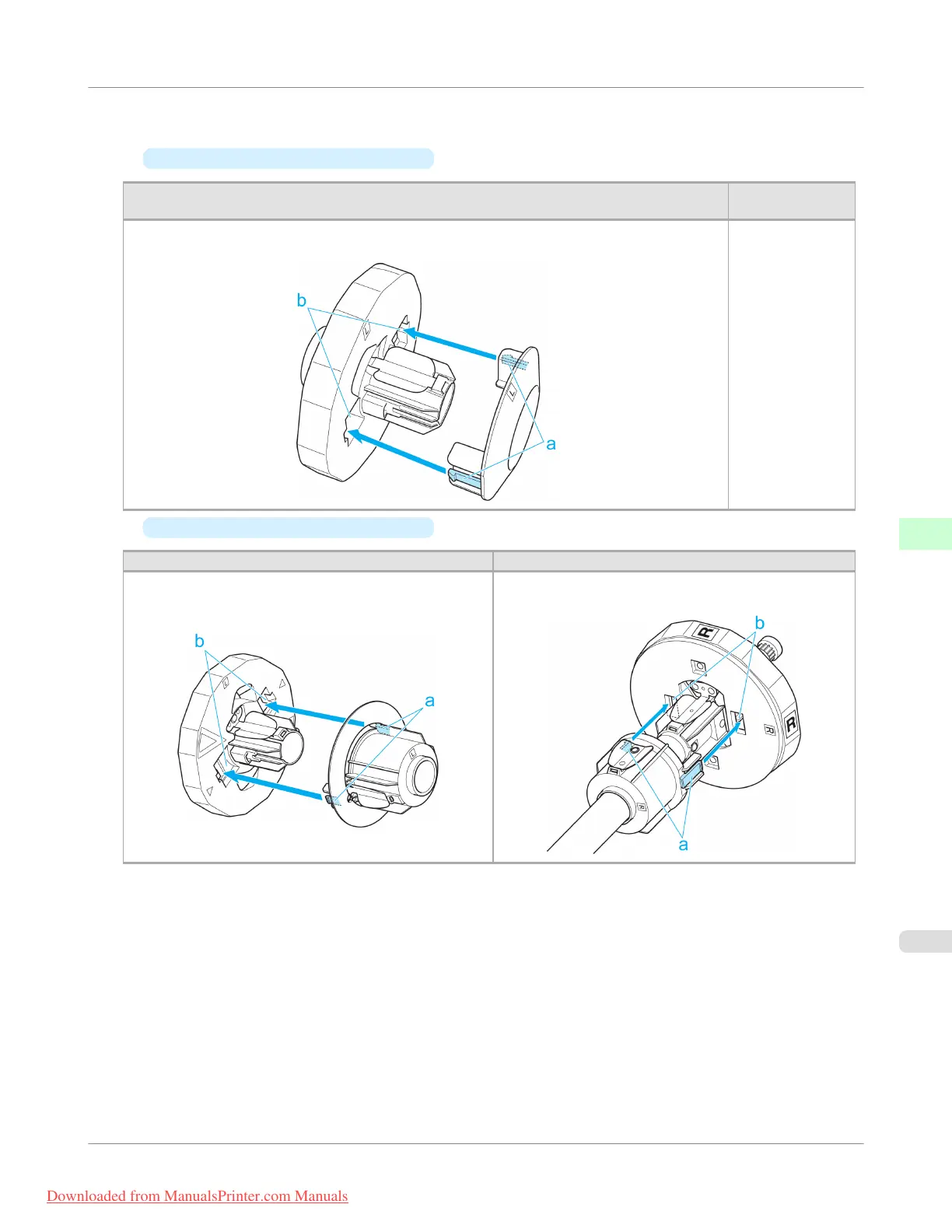
2. Insert the respective attachments for the roll paper core on the Roll Holder and Holder Stopper.
•
Using rolls with a 2-inch paper core
Holder Stopper (Left Side)
Roll Holder (Right
Side)
Align the tips (a) of the 2-Inch Paper Core Attachment with the holes (b) of the Holder Stopper
and insert it firmly.
No attachment is
needed.
•
Using rolls with a 3-inch paper core
Holder Stopper (Left Side) Roll Holder (Right Side)
Align the tips (a) of the 3-Inch Paper Core Attachment L
with the holes (b) of the Holder Stopper and insert it firm-
ly.
Align the tips (a) of 3-Inch Paper Core Attachment R
with the holes (b) of the Roll Holder and insert it firmly.
Handling Paper
>
Handling rolls
>
iPF755
Attaching the Roll Holder to Rolls
6
635
Downloaded from ManualsPrinter.com Manuals


 To Next Page
 Loading...










