Using the Matching Function to Correct Color
Using the color matching function, you can adjust the color of the printout to more closely match the color you see on
the screen.
Correcting Color by Adjusting Brightness (Gamma Adjustment)
You can adjust the brightness of the printout results without spoiling the lightest parts and darkest parts of the image
data.
Use this option when the printout result is brighter than the original image or when you want to change the brightness
of the image.
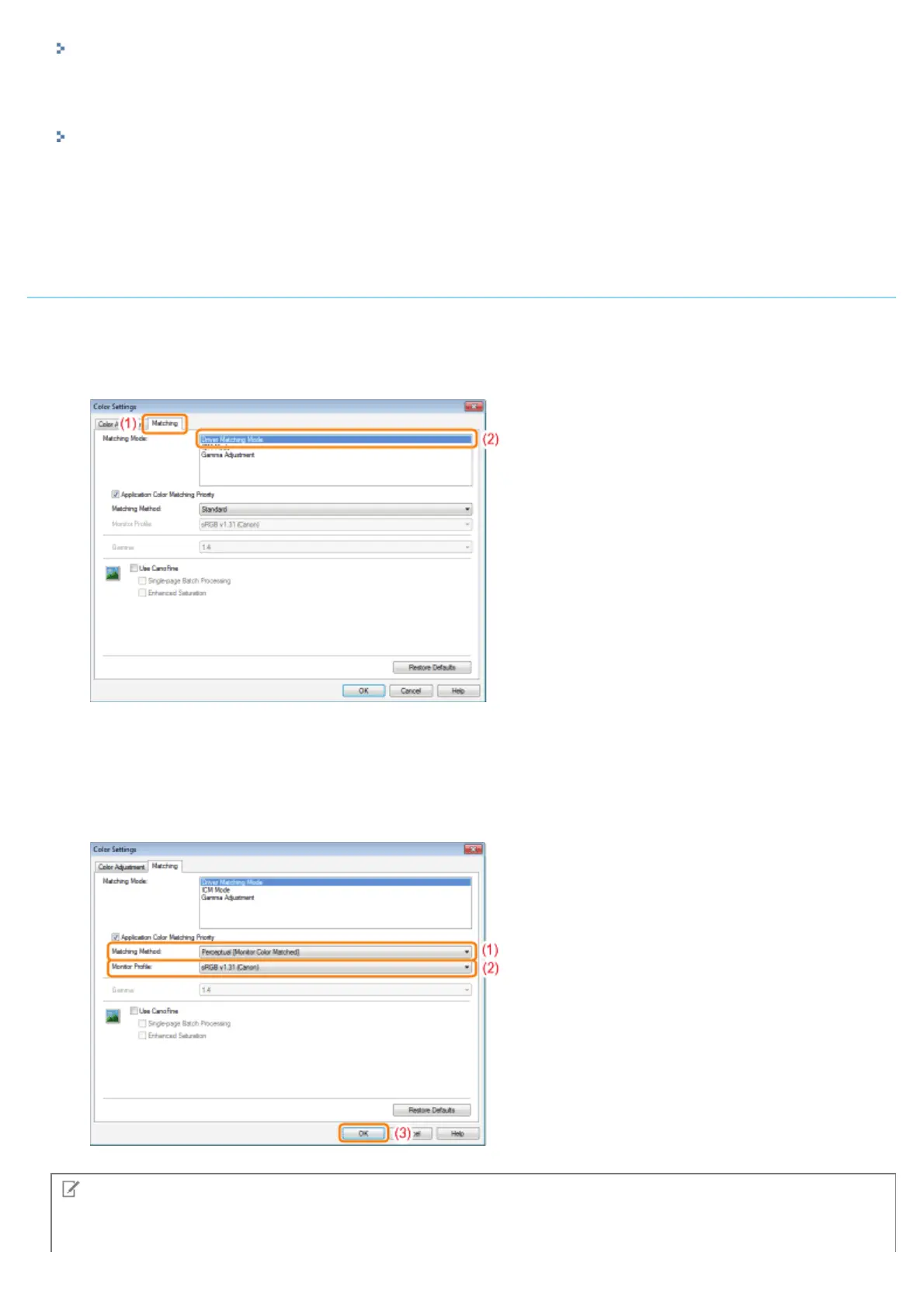
Using the Matching Function to Correct Color
1. Specify the setting for [Matching Mode].
(1) Display the [Matching] sheet.
(2) Select [Driver Matching Mode].
2. Specify the setting for [Matching Method].
(1) Set [Matching Method] to [Perceptual [Monitor Color Matched]].
(2) Select a profile you want to use.
(3) Click [OK]. Then, the [Quality] sheet reappears.
NOTE
About the options for [Monitor Profile]
㻞㻝㻣㻌㻛㻌㻟㻠㻟













 To Next Page