3-CONTROLSANDINSTRUMENTS
Enteringtheservicescreens
AfterthemachinehasbeenstartedorthekeyswitchhasbeenturnedtoON,theoperatororservicetechnicianmay
usethemainmenutoadjustmachinecongurationstoworkingconditions,totestcomponents,viewfaultsthatmay
haveoccurred,ortoselectpreferences.Languagescanbesetatthebeginningofthemenucongurationtoallow
theoperatortoworkinthelanguageofchoice.
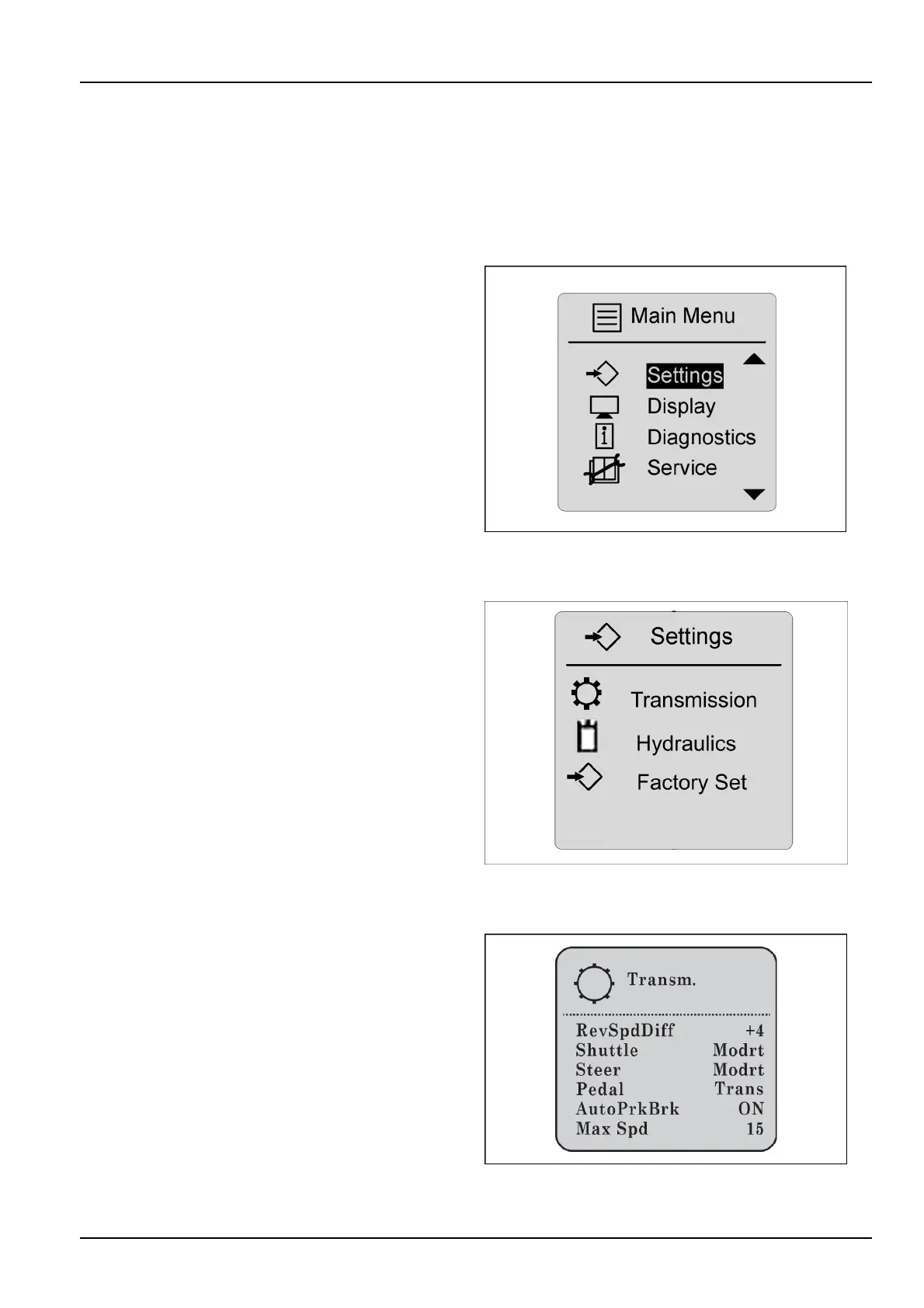
Mainmenu
Pressandholdtheenter/conrmswitchfortwoseconds
toarriveatthemainmenu.Thearrowswitchcanbeused
toscrollthroughmenuselections.
Itemsandselectionsinthismenuare:
Settings
Display
Diagnostics
Service
RCPH10WHL355AAH11
Settings
Selectionsatthesettingmenuinclude:
Transmission
Hydraulics
FactorySet
RAIL12DOZ0647AA12
Transmissionselections
RevSpdDiff—Indicatesspeeddifferentialbetweenre-
verseandforward.
Shuttle—Adjustsgrounddriveramps:smooth,moder-
ate,oraggressive.
Steer—Adjustssteeringcurves:smooth,moderate,or
aggressive.
Pedal—Adjuststransmissioncommand(default).
Changefromtransmissionpedaltodecelerationpedal.
AutoPrkBrk—Whenthe“AutoPrkBrk”functionissetto
“ON”,theunitisinneutralandtheUCMsensesmove-
mentfromthedrivemotorspeedsensorsfor30s,the
parkbrakewillengage.
1.ON(default)
2.OFF
MaxSpeed—Setsspeedinincrements:15,13,11,9.
RAIL14DOZ0583AA13
3-45


 To Next Page