3-CONTROLSANDINSTRUMENTS
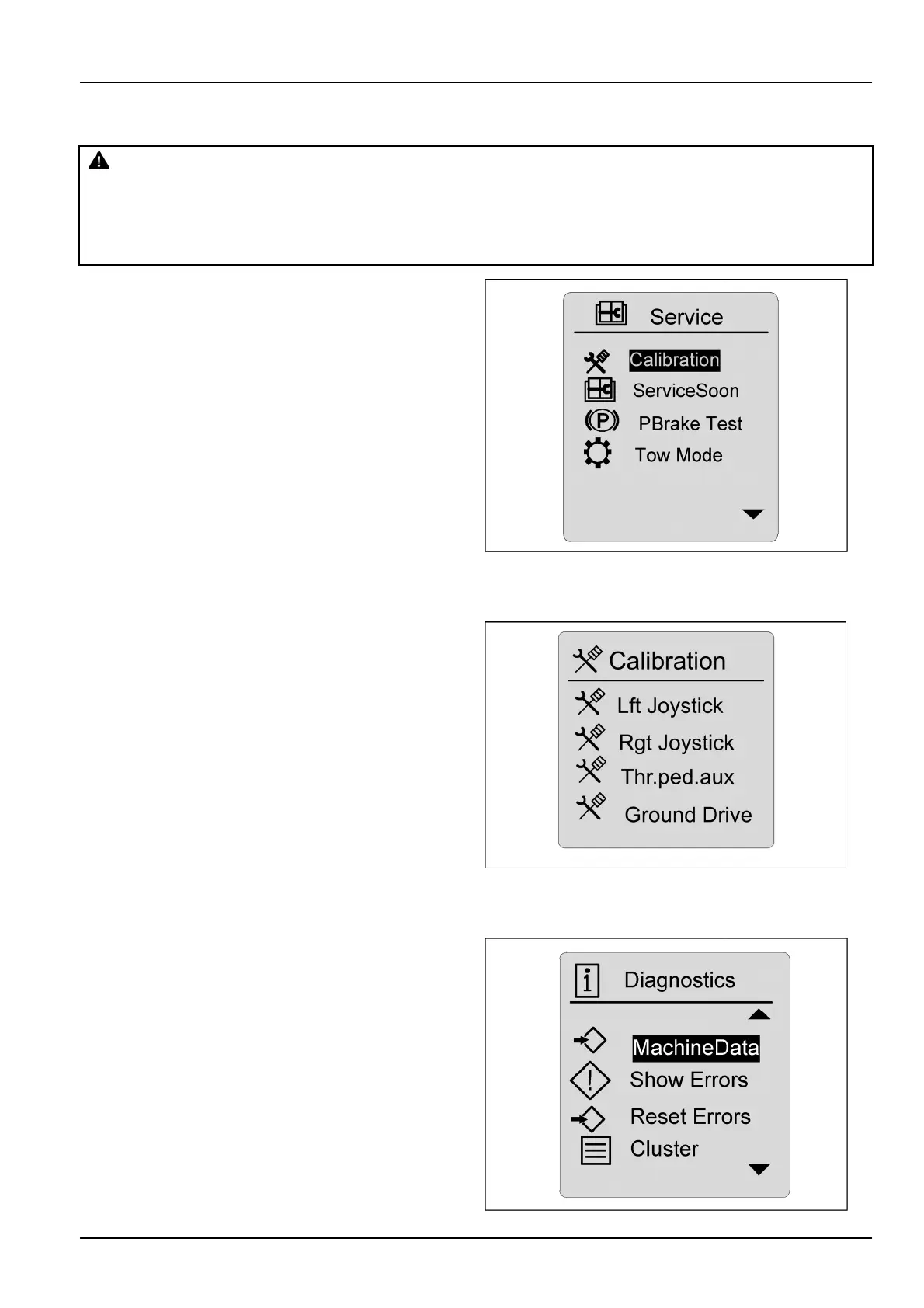
Service
WARNING
Unexpectedmachinemovement!
Themachinecouldmoveautomaticallyduringcalibration.Parkonaatsurface,engagetheparking
brake,andbesurethattheareaaroundthemachineisclearbeforestartingthecalibrationprocess.
Failuretocomplycouldresultindeathorseriousinjury.
W0300A
Highlightthedesiredselection,andpressenter/conrm.
Thetestsinthecongurationmenushouldbeperformed
onlybyaqualiedoperatorortechnician,assometests
requiretheenginetoberunningathighRPM.
Itemsandselectionsinthismenuare:
Calibration
ServiceSoon
PBrakeTest
TowMode
RAIL12DOZ0648AA17
Calibrationscreens
Calibrationforthe
Lftjoystick
Rgtjoystick
ThrPedAux
GroundDrive
Highlightselectionandfollowscreenprompts.Foren-
ablingconditions,theignitionkeymustbeON,theengine
mustbeOFF,theimplementsettingmustbeOFF ,theop-
eratorisintheseat,theparkingbrakeisON,andthere
arenojoystickrelatederrorcodes.
Forgrounddrivecalibration,theenginemustbeON,no
joystickorgrounddriveerrorcodes,parkbrakemustbe
OFF,theimplementsettingdisabled,hydraulicoiltemper-
atureisinthe40-80°C(104.0-176.0°F)range,and
RPMat1800.
RAIL12DOZ0223AA18
Diagnostics
Highlightthedesiredselectionandpressenter/conrm.
Thediagnosticareashouldbeusedbyatrainedservice
technician.
NOTE:PressingtheescapeswitchwillreturntheLCD
backtothenormaldrivingscreen.Inordertolockthe
changesintomemory,theoperatormustpresstheenter/
conrmswitch,thenusetheescapeswitchtoreturntothe
mainscreen.
RAIL12DOZ0586AA19
3-47


 To Next Page