EasyManua.ls Logo

Codec Tieline Gateway - Page 73

Codec Tieline Gateway
306 pages
Print Icon
To Next Page IconTo Next Page
To Previous Page IconTo Previous Page
Loading...
73
© Tieline Research Pty. Ltd. 2021
Gateway and Gateway 4 Manual v1.2
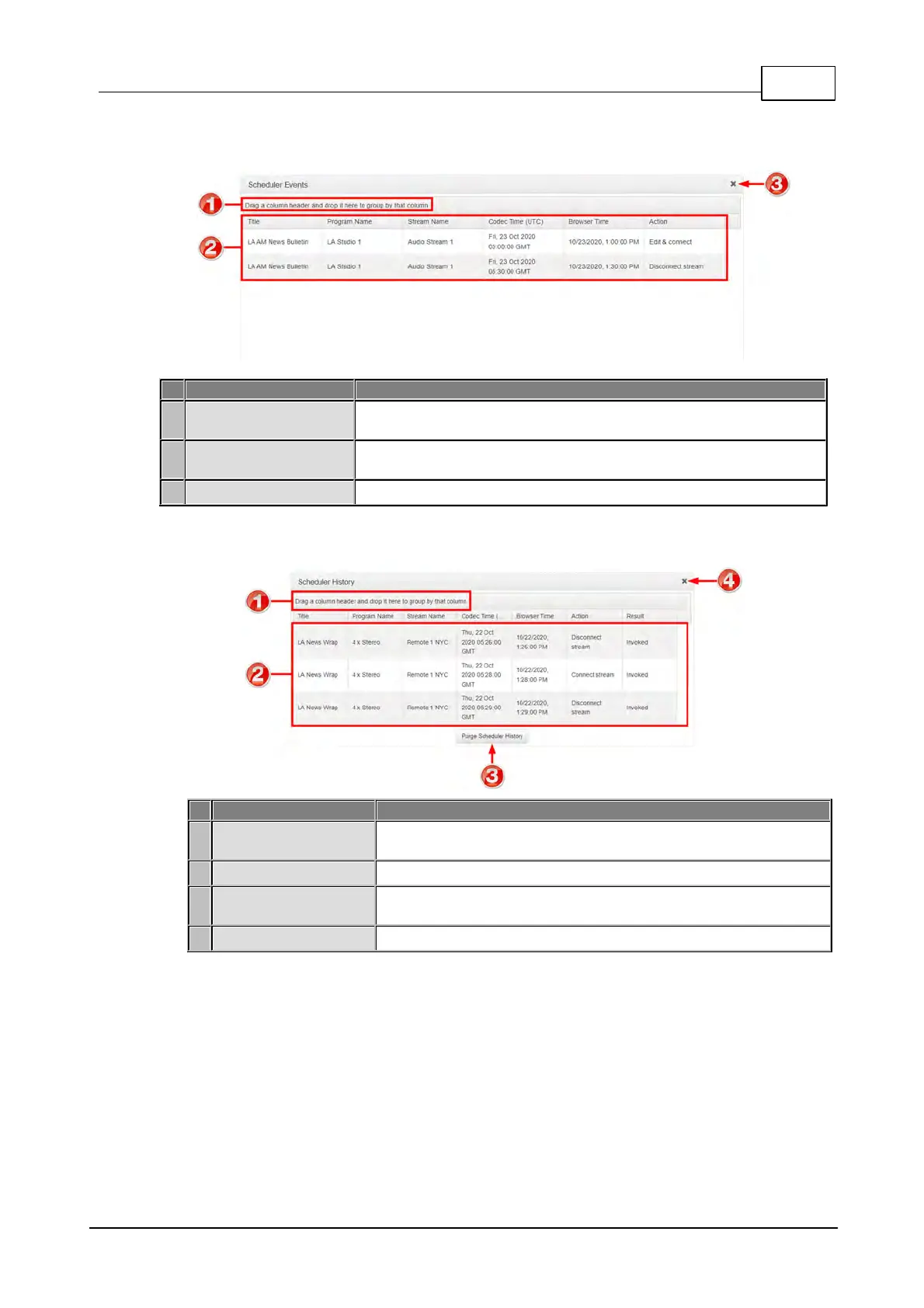
Scheduler Events Panel
Feature
Description
1
Grouping
Drag and drop a column header to group scheduled events by that
column, e.g. Codec Time.
2
List of scheduled
events
View scheduled events in a list view
3
Close button
Click to close the panel.
Scheduler History
Feature
Description
1
Grouping
Drag and drop a column header to group event history by that
column, e.g. Codec Time.
2
Event History List
View the codec's history of scheduled events.
3
Purge Scheduler
History button
Click to clear all event history displayed.
4
Close button
Click to close the panel.

Table of Contents

Related product manuals