EasyManua.ls Logo

Codec Tieline Gateway - Page 75

Codec Tieline Gateway
306 pages
Print Icon
To Next Page IconTo Next Page
To Previous Page IconTo Previous Page
Loading...
75
© Tieline Research Pty. Ltd. 2021
Gateway and Gateway 4 Manual v1.2
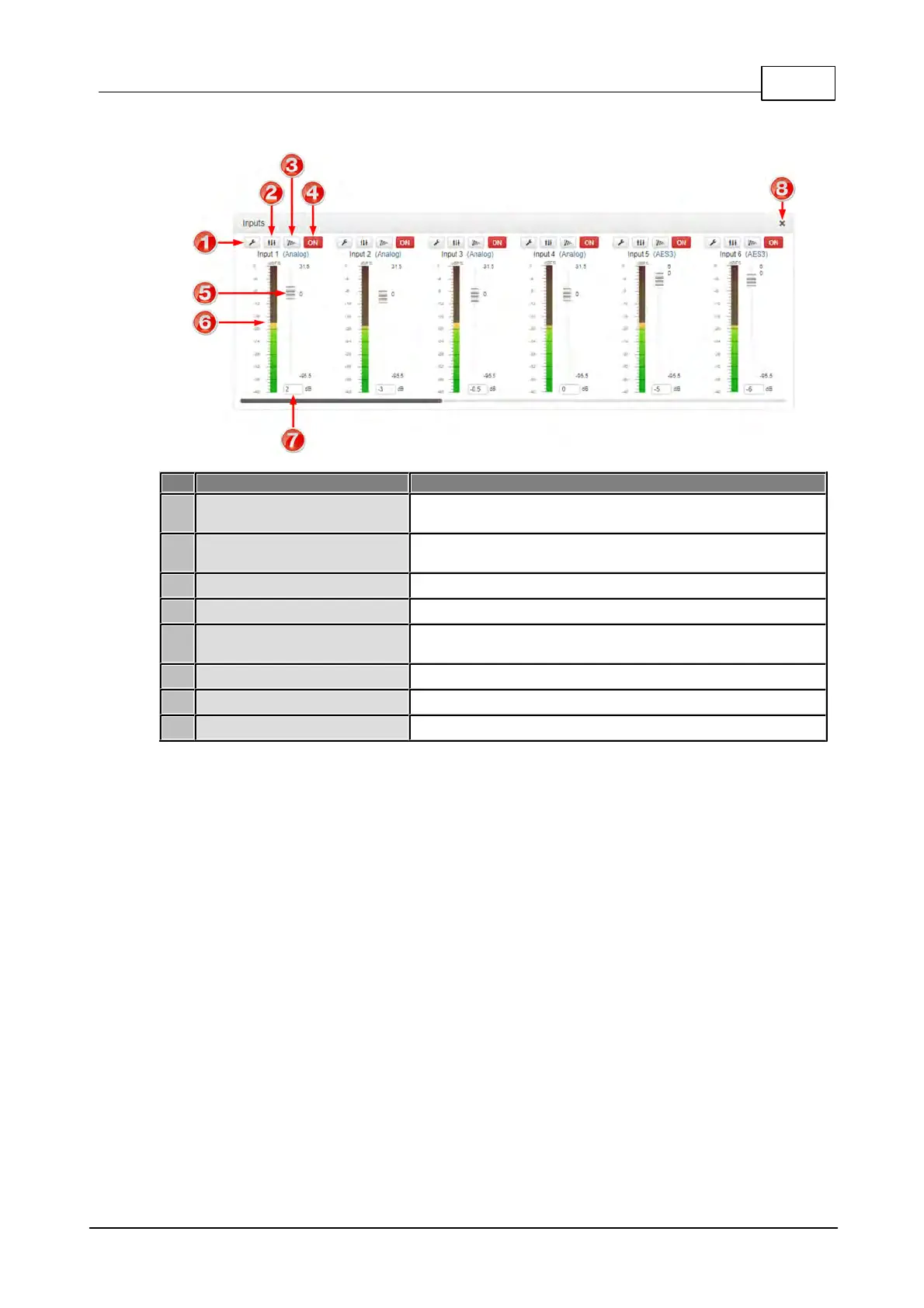
Inputs Panel
Feature
Description
1
Settings button
Click to adjust input Name, Type, Polarity Inverted and
IGC settings
2
EQ button
Click to enable and adjust 10 band EQ settings for individual
inputs
3
Compressor button
Click to enable the input compressor on each input
4
On/Off button
Click to toggle an input on or off
5
Input Sliders/Faders
Input gain control sliders/faders. Adjust input gain in +/-
0.5dB increments
6
Input PPM meter
Input PPM meter
7
Input gain adjustment
Enter a dB value to adjust input gain in 0.5dB increments
8
Close button
Click to close the panel

Table of Contents

Related product manuals