84 Gateway and Gateway 4 Manual v1.2
© Tieline Research Pty. Ltd. 2021
Transport Panels
There are several Transport panels which can be opened in the Web-
GUI. Each panel provides specific transport-related configuration
settings and options. Click to select and open each panel.
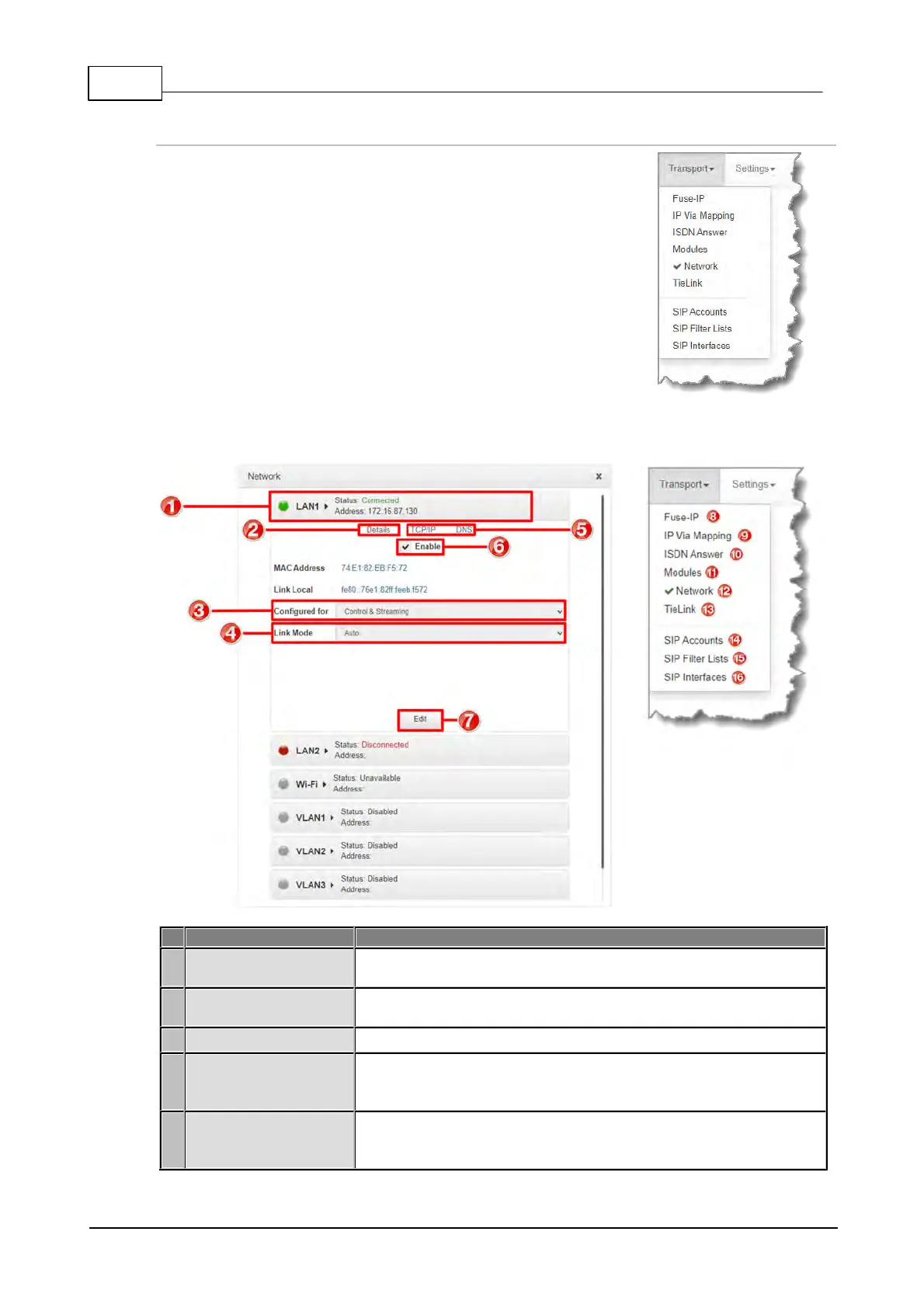
As an example, the Network panel is displayed with network interface configuration options. A
brief description of the other panels is also provided.
Click to select, expand and view configuration, and edit network
configuration settings for Ethernet, Wi-Fi and VLAN interfaces.
Displays configuration options for the selected network interface,
plus other device details.
Select Control and/or Streaming options for the selected interface.
Configure the Ethernet, VLAN or Wi-Fi link speed
(10/100/1000/Auto) and whether an interface will operate in Full-
Duplex or Half-Duplex mode.
Select the TCP/IP tab to configure IPv4/IPv6 address details.
Select the DNS tab to specify DNS addresses and domains to
search.



 To Next Page