INS_CNGE3FE8MS[POE][HO] Rev. 11.7.17 PAGE 240
INSTRUCTION MANUAL CNGE3FE8MS[POE][HO]
TECH SUPPORT: 1.888.678.9427
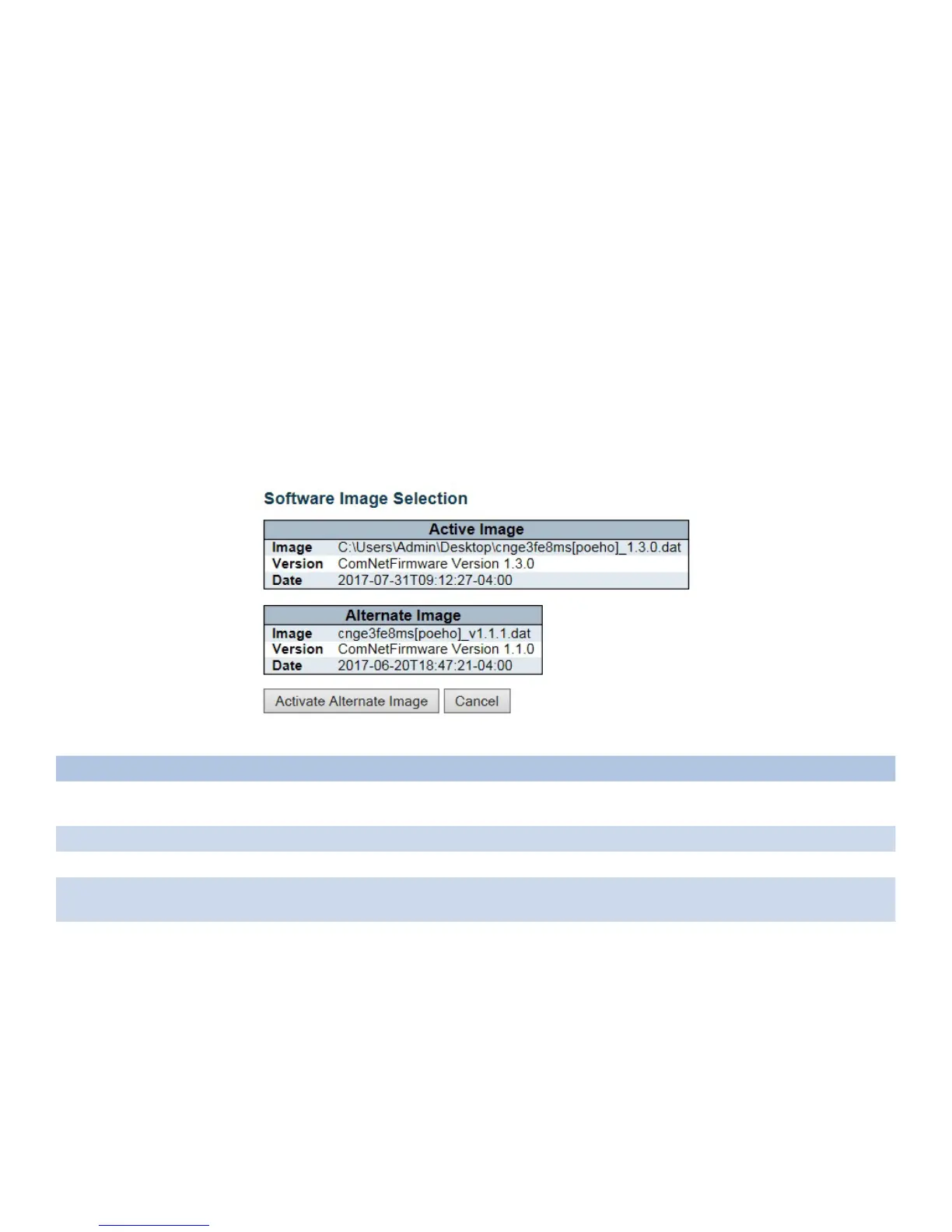
Image Select
This page provides information about the active and alternate (backup) firmware images in the
device, and allows you to revert to the alternate image.
The web page displays two tables with information about the active and alternate firmware
images.
Note:
1. In case the active firmware image is the alternate image, only the “Active Image” table is
shown. In this case, the Activate Alternate Image button is also disabled.
2. If the alternate image is active (due to a corruption of the primary image or by manual
intervention), uploading a new firmware image to the device will automatically use the primary
image slot and activate this.
3. The firmware version and date information may be empty for older firmware releases. This
does not constitute an error.
Object Description
Image The flash index name of the firmware image. The name of primary (preferred) image is image,
the alternate image is named image.bk.
Version The version of the firmware image.
Data The date where the firmware was produced.
Activate Alternate
Image
Click to swap the active image to alternate image.
Cancel Click to go back to home screen without change.
Click the “Activate Alternate Image” button to swap the image and restart the switch. Click
“Cancel” button to go back to home screen.



 To Next Page