INS_CNGE3FE8MS[POE][HO] Rev. 11.7.17 PAGE 97
INSTRUCTION MANUAL CNGE3FE8MS[POE][HO]
TECH SUPPORT: 1.888.678.9427
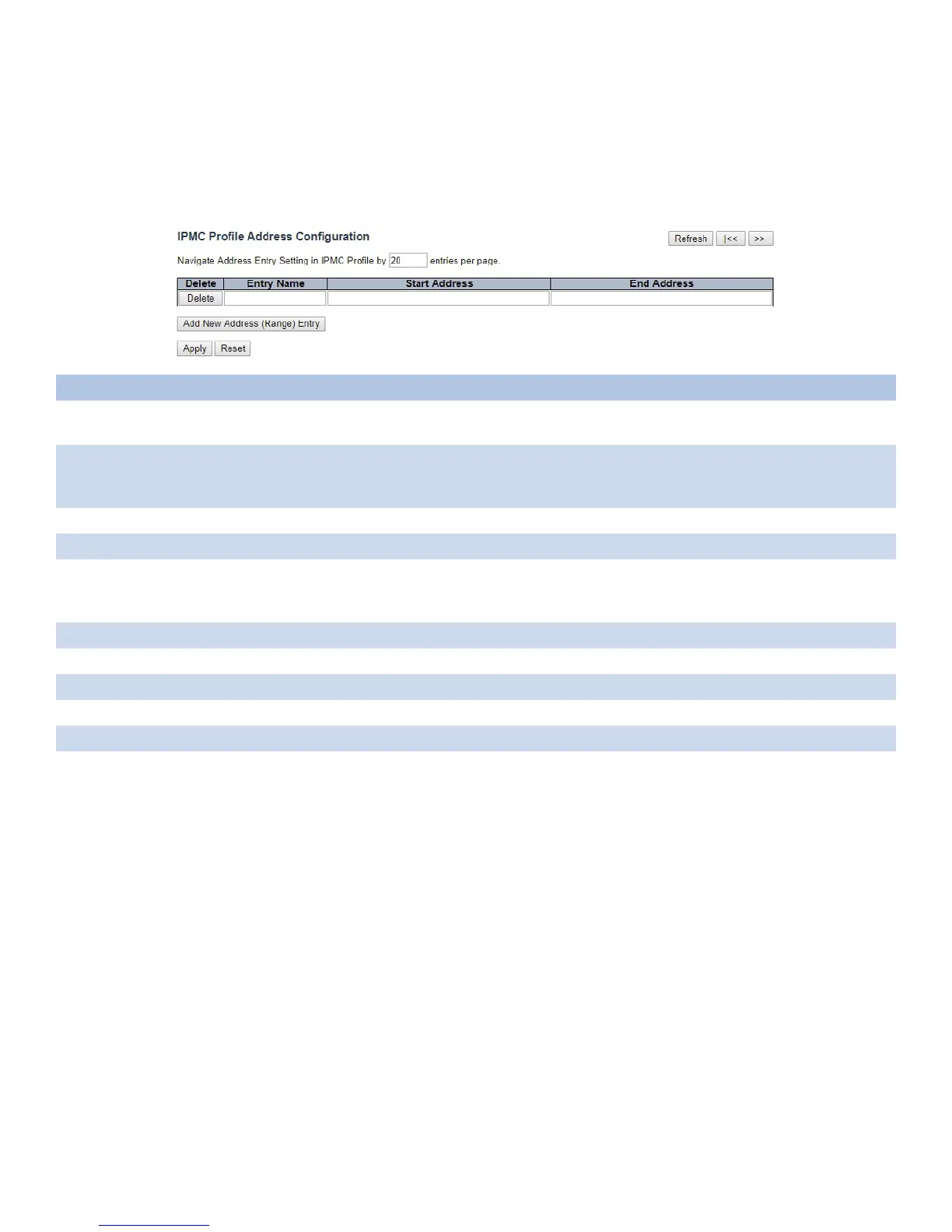
Address Entry
This page provides address range settings used in IPMC profile.
The address entry is used to specify the address range that will be associated with IPMC Profile. It
is allowed to create at maximum 128 address entries in the system.
Object Description
Delete Check to delete the entry.
The designated entry will be deleted during the next save.
Entry Name The name used for indexing the address entry table.
Each entry has the unique name which is composed of at maximum 16 alphabetic and numeric
characters. At least one alphabet must be present.
Start Address The starting IPv4/IPv6 Multicast Group Address that will be used as an address range.
End Address The ending IPv4/IPv6 Multicast Group Address that will be used as an address range.
Add New
Address (Range)
Entry
Click to add new address range. Specify the name and configure the addresses, then click “Apply”.
Apply Click to apply changes.
Reset Click to revert to previous values.
Refresh Click to refresh the table starting from input fields.
|<< Click to update the table starting from the first entry in the IPMC Profile Address Configuration.
>> Click to update the table starting with the entry after the last entry currently displayed.



 To Next Page