INS_CNGE3FE8MS[POE][HO] Rev. 11.7.17 PAGE 31
INSTRUCTION MANUAL CNGE3FE8MS[POE][HO]
TECH SUPPORT: 1.888.678.9427
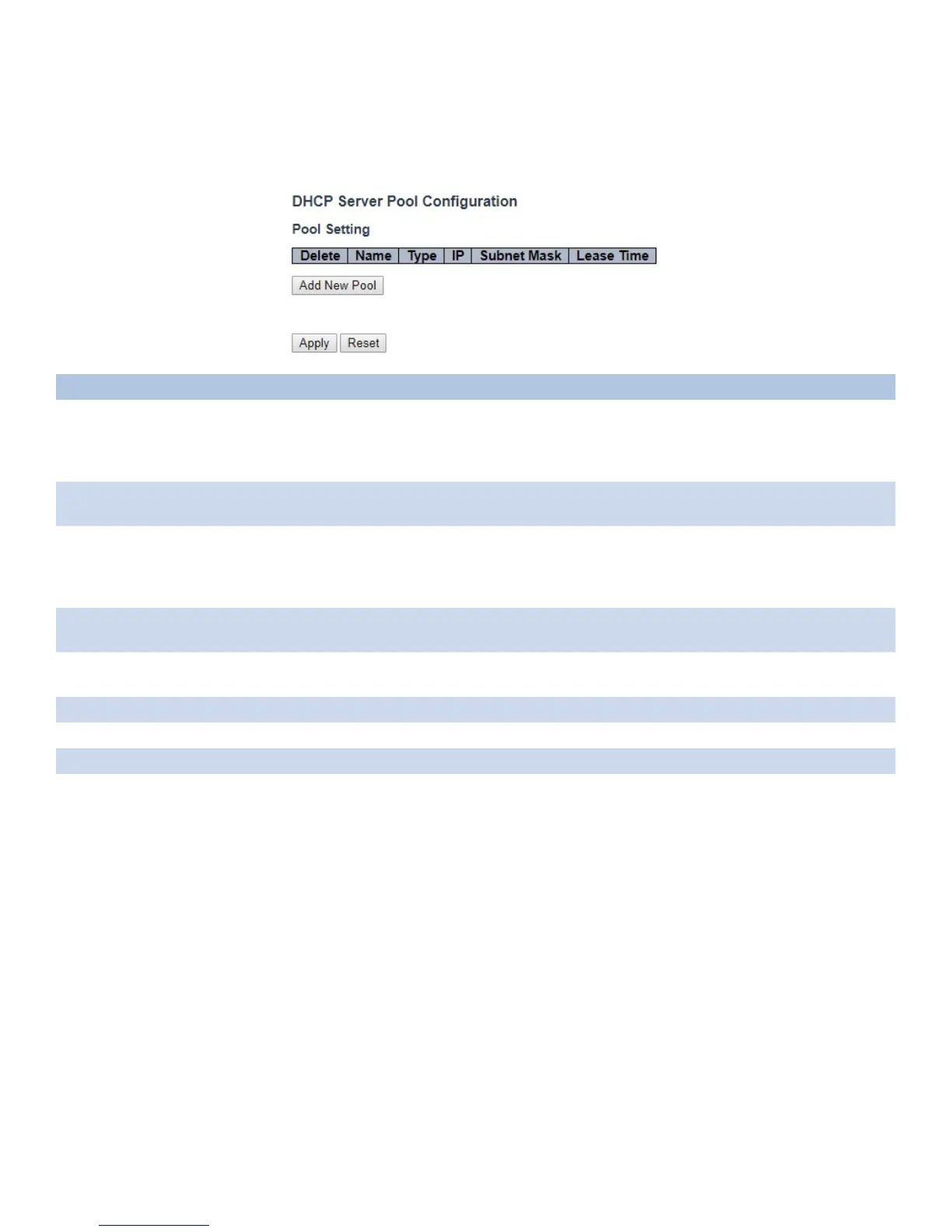
Pool
This page manages DHCP pools. According to the DHCP pool, DHCP server will allocate IP
address and deliver configuration parameters to DHCP client.
Object Description
Pool Setting Add or delete pools.
Adding a pool and giving a name is to create a new pool with “default” configuration. If you want to
configure all settings including type, IP subnet mask and lease time, you can click the pool name to
go into the configuration page.
Name Configure the pool name that accepts all printable characters, except white space. If you want to
configure the detail settings, you can click the pool name to go into the configuration page.
Type Display which type of the pool is.
Network: the pool defines a pool of IP addresses to service more than one DHCP client.
Host: the pool services for a specific DHCP client identified by client identifier or hardware address.
If “-” is displayed, it means not defined.
IP Display network number of the DHCP address pool.
If “-” is displayed, it means not defined.
Subnet Mask Display subnet mask of the DHCP address pool.
If “-” is displayed, it means not defined.
Lease Time Display lease time of the pool.
Add New Pool Click to add a new DHCP pool.
Apply Click to apply changes.
Reset Click to undo any changes made locally and revert to previously saved values.



 To Next Page