INS_CNGE3FE8MS[POE][HO] Rev. 11.7.17 PAGE 69
INSTRUCTION MANUAL CNGE3FE8MS[POE][HO]
TECH SUPPORT: 1.888.678.9427
Object Description
Clear Click to clear the counters.
Object Description
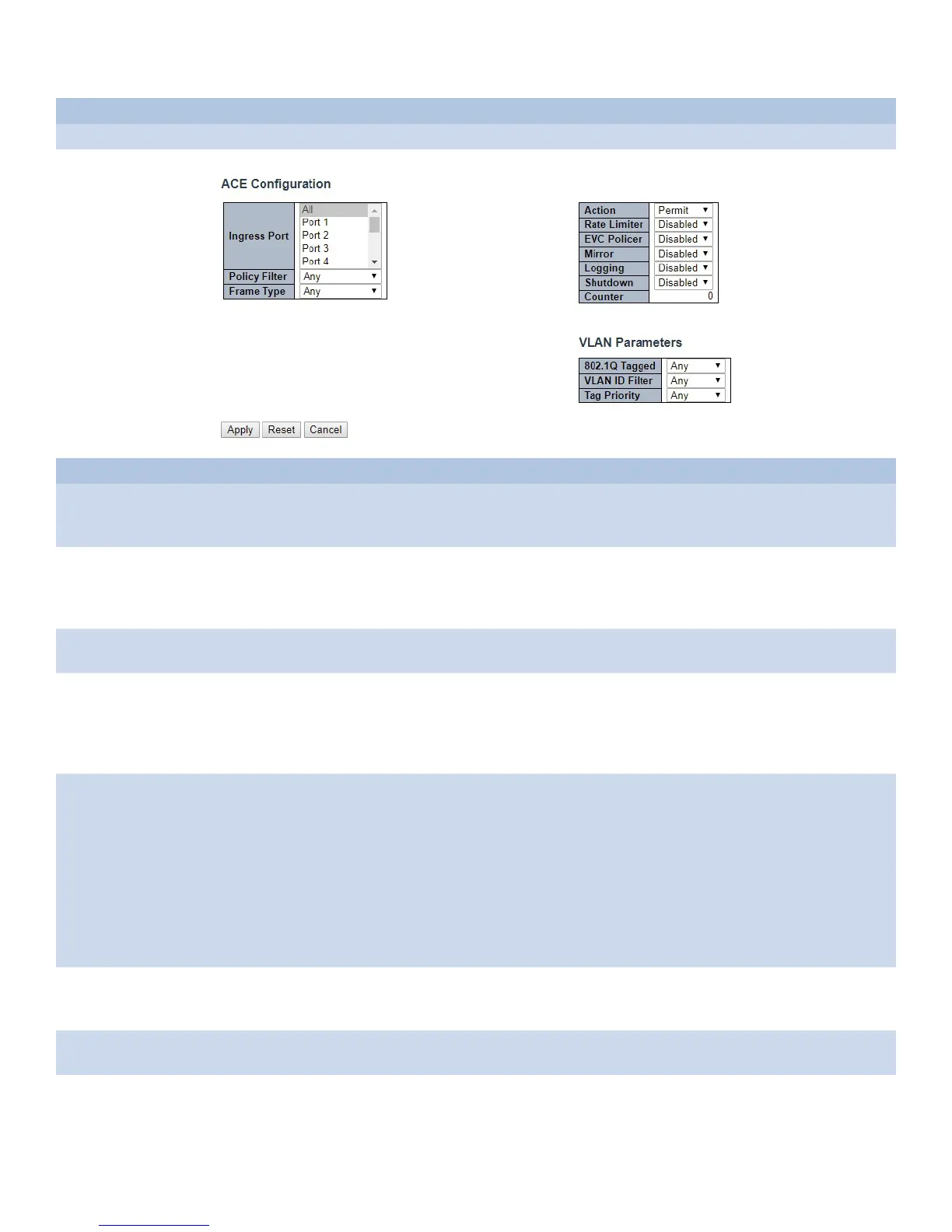
Ingress Port Select the ingress port for which this ACE applies.
All: The ACE applies to all port.
Port n: The ACE applies to this port number, where n is the number of the switch port.
Policy Filter Specify the policy number filter for this ACE.
Any: No policy filter is specified. (policy filter status is “don’t-care”.)
Specific: If you want to filter a specific policy with this ACE, choose this value. Two field for entering a
policy value and bitmask appears.
Policy Value When “Specific” is selected for the policy filter, you can enter a specific policy value. The allowed
range is 0 to 255.
Policy Bitmask When “Specific” is selected for the policy filter, you can enter a specific policy bitmask. The allowed
range is 0x0 to 0xff. Notice the usage of bitmask, if the binary bit value is “0”, it means this bit is
“don’t-care”. The real matched pattern is [policy_value & policy_bitmask]. For example, if the policy
value is 3 and the policy bitmask is 0x10(bit 0 is “don’t-care” bit), then policy 2 and 3 are applied to
this rule.
Frame Type Select the frame type for this ACE. These frame types are mutually exclusive.
Any: Any frame can match this ACE.
Ethernet Type: Only Ethernet Type frames can match this ACE. The IEEE 802.3 describes the value
of Length/Type Field specifications to be greater than or equal to 1536 decimal (equal to 0600
hexadecimal).
ARP: Only ARP frames can match this ACE. Notice the ARP frames won’t match the ACE with Ethernet
type.
IPv4: Only IPv4 frames can match this ACE. Notice the IPv4 frames won’t match the ACE with Ethernet
type. IPv6: Only IPv6 frames can match this ACE. Notice the IPv6 frames won’t match the ACE with
Ethernet type.
Action Specify the action to take with a frame that hits this ACE.
Permit: The frame that hits this ACE is granted permission for the ACE operation.
Deny: The frame that hits this ACE is dropped. Filter: Frames matching the ACE are filtered.
Rate Limiter Specify the rate limiter in number of base units. The allowed range is 1 to 16. Disabled indicates that
the rate limiter operation is disabled.
EVC Policer Select whether EVC policer is enabled or disabled. The default value is "Disabled". Note that the ACL
rate limiter and EVC policer can not both be enabled.



 To Next Page