11-4 Increasing RAM
Writer: Karen Williams Saved by: Cheryl Love Saved date: 09/03/97 9:47 AM
Part Number: 220709-003 File name: Ch11.doc
Removing a Memory Expansion Board
This section tells how to remove a memory expansion board from
a memory expansion slot.
If you are not replacing an installed memory expansion
board, refer to the following section, “Inserting a Memory
Expansion Board.”
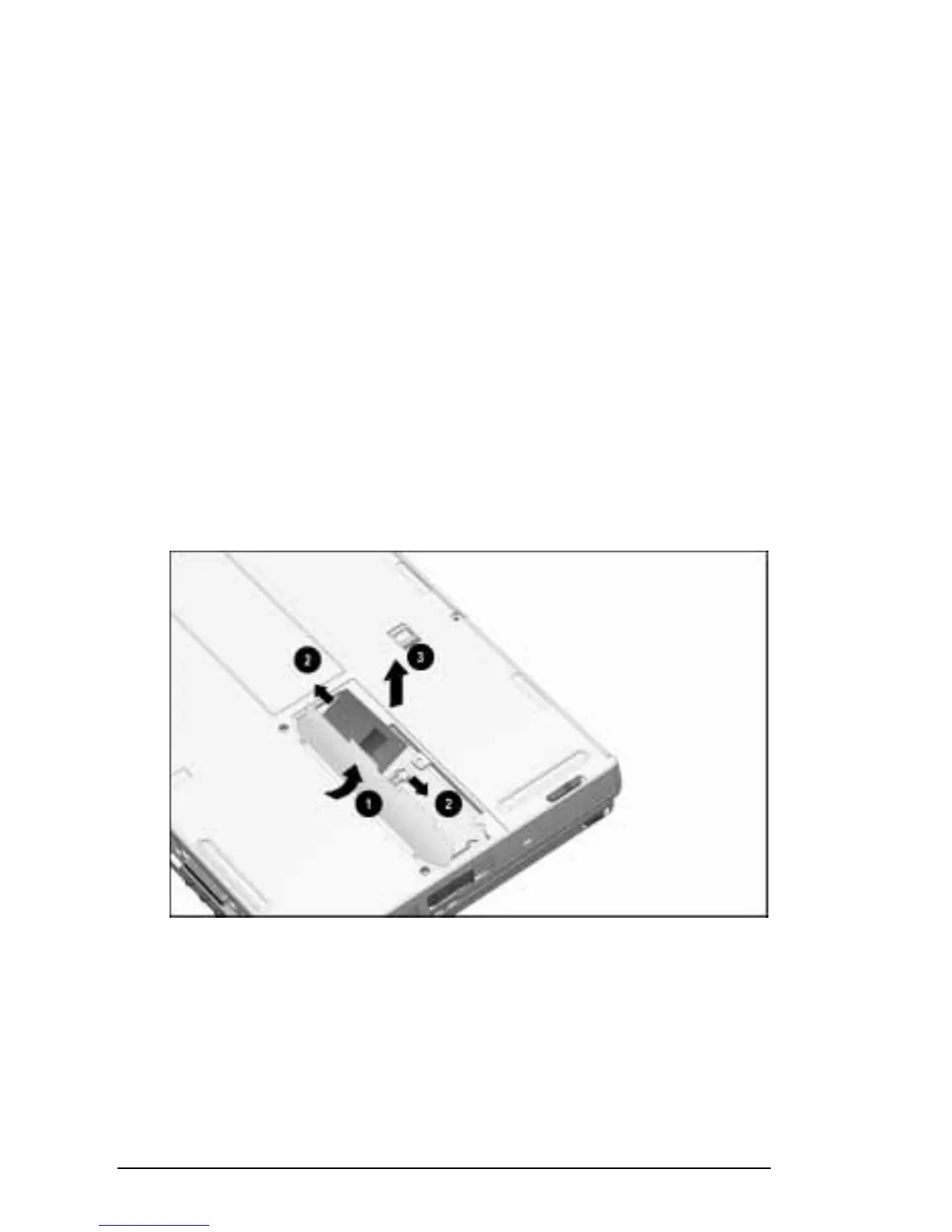
To remove an installed memory expansion board:
1. Lift and hold back the memory insulator
1
.
2. Pull away the plastic retention clips on each side of the
memory expansion board to release it
2
. The memory
expansion board tilts toward you.
3. Lift the edge of the memory expansion board and slide
it gently out of the memory expansion slot at a
45-degree angle
3.
4. Place the removed memory expansion board in an
electrostatic-safe container.
Releasing and Removing an Installed Memory Expansion Board











 To Next Page