5-10 Using Battery Packs
Writer: Karen S. Williams Saved by: Cheryl Love Saved date: 09/05/97 2:33 PM
Part Number: 220709-003 File name: Ch05.doc
Replacing a Discharged Battery Pack
In most circumstances, you can remove and insert battery packs in
the computer battery bay or the computer MultiBay while the
computer is on, off, in Suspend, or in Hibernation.
However, if the computer is on and you are replacing the battery
pack that is running the computer, you must initiate Suspend
before removing the battery pack. You can then exit Suspend after
inserting a charged battery pack and your work will return to the
screen.
!
WARNING:
To reduce the risk of injury or damage to the battery
pack, do not crush, puncture, or incinerate the battery pack or short
the metal contacts. Do not attempt to open or service the battery
pack.
Removing a Battery Pack from the Battery Bay
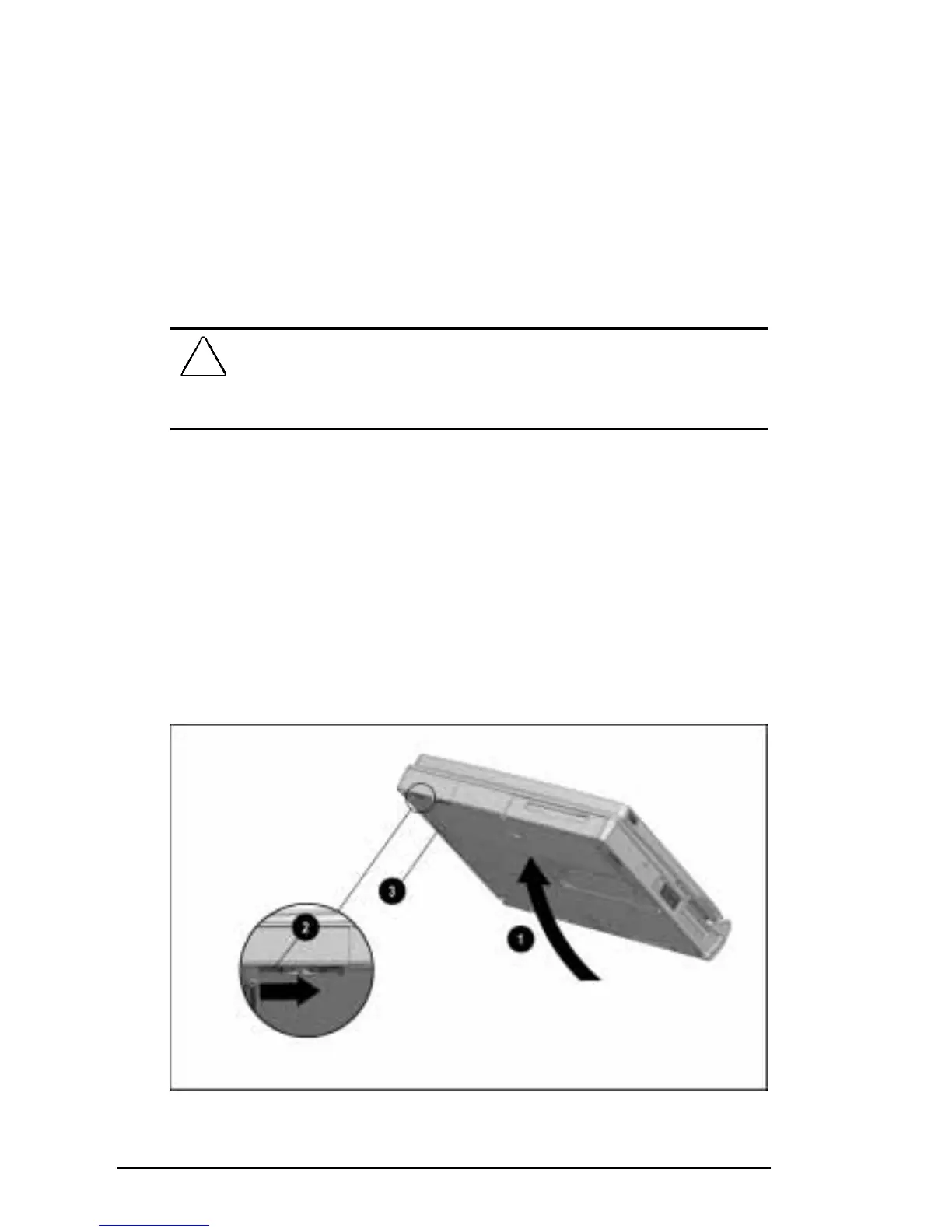
To remove a battery pack from the computer battery bay:
1. If the computer is on and you want to return your work to the
screen after replacing the battery pack that is running the
computer, press the suspend button.
2. Tilt the computer
1
to access the battery release features.
3. Slide the battery release latch
2
right while pulling on the
battery pack from the recess
3 beneath the battery bay.
Releasing a Battery Pack from the Battery Bay











 To Next Page