9
1.6 System Indicators
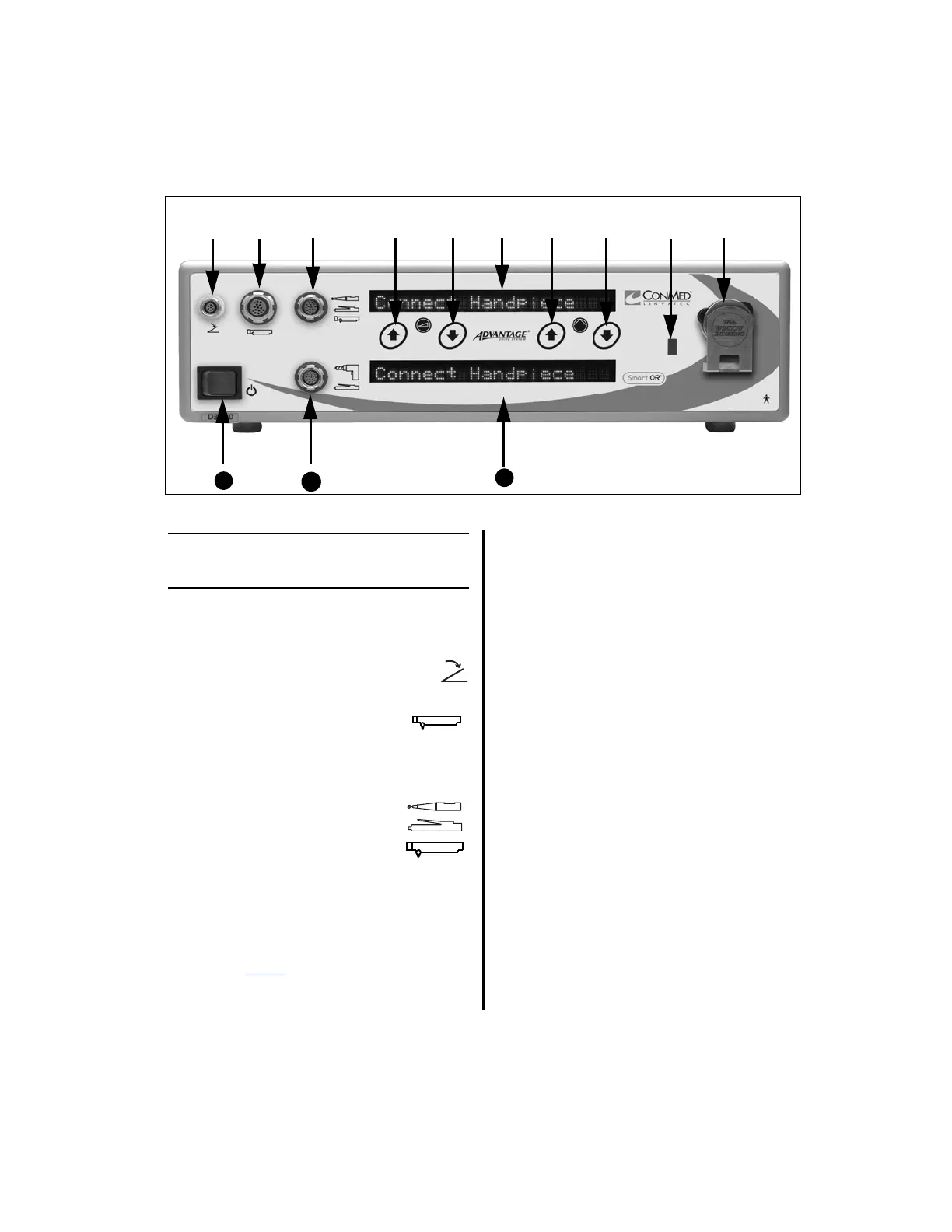
1.6.1 Advantage Controller Front
Panel (Top Portion)
1. Footswitch Receptacle — Accepts
the footswitch cord connector.
2. APEX Handpiece Receptacle
(Port 1) — Directly accepts the
handpiece cord connector of any APEX
handpiece (C9820, C9824, C9828, C9840).
3. Handpiece Receptacle (Port 2)
Directly accepts the handpiece
cord connector of the following
handpieces; all Group 1
Handpieces (E9005, E9015, and CoolFlex);
all Group 2 Handpieces (5020-021, -022,
-023, -024, -025, -026, -027); most Group 3
Handpieces (D9820, D9920, MC9820,
D9824, D9924, MC9828, and MC9840);
and the Power
Pro PRO2300E and
PRO6125 Oscillator Saws, PRO6100
Electric II Modular Handpiece, and
PRO6135 Reciprocator Saw. However,
with the addition of a handpiece
adapter - the APEX Adapter (E9320) or the
Mini-Driver Adapter (K501) - this
receptacle will also accept and operate the
following shaver handpieces (C9820,
C9824, C9828, C9840) or the Mini-Driver
Handpiece (K500).
NOTES:
• All cord receptacles and connectors are
keyed to prevent incorrect insertion.
Likewise, receptacles and connectors are
color-coded to easily recognize where to
connect each cord (footswitch receptacle
and connector - yellow, handpiece
receptacles and connectors - red or grey).
• Only one handpiece can be connected at
a time in either port of the top section. If
a handpiece is connected while another
handpiece is already connected,
“CHECK HANDPIECE” will display.
BOTH handpieces must be removed to
clear the fault condition.
PORT 1 PORT 2
PORT 3
❹❶❷ ❸ ❻ ❼ ❽ ❾ ❿❺
11
12
13















 To Next Page