RS20iInstallationandOperatingGuide
Page 96
RS20i Installation & Operating Guide Document # 9301H52900 Ver. 1.02
Setup > System > More > Monitor
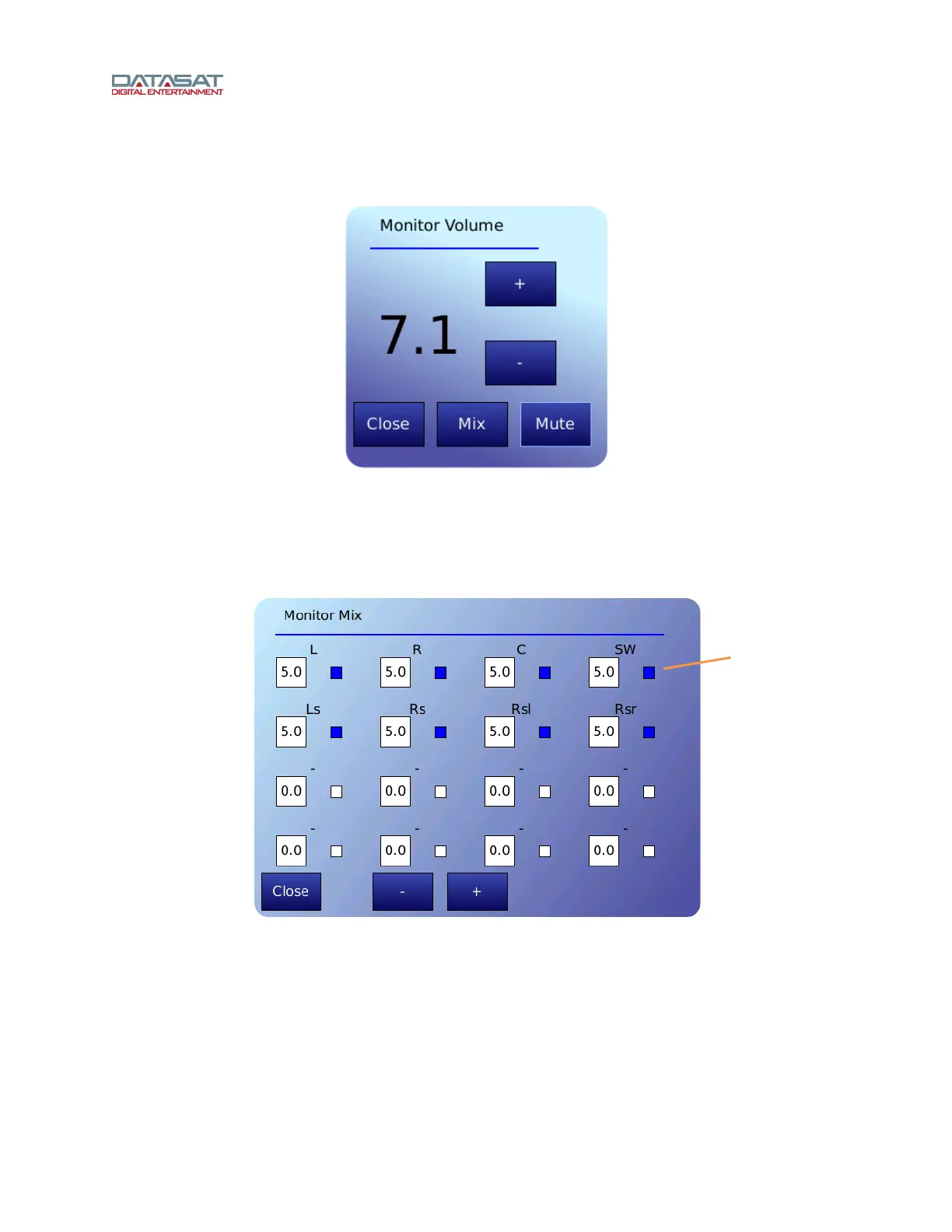
Touching the Close button will close this screen. The Monitor Volume window will close automatically if
not used within 30 seconds.
Figure 62. Monitor Volume
Touch the + or – buttons to raise or lower the volume.
Touch the Mute button to mute/unmute the external monitor.
Touch the Mix button to select a channel and adjust the volume from 0 to 10. See Figure 63,
belo
w.
Figure 63. Monitor Mix
Channel enable: Touch the small button next to a channel to select it for monitoring.
Channel volume: Select channel(s), then touch the + or – button to adjust volume from 0 to
10.
Touch Close to close the Mix window. It also will close automatically after 30 seconds of inactivity.
Touch the small
button to select a
channel for
monitoring



 To Next Page