Appendix B Accessories|
Revision Jan. 2009, 06EE, SW--PW V1.12/CTL V2.12 B-23
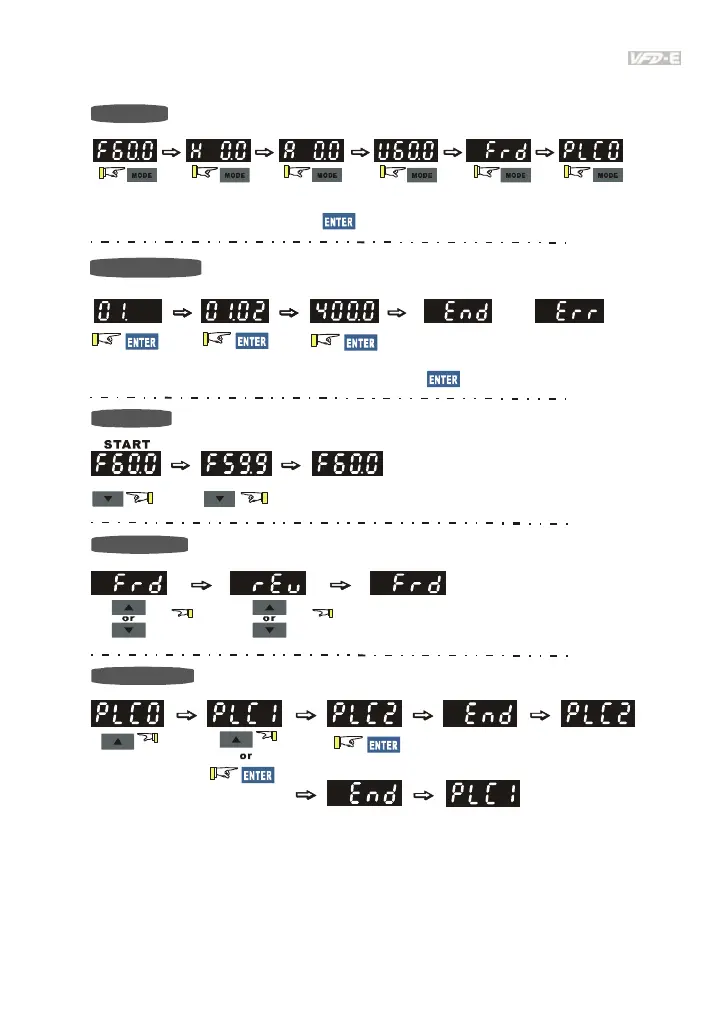
B.8.2 How to Operate the Digital Keypad
To s hif t d ata
Setting direction
Setting PLC Mode
Setting Mode
Setting parameters
(When operation source is digital keypad)
enter PLC2 mode
enter PLC1 mode
START
GO START
NOTE:
In the selection mode, press
to set the parameters.
Success to
set parameter.
Input data error
or
NOTE
:
In the parameter setting mode, you can press
to return the selecting mode.



 To Next Page