ineo+ 650/550/451 3-69
Print Operations
3
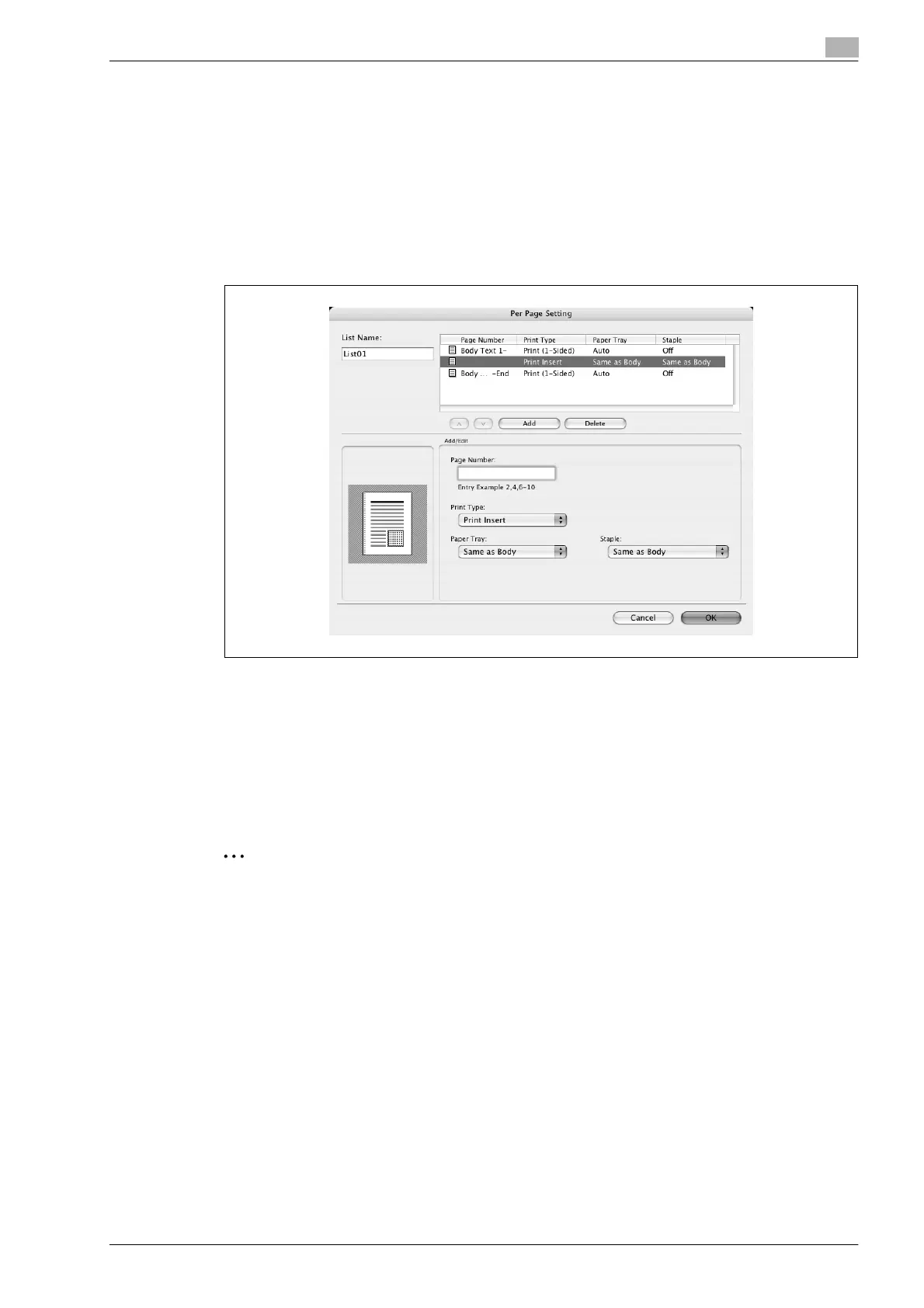
Adding and editing the settings in per page setting
1 Select the "Per Page Setting" check box.
2 Click the [Add] button to add a new setting to the list.
To edit the list, select the desired name in the list, and then click the [Edit] button.
The Per Page Settings dialog box for specifying the print settings appears.
3 Click the [Add] button to add the setting to the list.
A new row for specifying the settings is added to the settings list.
4 Select the row that was added to the list, and then specify the print settings in "Add/Edit".
– Page Number: Enters the page number. When entering multiple page numbers, separate the page
numbers with commas such as "2, 4, 6" or enter a page range using a hyphen such as "6-10".
– Print Type: Specifies Print Insert, Insert Blank Sheet, Print (1-Sided), and Print (2-Sided).
– Paper Tray: Specifies the paper tray.
– Staple: Specifies the number of staples and the stapling position.
5 Click the [OK] button.
2
Note
To change existing print settings, select the desired row and change the settings. To delete existing
print settings, select the desired row, and then click the [Delete] button.
Click the [+] button or the [,] button to change the page number starting with the smallest page
number.
The name of the list can be changed in the "List Name:" text box.









 To Next Page