Page 47 of 112
DMM-0200 Product User Guide
159 Swanson Road
Boxborough, MA 01719
Tel: 508-475-3400
Email: sales@dovermotion.com
Status Screen (A)
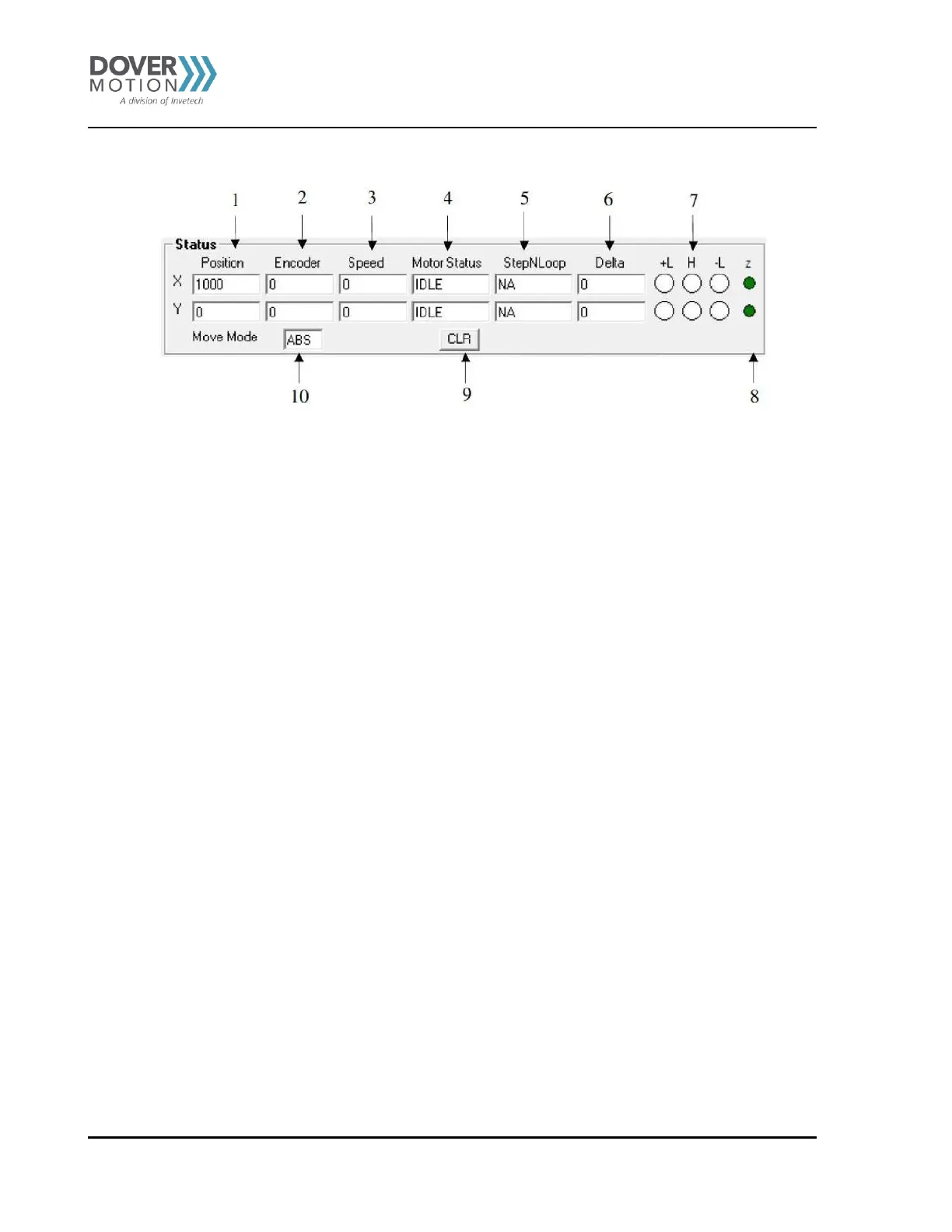
Figure 15 Status Screen (A)
1. Current pulse position (X/Y axis).
2. Current encoder position (X/Y axis).
3. Current speed (X/Y axis).
4. Motor status (X/Y axis).
i. IDLE – Motor is not moving.
ii. ACCEL – Motor is accelerating.
iii. CONST – Motor is moving at constant speed.
iv. DECEL – Motor is decelerating
5. StepNLoop value (X/Y axis).
i. NA – StepNLoop is disabled.
ii. IDLE – Motor is not moving.
iii. MOVING – Motor is moving.
iv. CORRECTING – Motor is attempting to correct its position.
v. STOPPING – Motor is stopping using deceleration.
vi. ABORTING – Motor is stopping without deceleration.
vii. JOGGING – Motor is jogging.
viii. HOMING – Motor is homing using the home switch.
ix. L-HOMING - Motor is homing using the limit switch.
x. Z-HOMING – Motor is homing using the Z-index
xi. ERR-RANGE – The error range has been exceeded.
xii. ERR-ATMPT – The maximum number of attempts has been made to correct the position.
xiii. ERR-STALL – The motor has stalled.
xiv. ERR-LIM – A limit switch has been hit.
6. StepNLoop delta value (X/Y axis).
7. –Limit, +Limit, Home input status (X/Y axis).
8. Z encoder index channel status (X/Y axis)
9. Clear status button and StepNLoop status(X/Y axis).
10. Move mode.
i. ABS mode: On individual and interpolated move commands, motor will move to target position.
ii. INC mode: On individual and interpolated move commands, motor will increase its position by the target
position amount.



 To Next Page