Page 51 of 112
DMM-0200 Product User Guide
159 Swanson Road
Boxborough, MA 01719
Tel: 508-475-3400
Email: sales@dovermotion.com
2. Boot Up
a. DO Boot/EO Boot - Set the digital and enable output configuration on boot up
b. Auto Run - Have the specified standalone program run on boot up.
3. Homing Parameters
a. LCA - Set the limit correction amount for the specified axis
b. HCA - Set the home correction amount for the specified axis
c. Return to Zero - Return to zero after a homing routine.
4. Joystick Parameters (X/Y axis). See joystick section for further details.
5. StepNLoop Parameters (X/Y axis). See StepNLoop section for further details.
6. Device Name – Set the name of the device. Must be in the range of 2EX00 to 2EX99.
7. M is c
a. Ignore Error - Set the IERR register to ignore the limit error status
b. Enable Decel - Set the EDEC register to enable unique deceleration
8. STORE - Permanently store the downloaded parameters to flash memory.
9. Download/Upload - Download the current settings to the unit or upload the current settings from the unit.
10. Upload/Download parameters to and from RAM
11. Open/Save parameters to file.
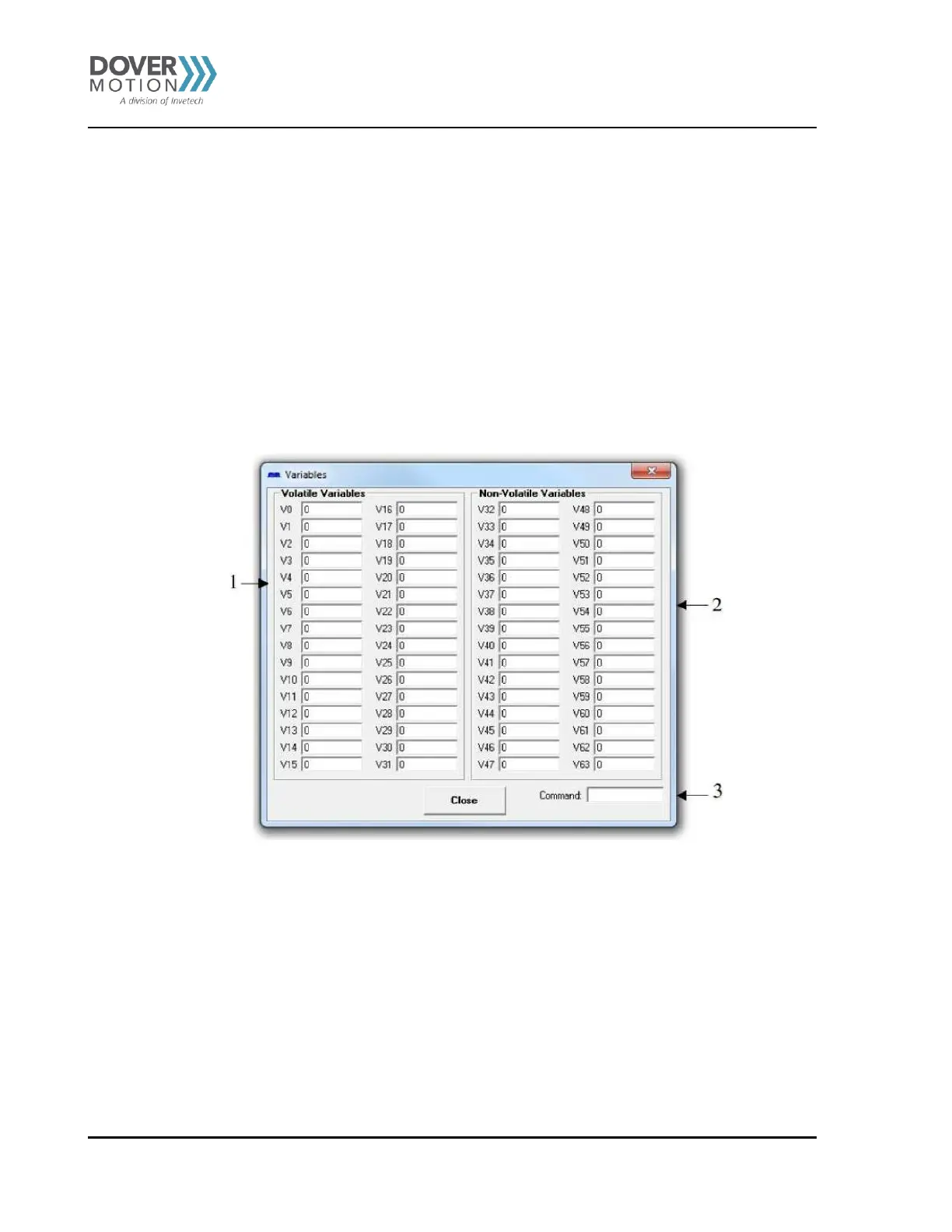
Figure 24 Variables (J)
1. Current values of variables that cannot be stored to flash.
2. Current values of variables that can be stored to flash.
3. Send commands to the PMX-2EX-SA through this terminal.



 To Next Page