Page 91 of 112
DMM-0200 Product User Guide
159 Swanson Road
Boxborough, MA 01719
Tel: 508-475-3400
Email: sales@dovermotion.com
Motion Control Overview and Interactive Command Description
All the commands described in this section are interactive commands and are not analogous to stand-alone
commands. Refer to the “Standalone Language Specification” section for details regarding stand-alone commands.
Motion Profile
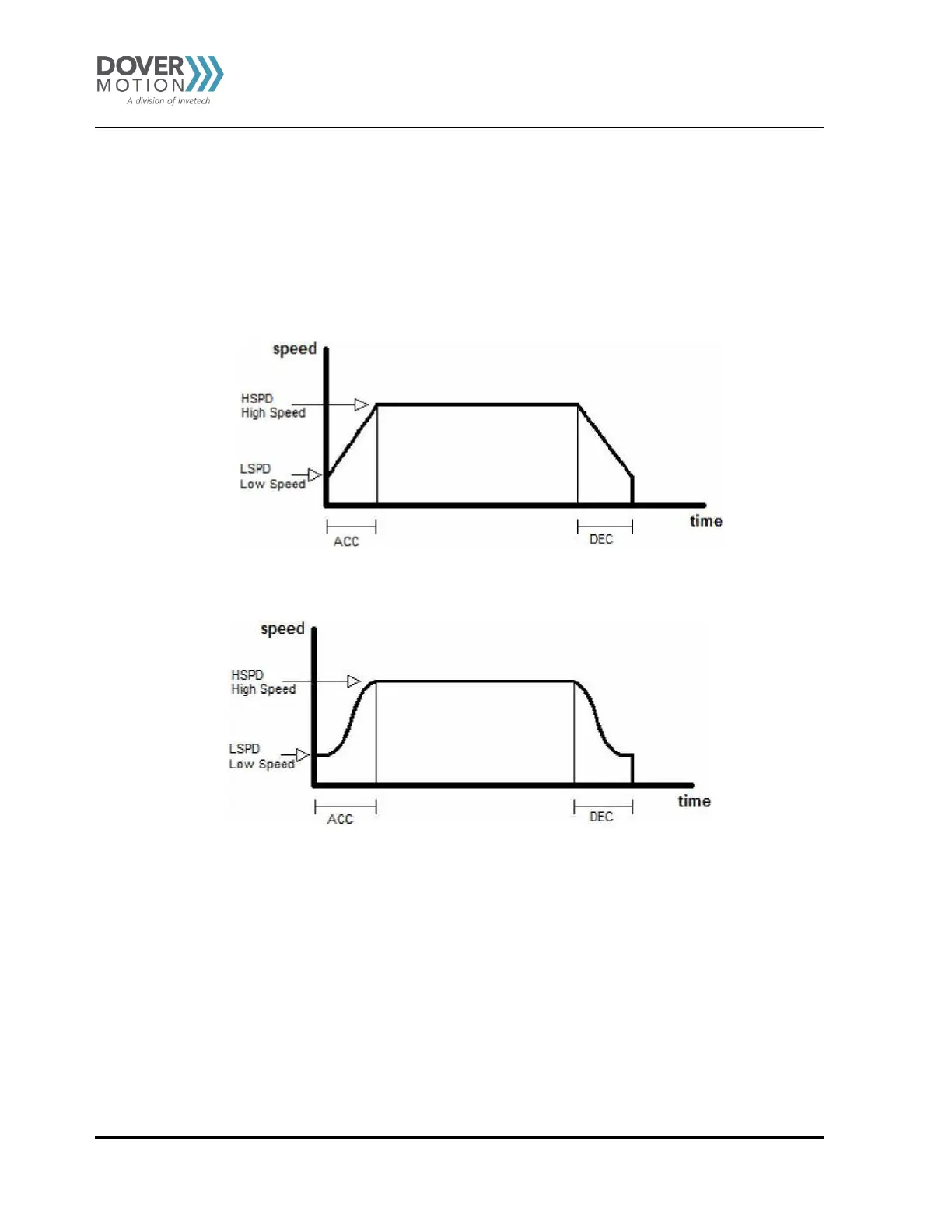
By default, the PMX-2EX-SA uses trapezoidal velocity profile. See
Figure 33.
Figure 33 Trapezoidal Velocity Profile
S-curve velocity profile can also be achieved by using the SCV[axis] command. See Figure 34.
Figure 34 S-Curve Velocity Profile
High speed and low speed are in pps (pulses/second). Use HS[axis] and LS[axis] to set/get individual high
speed and low speed settings. To set/get the global high speed and low speed values use the HS
and LS commands.
Acceleration and deceleration time are in milliseconds and are symmetrical. Use the ACC[axis] command to set/get
individual acceleration/deceleration values. To set/get the global acceleration value, use the ACC command.
Note: By default, moves by a single axis use global speed settings, unless individual high
speed, low speed and acceleration values for that axis are non-zero.



 To Next Page