Operating concept
Operating concept of the ventilator
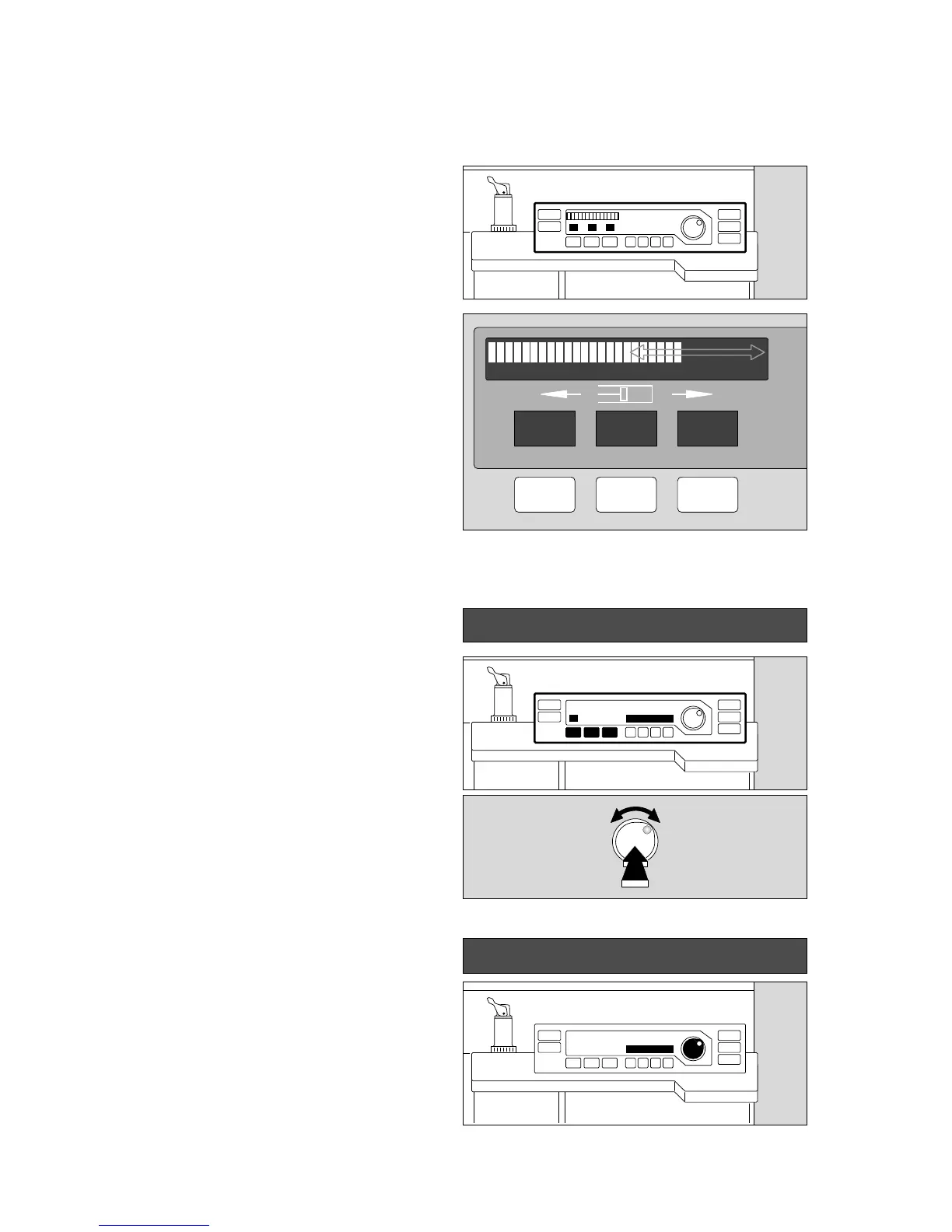
Display window without and with dialogue function
12
Display window without dialogue function
Top left:
Continuous indication of the relative piston movement
(in % referred to the set stroke volume VT)
The set operating parameters correspond with the keys
below:
– Indication of the maximum pressure Pmax in mbar.
– Indication of the tidal volume VT in mL or L.
– Indication of the ventilation frequency fIPPV in breaths
per minute.
Display window with dialogue function
(in combination with the rotary control)
Example: adjusting the maximum pressure
In the black field, beside the rotary control:
1 The set value appears on the right and left-hand sides
of the field when a parameter key (Pmax, VT, fIPPV) is
pressed. Here: »23«.
2 The value on the right-hand side is changed by turning
the rotary control. Here: »28«.
The old and new values are consequently always
displayed together.
3 The value on the right («28«) is confirmed as the
definitive value by pressing the control.
If the rotary control is not pressed and not turned again,
the machine is reset after 10 seconds without changing
the setting.
● This dialogue window also displays advisory messages
(see page 78) –
Example: »Paed. hoses !«:
23 Pmax / mbar 28
Paed. hoses !
2
3
1
0% 100%
Pmax
23
VT
600
fIPPV
12
mbar ml/L 1/min
0072897000828970009289700102897001128970












 To Next Page