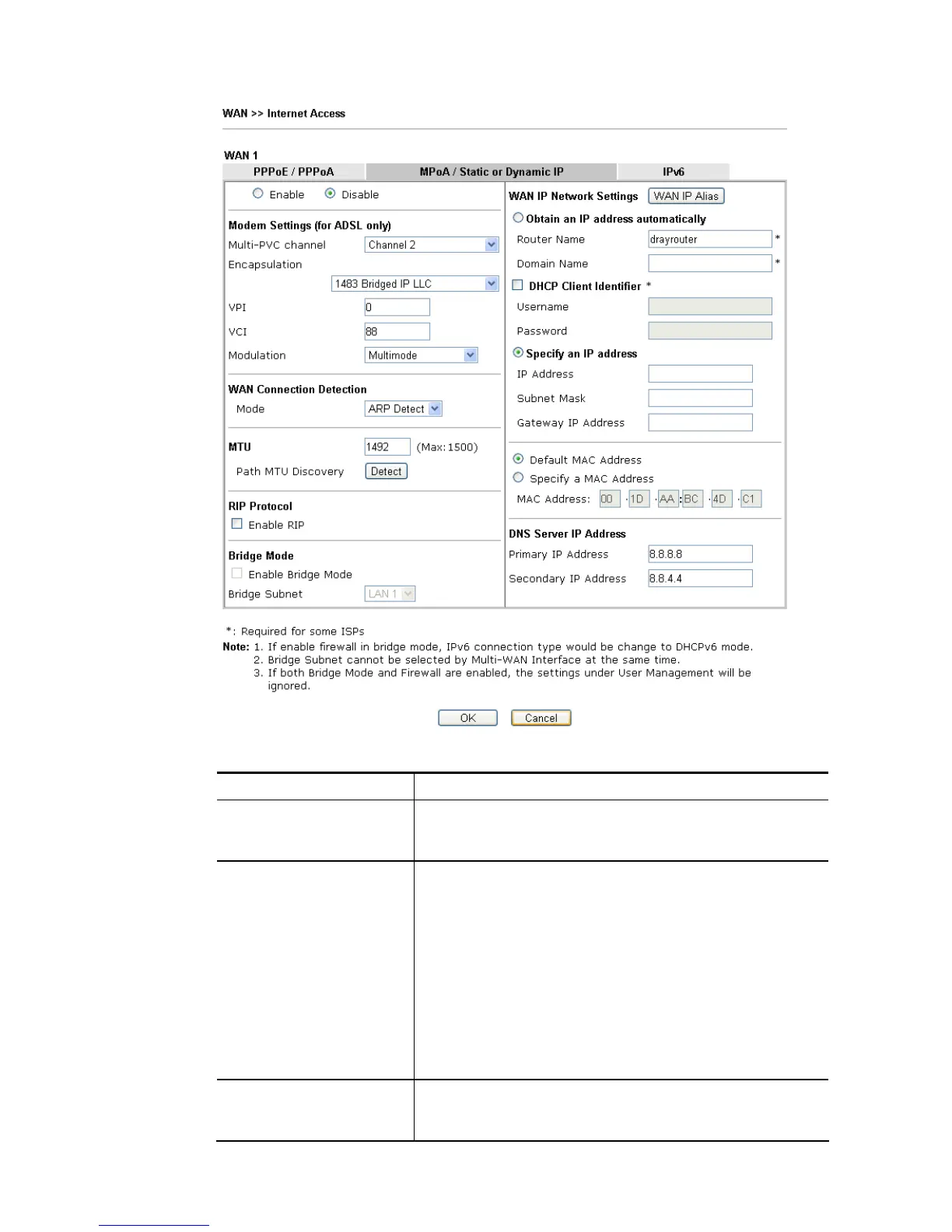
Available settings are explained as follows:
Item Description
Enable/Disable Click Enable for activating this function. If you click Disable,
this function will be closed and all the settings that you
adjusted in this page will be invalid.
Modem Settings (for ADSL
only)
Set up the DSL parameters required by your ISP. These
settings configured here are specified for ADSL only.
Multi-PVC channel - The selections displayed here are
determined by the page of Internet Access >>Multi PVCs.
Select M-PVCs Channel means no selection will be chosen.
Encapsulating - Drop down the list to choose the type
provided by ISP.
VPI - Type in the value provided by ISP.
VCI - Type in the value provided by ISP.
Modulation –Default setting is Multimode. Choose the one
that fits the requirement of your router.
WAN Connection
Detection
Such function allows you to verify whether network
connection is alive or not through ARP Detect or Ping Detect.














 To Next Page