W
W
e
e
b
b
U
U
s
s
e
e
r
r
I
I
n
n
t
t
e
e
r
r
f
f
a
a
c
c
e
e
I
I
V
V
-
-
1
1
-
-
1
1
V
V
o
o
I
I
P
P
W
W
i
i
z
z
a
a
r
r
d
d
Vigor router offers a quick method to configure settings for VoIP application. Follow the steps
listed below.
Info
This wizard is available for “V” model only.
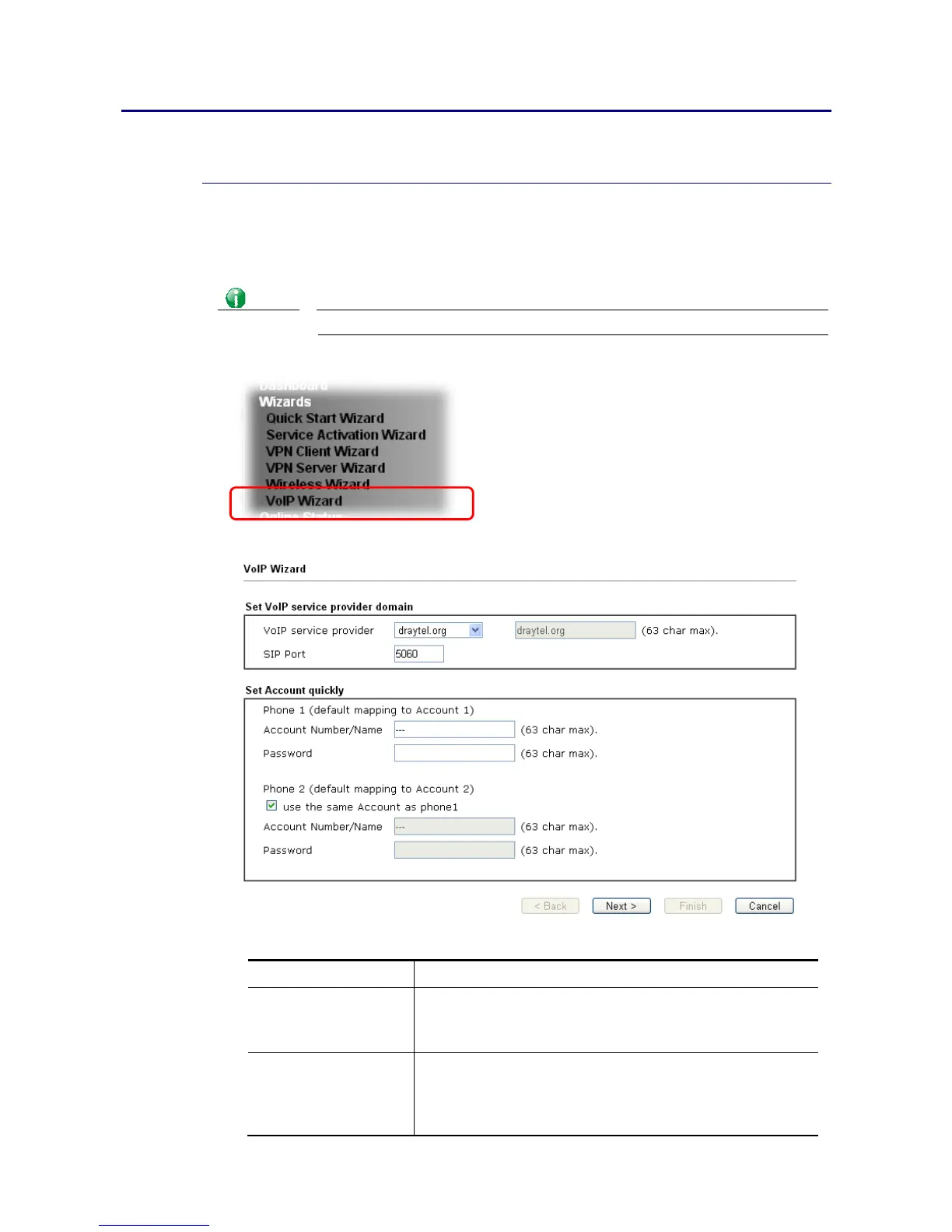
1. Open Wizards>>VoIP Wizard.
2. The screen of VoIP Wizard will be shown as follows.
Available settings are explained as follows:
Item Description
Set VoIP service
provider domain
VoIP service provider - Use the drop down list to choose
the ISP which offers the VoIP service for your router.
SIP Port – Use the default setting (5060).
Set Account quickly Account Number/Name – Type the account number/name
registered to your ISP.
Password – Type the password for the account registered to
your ISP.














 To Next Page