I
I
I
I
-
-
1
1
-
-
1
1
-
-
1
1
W
W
A
A
N
N
1
1
(
(
A
A
D
D
S
S
L
L
/
/
V
V
D
D
S
S
L
L
2
2
)
)
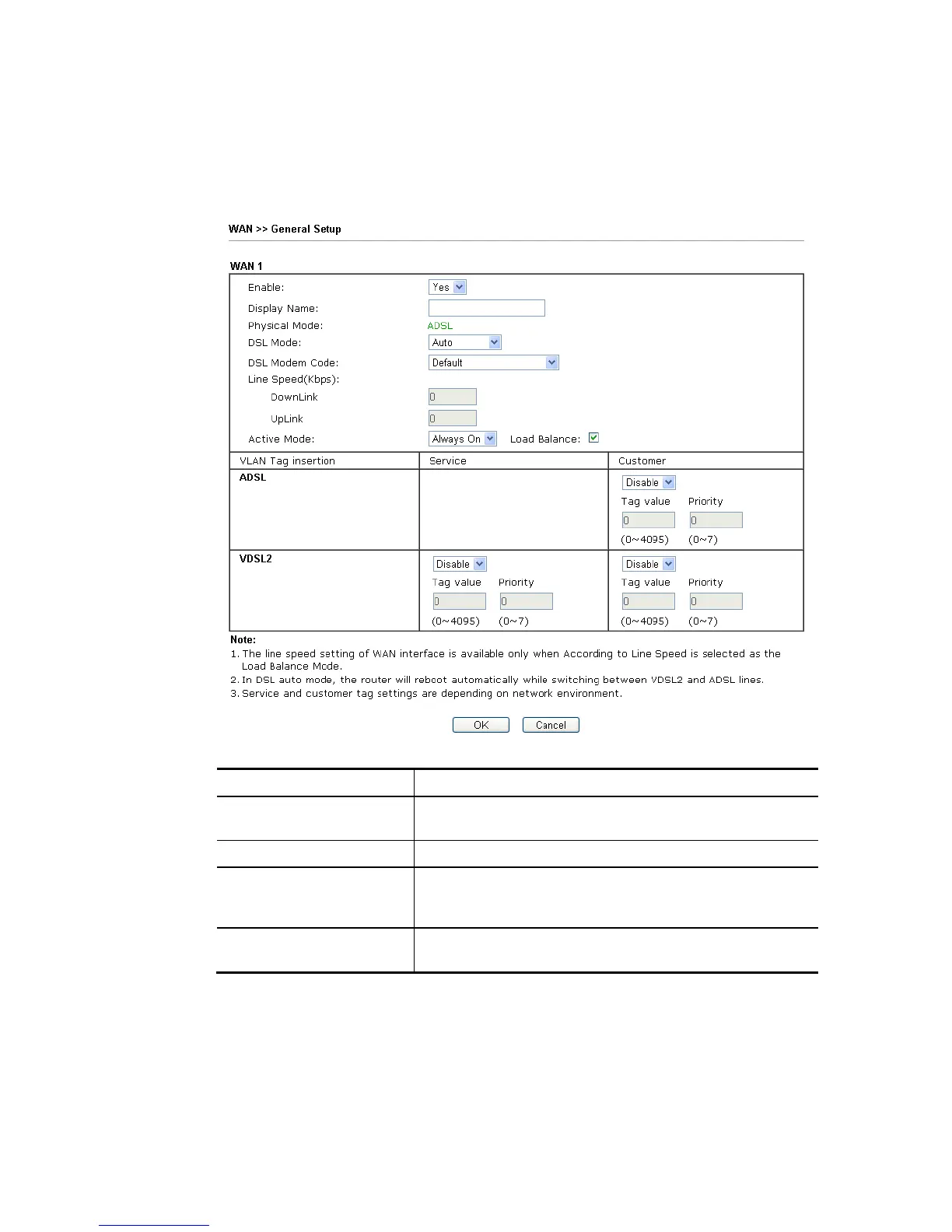
Vigor router will detect the physical line is connected by ADSL or VDSL2 automatically.
Therefore, this page allows you to configure settings for ADSL and VDSL2 at one time. That is,
it is not necessary for you to configure different profile settings for ADSL and VDSL2
respectively.
Available settings are explained as follows:
Item Description
Enable Choose Yes to invoke the settings for this WAN interface.
Choose No to disable the settings for this WAN interface.
Display Name Type the description for such interface.
Physical Mode Display the physical mode of such interface. If VDSL2 is
detected, this field will display “VDSL2”; if ADSL is
detected, it will display “ADSL”.
DSL Mode Specify the physical mode (VDSL or ADSL) for such router
manually.














 To Next Page