Protocol Use the drop down list to choose the protocol that you want
to ping through.
Host/IP Address It indicates the IP address of the host.
Trace Host/IP Address It indicates the IPv6 address of the host.
Run Click this button to start route tracing work.
Clear Click this link to remove the result on the window.
I
I
X
X
-
-
1
1
-
-
1
1
3
3
S
S
y
y
s
s
l
l
o
o
g
g
E
E
x
x
p
p
l
l
o
o
r
r
e
e
r
r
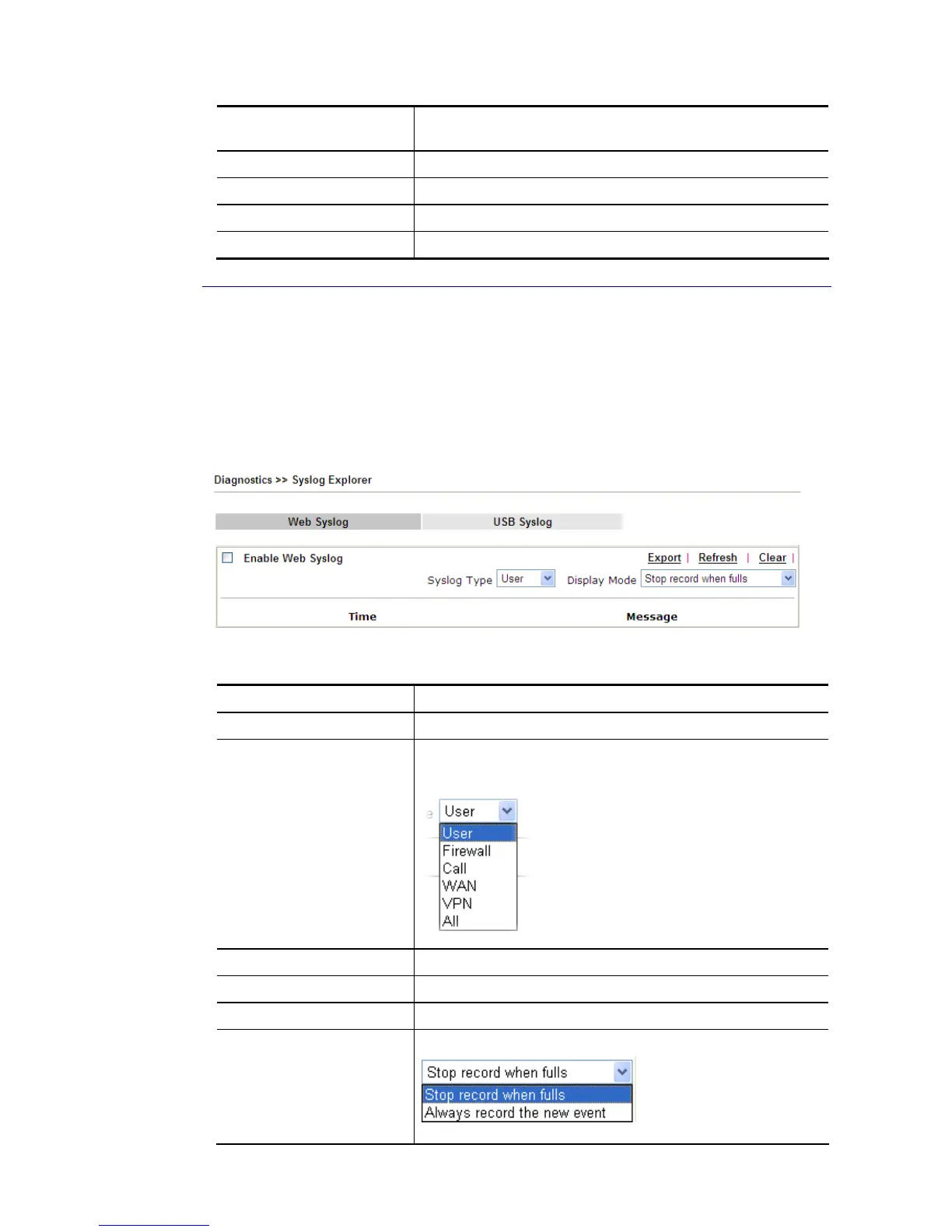
Such page provides real-time syslog and displays the information on the screen.
F
F
o
o
r
r
W
W
e
e
b
b
S
S
y
y
s
s
l
l
o
o
g
g
This page displays the time and message for User/Firewall/call/WAN/VPN settings. You can
check Enable Web Syslog, specify the type of Syslog and choose the display mode you want.
Later, the event of Syslog with specified type will be shown for your reference.
Available settings are explained as follows:
Item Description
Enable Web Syslog Check this box to enable the function of Web Syslog.
Syslog Type Use the drop down list to specify a type of Syslog to be
displayed.
Export Click this link to save the data as a file.
Refresh Click this link to refresh this page manually.
Clear Click this link to clear information on this page.
Display Mode There are two modes for you to choose.
Stop record when fulls – when the capacity of syslog is full,














 To Next Page