Such method is suitable for a user which has multiple ISP
accounts. With such method;
All WANs of secondary routers can be up. Therefore,
the user can route its traffic to secondary.
WAN settings of primary and secondary routers must
not be the same.
The Config Sync must be disabled, or you cannot change
redundancy method to active-standby.
I
I
I
I
-
-
4
4
-
-
1
1
2
2
-
-
1
1
G
G
e
e
n
n
e
e
r
r
a
a
l
l
S
S
e
e
t
t
u
u
p
p
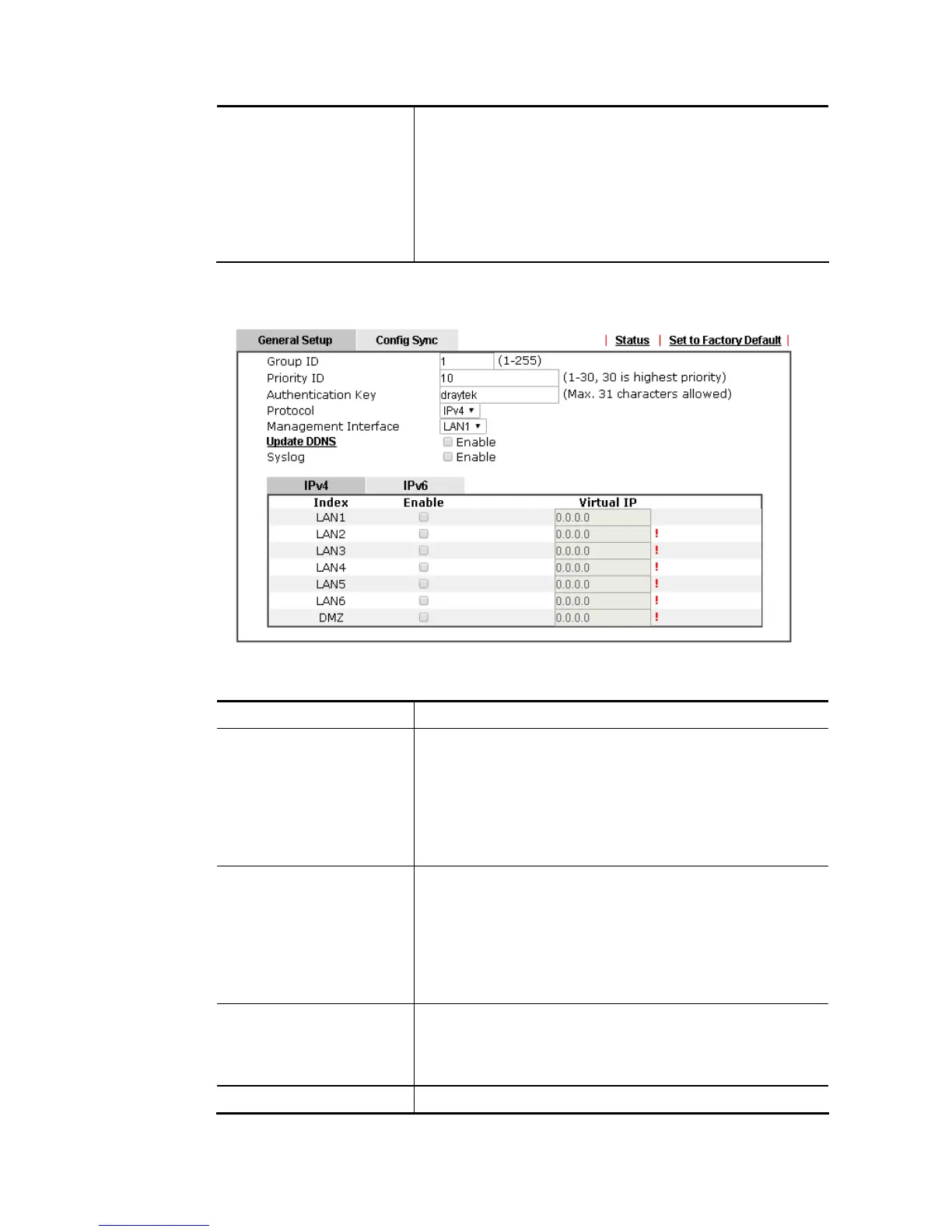
Available settings are explained as follows:
Item Description
Group ID Type a value (1~255).
In LAN environment, multiple routers can be devided into
several groups. Each router must be specified with one group
ID. Different routers with the same ID value will be
categoried into the same group.
Only one of the routers in the same group will be selected as
the primary router.
Priority ID Type a value (1~30).
Different routers must be configured with different IDs.
The router with the highest priority will be treated as
primary router. If multiple routers have the same priority,
the router with lower “IP” will be treated as primary. “IP” is
the IP address configured on LAN >> General Setup page, in
which LAN is determined by management interface.
Authentication Key Type a string as the authentication key (maximum 31
characters allowed).
It is used for encrypting the DARP to prevent malicious
attack.
Protocol Choose IPv4 or IPv6.














 To Next Page