I
I
I
I
-
-
1
1
-
-
3
3
M
M
u
u
l
l
t
t
i
i
-
-
P
P
V
V
C
C
/
/
V
V
L
L
A
A
N
N
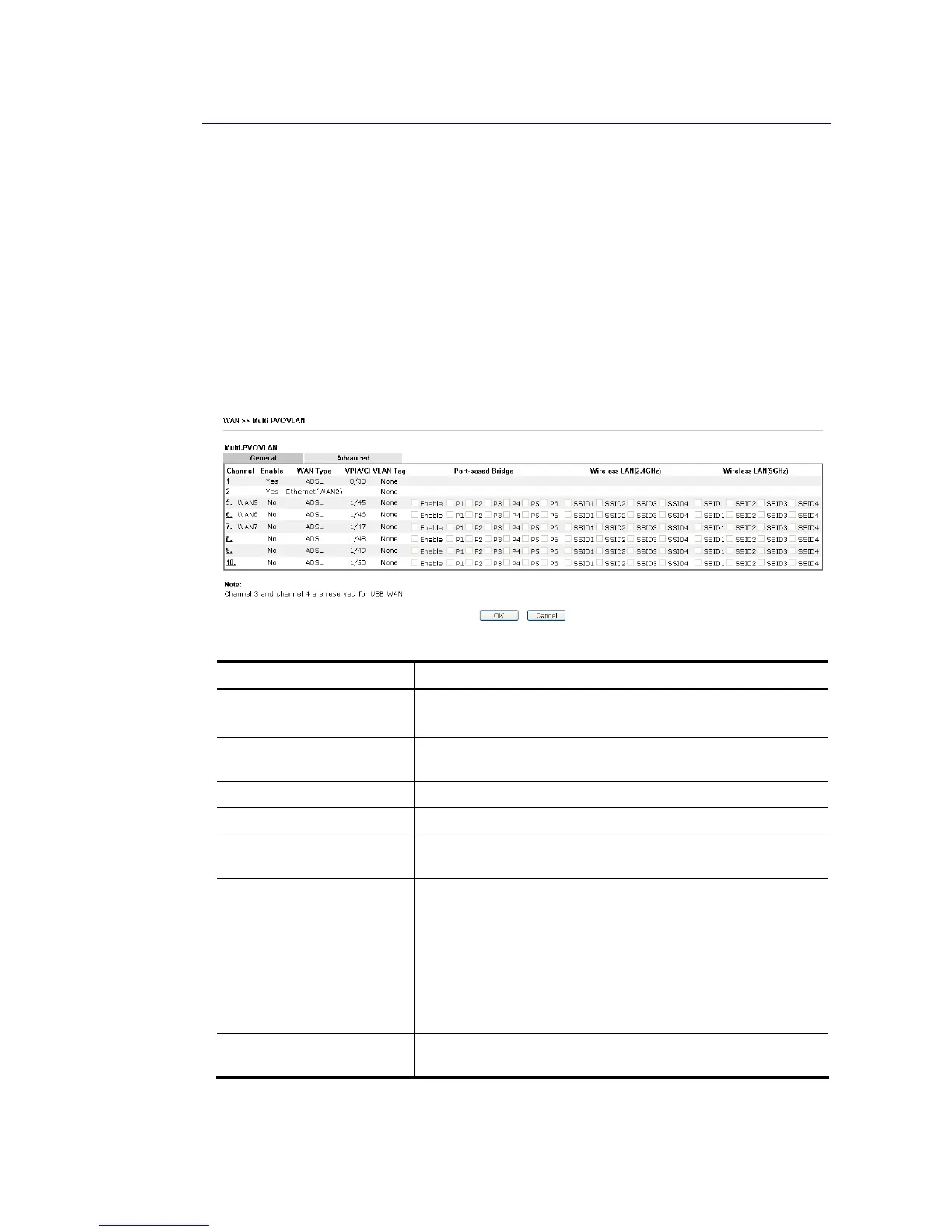
Multi-PVC/VLAN lets you configure multiple permanent virtual circuits (PVCs) and ATM QoS
for channels using ADSL.
Channel 1 to 4 have the following fixed assignments and cannot be altered.
Channel 1: ADSL/VDSL on WAN1.
Channel 2: Ethernet on WAN2.
Channel 3 and 4: USB1 (WAN3) and USB2 (WAN4), respectively.
Channels 5 through 10 can be bridged to one or more of the 5 LAN ports P2 through P6. In
addition, Channels 5 through 7 can be configured as virtual WANs (WAN5 through WAN7).
G
G
e
e
n
n
e
e
r
r
a
a
l
l
Available settings are explained as follows:
Item Description
Channel Display the number of each channel.
Channels 5 ~ 10 are configurable.
Enable Display whether the settings in this channel are enabled
(Yes) or not (No).
WAN Type Displays the physical medium that the channel will use.
VPI/VCI Display the value for VPI and VCI.
VLAN Tag Displays the VLAN tag value that will be used for the packets
traveling on this channel.
Port-based Bridge The network traffic flowing on each channel will be
identified by the system via their VLAN Tags. Channels using
the same WAN type may not configure the same VLAN tag
value.
Enable - Check this box to enable the port-based bridge
function on this channel.
P1 ~ P6 – Check the box(es) to build bridge connection on
LAN.
Wireless LAN
(2.4GHz/5GHz)
Group the SSIDs by checking the corresponding check box(es)
for applying the bridge connection.
WAN links for Channel 5, 6 and 7 are provided for router-borne application such as TR-069.
The settings must be applied and obtained from your ISP. For your special request, please
contact with your ISP and then click WAN link of Channel 5, 6 or 7 to configure your router.














 To Next Page