I
I
I
I
-
-
1
1
-
-
2
2
-
-
7
7
D
D
e
e
t
t
a
a
i
i
l
l
s
s
P
P
a
a
g
g
e
e
f
f
o
o
r
r
P
P
P
P
T
T
P
P
/
/
L
L
2
2
T
T
P
P
i
i
n
n
W
W
A
A
N
N
2
2
(
(
P
P
h
h
y
y
s
s
i
i
c
c
a
a
l
l
M
M
o
o
d
d
e
e
:
:
E
E
t
t
h
h
e
e
r
r
n
n
e
e
t
t
)
)
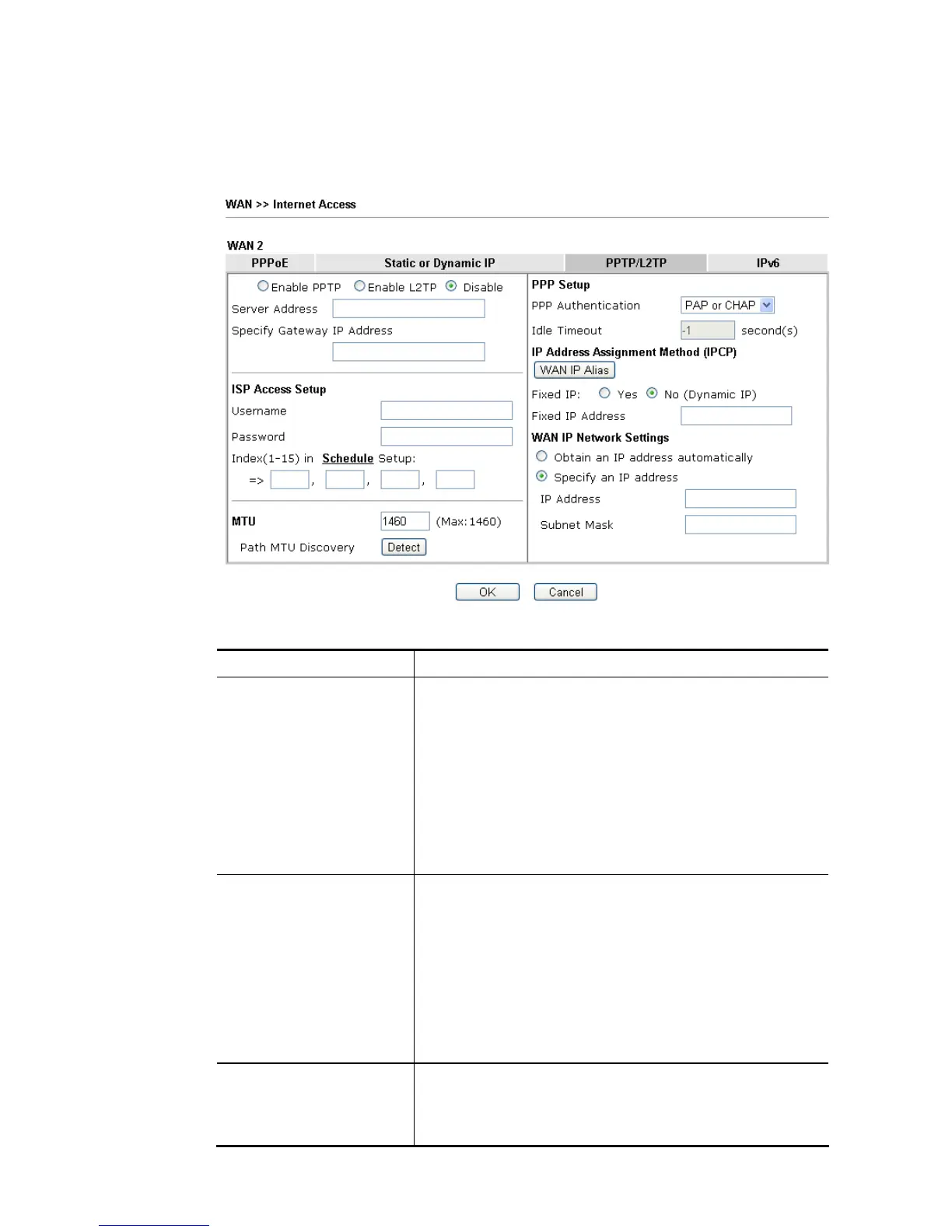
To use PPTP/L2TP as the accessing protocol of the internet, please click the PPTP/L2TP tab.
The following web page will be shown.
Available settings are explained as follows:
Item Description
PPTP/L2TP Enable PPTP- Click this radio button to enable a PPTP client
to establish a tunnel to a DSL modem on the WAN interface.
Enable L2TP - Click this radio button to enable a L2TP client
to establish a tunnel to a DSL modem on the WAN interface.
Disable – Click this radio button to close the connection
through PPTP or L2TP.
Server Address - Specify the IP address of the PPTP/L2TP
server if you enable PPTP/L2TP client mode.
Specify Gateway IP Address – Specify the gateway IP address
for DHCP server.
ISP Access Setup Username -Type in the username provided by ISP in this
field. The maximum length of the user name you can set is 63
characters.
Password -Type in the password provided by ISP in this field.
The maximum length of the password you can set is 62
characters.
Index (1-15) in Schedule Setup - You can type in four sets of
time schedule for your request. All the schedules can be set
previously in Application >> Schedule web page and you can
use the number that you have set in that web page.
MTU It means Max Transmit Unit for packet.
Path MTU Discovery – It is used to detect the maximum MTU
size of a packet not to be segmented in specific transmit
path.














 To Next Page