I
I
I
I
-
-
1
1
-
-
2
2
-
-
9
9
D
D
e
e
t
t
a
a
i
i
l
l
s
s
P
P
a
a
g
g
e
e
f
f
o
o
r
r
3
3
G
G
/
/
4
4
G
G
U
U
S
S
B
B
M
M
o
o
d
d
e
e
m
m
(
(
P
P
P
P
P
P
m
m
o
o
d
d
e
e
)
)
i
i
n
n
W
W
A
A
N
N
3
3
/
/
W
W
A
A
N
N
4
4
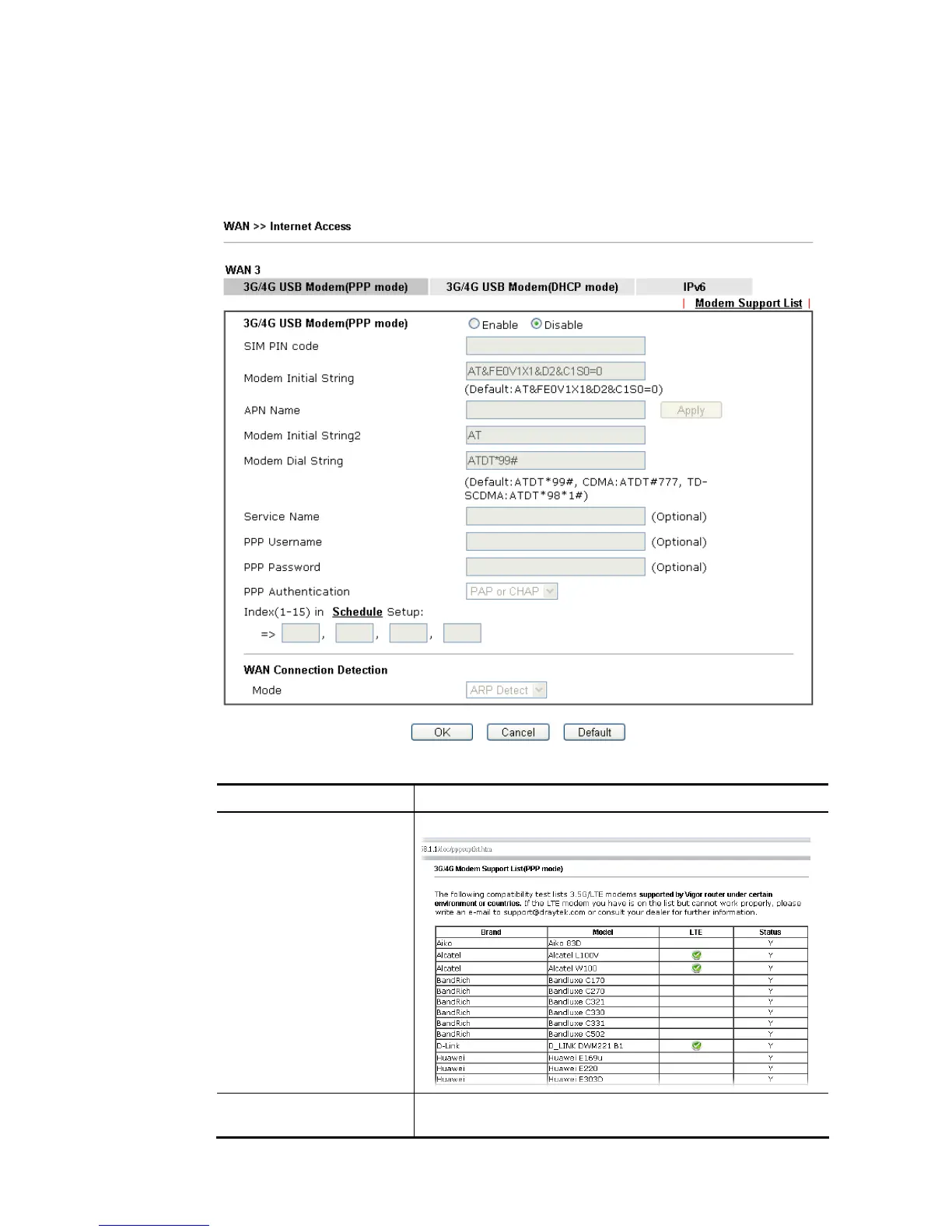
To use 3G/4G USB Modem (PPP mode) as the accessing protocol of the internet, please
choose Internet Access from WAN menu. Then, select 3G/4G USB Modem (PPP mode) for
WAN3. The following web page will be shown.
Available settings are explained as follows:
Item Description
Modem Support List It lists all of the modems supported by such router.
3G /4G USB Modem (PPP
mode)
Click Enable for activating this function. If you click Disable,
this function will be closed and all the settings that you














 To Next Page