I
I
I
I
-
-
4
4
-
-
1
1
3
3
L
L
o
o
c
c
a
a
l
l
8
8
0
0
2
2
.
.
1
1
X
X
G
G
e
e
n
n
e
e
r
r
a
a
l
l
S
S
e
e
t
t
u
u
p
p
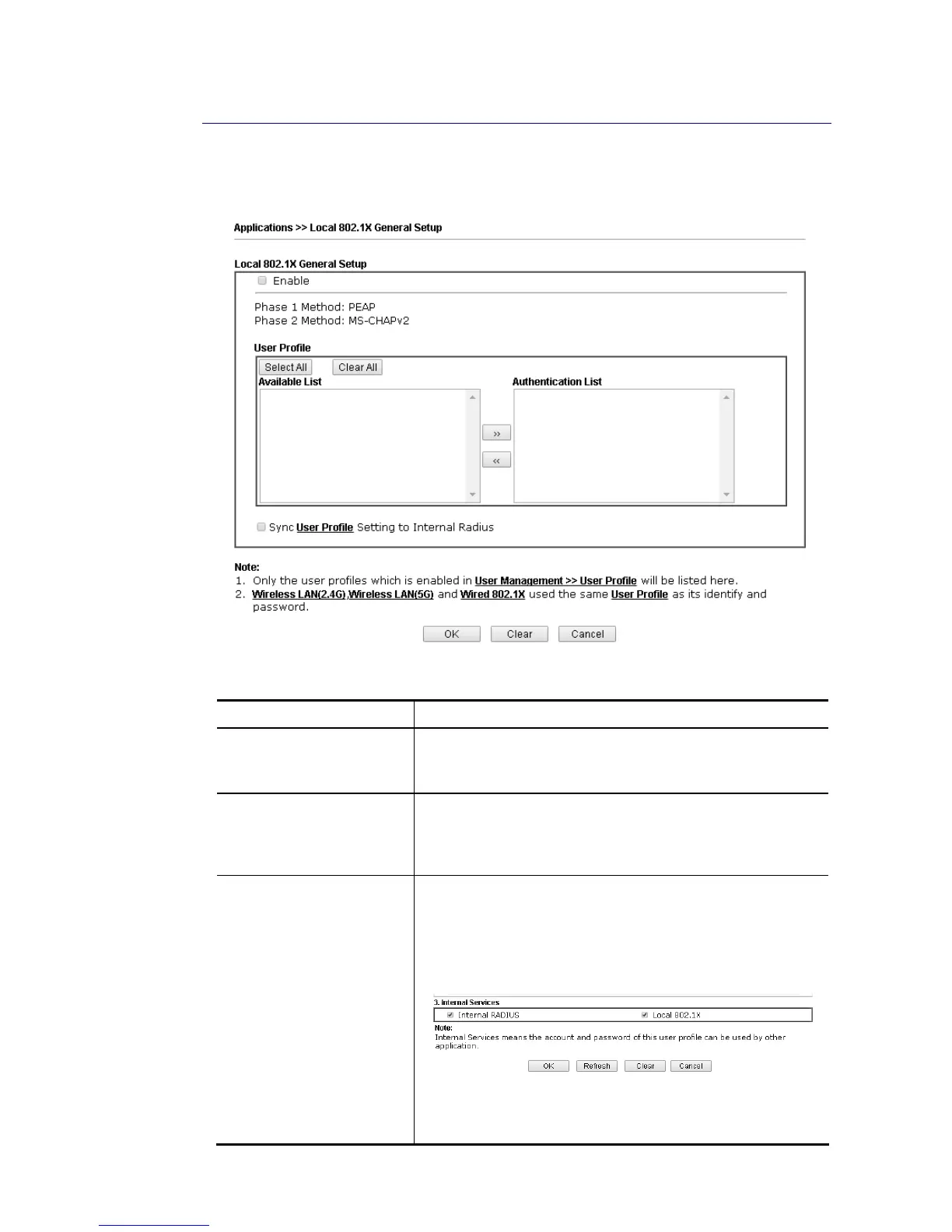
Such page allows you to configure general settings for Local 802.1X server built in Vigor
router.
Available settings are explained as follows:
Item Description
Enable Click it to enable local 802.1X server.
At present, such feature can be used for wireless and wired
802.1x authentication.
User Profile Select All – Click it to select all of the profiles under
Available List.
Clear All – Click it to remove all of the profiles under
Authentication List.
Sync User Profile …. Make the enabling/disabling setting for both Internal RADIUS
and Local 802.1X synchronize for all of the user profiles
(User Management>>User Profile).
For example, if Local 802.1x is configured as Enabled
(checked), the Internal RADIUS will be configured as Enabled
too.
If Local 802.1X is configured as Disabled (unchecked), the
Internal RADIUS will be changed as Disabled too, even if it is
enabled previously.














 To Next Page