W
W
e
e
b
b
U
U
s
s
e
e
r
r
I
I
n
n
t
t
e
e
r
r
f
f
a
a
c
c
e
e
V
V
I
I
I
I
-
-
1
1
-
-
1
1
S
S
y
y
s
s
t
t
e
e
m
m
S
S
t
t
a
a
t
t
u
u
s
s
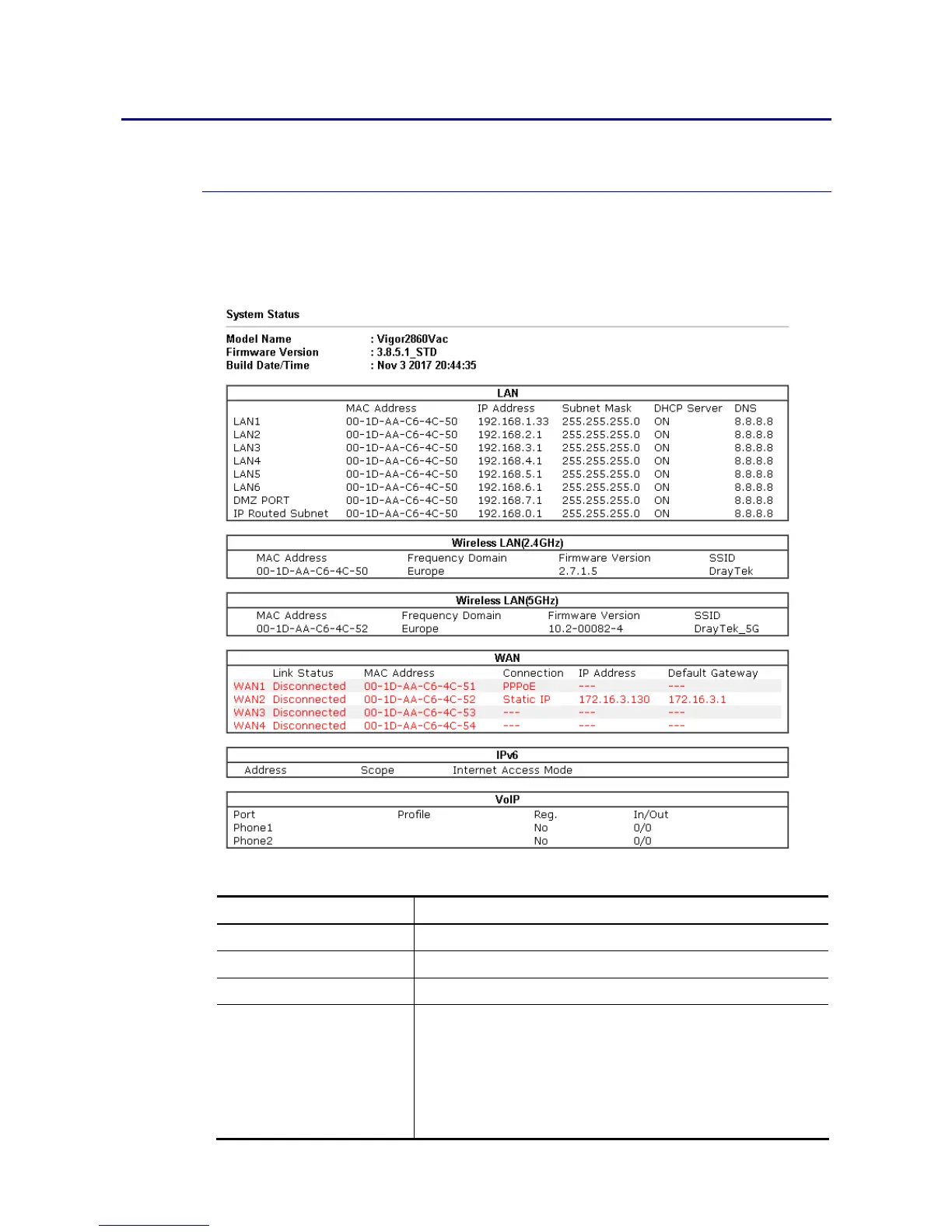
The System Status provides basic network settings of Vigor router. It includes LAN and WAN
interface information. Also, you could get the current running firmware version or firmware
related information from this presentation.
Available settings are explained as follows:
Item Description
Model Name Display the model name of the router.
Firmware Version Display the firmware version of the router.
Build Date/Time Display the date and time of the current firmware build.
LAN MAC Address
- Display the MAC address of the LAN Interface.
IP Address
- Display the IP address of the LAN interface.
Subnet Mask
- Display the subnet mask address of the LAN interface.














 To Next Page